
At a Glance:
The main difference between M4A and WAV is compression and intended use. WAV is an uncompressed, lossless format widely used in professional audio production (DAWs) for its pristine sound quality, though it can result in massive file sizes. M4A is an Apple-developed format that uses advanced compression (usually AAC) to reduce file size while maintaining high audio quality, making it well-suited for daily streaming, mobile storage, and consumer playback. Choose WAV for studio editing, and M4A for listening and sharing.
Are you worried about the huge WAV files that fill your hard drive, or are you mad because professional editing software on Windows cannot read M4A recordings? Navigating the messy world of M4A vs. WAV can feel like an endless battle between saving storage space and preserving pure sound quality.
But there is a key point that most guides overlook: an M4A file does not necessarily indicate a highly compressed audio clip. Depending on the encoder, it can be either a lossy format designed for streaming media or a bit-for-bit lossless master comparable to the original studio sound. In an era dominated by multi-microphone podcasting equipment and complex AI audio restoration, choosing the right audio format is no longer just a casual choice: it directly affects your work efficiency. Let's explore these two formats and see which one suits you best.
An M4A file (MPEG-4 Audio) is an audio-only file format developed by Apple. It serves as the standard for unencrypted, downloadable music from the iTunes Store and the default format for voice memos on iPhones. It uses either the AAC (lossy) or ALAC (lossless) compression algorithms.
WAV (Waveform Audio File) is the heavyweight standard for digital audio, jointly created by Microsoft and IBM. It is a container format that typically holds audio encoded using LPCM (Linear Pulse Code Modulation). Because the audio is completely uncompressed, it can be edited countless times in a Digital Audio Workstation (DAW) without degrading the sound quality.
| WAV | VS. | M4A (AAC / ALAC) |
| Uncompressed (LPCM) | Compression Type | Lossy (AAC) or Lossless (ALAC) |
| Studio-grade raw sound (100% data) | Audio Fidelity | High-quality consumer or archival audio |
| Up to 32-bit float (Infinite headroom) | Bit Depth Capacity | Up to 24-bit |
| Large (Approx. 10 MB/min) | Average File Size | Small (Approx. 1–2 MB/min for AAC) |
| Recording, mixing, and mastering | Primary Use Case | Streaming and mobile storage |
| Universal (All DAWs & OS platforms) | Compatibility | Apple-optimized (May fail on Windows) |
WAV uses LPCM technology to retain 100% of the original audio data. On the contrary, standard M4A uses AAC lossy compression and leverages psychoacoustic to discard imperceptible frequencies, whereas ALAC M4A provides lossless compression.
For heavy editing, bit depth is very important. WAV supports 32-bit float, providing nearly unlimited headroom to save clipped audio. M4A only supports up to 24 bits. Although it is well-suited for high-resolution playback, it is fragile under heavy audio enhancement processing.
One hour of WAV audio takes up 600+ MB, which can easily bloat the hard disk. AAC M4A compresses the same audio to 60 MB, making it a wise choice for archiving long podcasts. If you like you can try the WAV compressor to shrink the video file size easily.
WAV is the common format used by professional DAW software such as Pro Tools and Premiere. M4A performs very well in the Apple ecosystem, but on Windows, it often triggers the 'format not supported' error, underscoring the importance of a professional audio converter.
Editorial Note: The software recommended below has been technically verified to preserve bit-perfect audio data during conversion.
The Best Tool for the Job: AnyMP4 Video Converter Ultimate
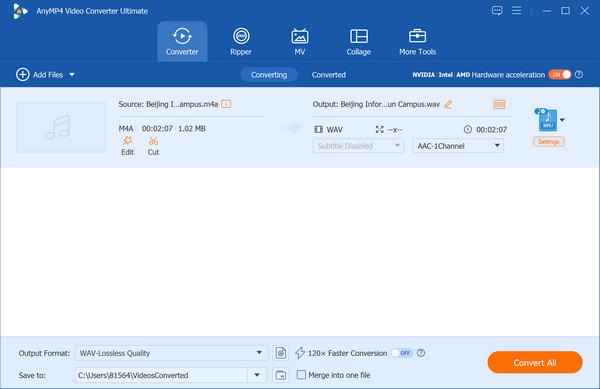
Stop wrestling with incompatible audio files and storage warnings. Whether you need to shrink massive studio WAV files for quick email sharing or convert an iPhone M4A recording for use in your digital audio workstation (DAW), AnyMP4 Video Converter Ultimate bridges the gap effortlessly.
Secure Download
Secure Download
Here is how it upgrades your audio workflow:
• Bit-Perfect Quality Control (Keep Your Studio Sound):
The Benefit: The Benefit: You do not have to sacrifice audio fidelity for compatibility. The software allows you to customize the audio bitrate, sample rate, and number of channels. When converting M4A to WAV, it extracts the exact raw data without introducing new artifacts. When converting WAV to M4A, you can select the precise compression level to balance crisp sound with a tiny file footprint.
• Hardware-Accelerated Speeds (Save Hours of Waiting):
The Benefit: The Benefit: Processing a 2-hour podcast or an entire album of high-res WAV files usually brings standard computers to a crawl. AnyMP4 utilizes advanced hardware acceleration, meaning you can batch-convert hundreds of audio tracks 70x faster, freeing you up to focus on actual content creation.
• Built-in Audio Enhancer (Fix Flaws on the Fly):
The Benefit: The Benefit: Got a voice memo recorded in a noisy room? You do not need a separate, expensive audio editor. Before hitting convert, you can use the built-in toolset to adjust volume levels, delay audio sync, and trim out dead air in seconds.
Does converting an M4A file to WAV actually improve the audio quality?
The short answer is no, converting an M4A file to WAV will not improve the audio quality.
Which format is better suited for podcast recording and professional editing?
For a professional podcast workflow, WAV is the clear winner for recording and editing, while M4A (AAC) is typically reserved for the final distribution stage.
Why are my WAV files taking up significantly more storage space than my M4A files?
The massive difference in storage space comes down to one fundamental difference: M4A uses data compression to throw away audio information, while WAV stores absolutely everything.
Can I natively play WAV files on my iPhone or iPad without third-party apps?
Yes, you can absolutely play WAV files natively on your iPhone or iPad without downloading any third-party WAV player apps. iOS and iPadOS have built-in native support for WAV audio.
What is the fundamental difference between an AAC-encoded M4A and an ALAC-encoded M4A?
The fundamental difference between the two boils down to one major distinction: AAC is lossy (it discards audio data), while ALAC is lossless (it preserves every single bit of audio data).
Choosing between M4A vs. WAV depends on your current stage of production. For editing, multi-track mixing, mastering, or high-quality archiving, WAV is non-negotiable. If you want to save space on your mobile phone, send a Demo through the network or play it in the Apple ecosystem, choose M4A.
Modern digital workflows mean you never have to be locked into one format: switching formats is just a routine part of audio production.
Do not let file formats dictate your creative process. Download AnyMP4 Video Converter Ultimate today to seamlessly switch between M4A and WAV while preserving every sonic detail of your audio.
Secure Download
Secure Download
 Updated by Alice Thorne to Glossary
More readings
 How to Convert M4A to WMV File in 2026
How do I open a M4A file on Windows? This post shares 3 easy ways to help you convert M4A to WMV or WMA for playback.
 How to Compress M4A Audio Files using Offline & Online Tools
Are M4A files compressed? Let us discover these possibilities by presenting you with tools to do the process. Also, see how we can do it properly.
 10 Best MP4 to WAV Converters for Lossless Audio Extraction
We tested the 10 best MP4 to WAV converters for computers and mobile devices. Get expert tips on PCM and bit rates to extract WAV without losing quality.
 5 Best Ways to Convert M4A to WAV (Free, Online & Pro) - 100% Quality
Learn how to convert M4A to WAV on Windows, Mac, and Online by using AnyMP4, iTunes, VLC, and Audacity to ensure lossless audio quality.
 Add your comments to join the discussion here