
Summary
AAC (Advanced Audio Coding) is an audio compression codec, while M4A is a file container that holds AAC-encoded audio. An M4A file almost always contains an AAC file. You should choose M4A for the best compatibility with Apple devices, and raw AAC (often with an .aac extension) if required by specific older hardware or streaming protocols.
You've just downloaded a high-quality audio track, but now you're wondering whether converting it to AAC is the right move. The confusion is understandable because M4A vs. AAC is not a straightforward comparison. M4A is a container, while AAC is an audio codec that can be stored inside it. If you're dealing with playback problems or want to reduce file sizes without unnecessarily sacrificing sound quality, understanding this distinction matters. In this audio format comparison, we'll explain when converting M4A to AAC actually makes sense. Also, we will cover which is better for different situations and how lossy audio codecs affect quality.

What is AAC? AAC, short form of Advanced Audio Coding, is an audio codec that uses lossy compression. It is standardized by MPEG-4 audio and developed as the successor to MP3. It uses a pure Modified Discrete Cosine Transform (MDCT) to achieve higher audio quality and better compression. When comparing AAC vs. M4A, the important thing to understand is that AAC is a codec, not a container or file format.
PROS
CONS
AAC still remain the premier audio standard because of its high compression efficiency. It anchors major Spotify and YouTube Music, and supports in-car infotainment systems via Bluetooth or device projection.
M4A is a file container that holds compressed audio data encoded with AAC or Apple Lossless (ALAC). M4A vs. AAC is not really a comparison between two equivalent file types. Think of the M4A as a storage box, and the AAC as the item you pack. The box holds the data, while the codec packs and unpacks the audio inside. This distinction explains much of the confusion surrounding the terms.
PROS
CONS
| M4A | VS | AAC |
| Container | File Type | Codec |
| Lossy (AAC), Lossless (ALAC) | Compression | Lossy |
| 128 kbps to 256 kbps | Typical Bitrate | 64 kbps to 256 kbps |
| Apple / iOS Ecosystem | Device Compatibility | Wide (Android, Windows, Web, etc.) |
 |
DRM Support |  |
AAC vs M4A: Which is better? We tested both formats using the same source, playback system, and encoding conditions. We created AAC samples at 128, 192, and 256 kbps and stored AAC audio in M4A containers for comparison.
For listening, we used a headphone setup with Sony WH-1000XM5 headphones. For testing, we used the same computer, media player, volume, and source tracks. We also recorded codec, bitrate, sample rate, channel configuration, file size, and encoding time.
We compared the AAC samples with their original lossless sources. The spectrum showed noticeable changes in high-frequency content as the bitrate decreased. In our listening tests, 256 kbps AAC was difficult to distinguish from the original lossless source.
Differences were easier to notice in demanding passages featuring cymbals, dense electronic textures, and complex high-frequency details at lower bitrates. We also found no meaningful audible difference caused solely by storing the same AAC stream as an M4A file.
AnyMP4 Video Converter Ultimate is a multi-use software that goes beyond video-to-video conversion. It can convert M4A to AAC or either format to 500+ other common audio formats. It uses passthrough technology to ensure it does not re-encode and degrade audio quality. It can extract AAC from M4A and transfer the data bit by bit.
With it, you can convert hundreds of FLAC or WAVs to M4A or AAC without lag or crashes. It uses the most advanced hardware-accelerated media processing to achieve a 120× conversion speed. Before conversion, you can adjust the bit rate (kbps), sample rate, and audio channels. Better yet, it completely retains metadata to keep your library organized.
1. Download AnyMP4 Video Converter Ultimate and complete the installation. After setup, it will open to the Converter tab.
Secure Download
Secure Download
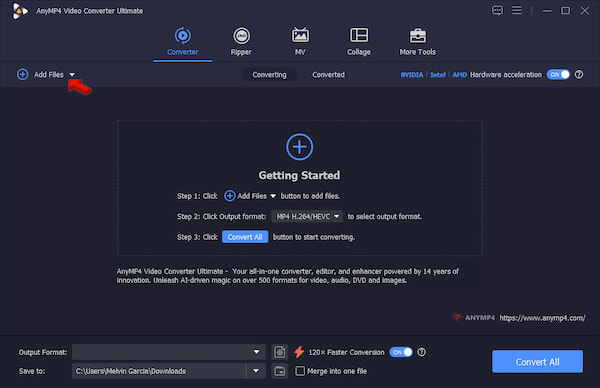
Click +Add Files to import M4A sources from your computer. Use the Add Folder instead to upload multiple M4A files in batches.
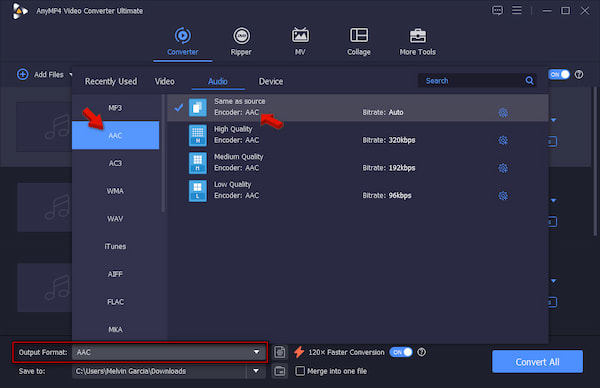
2. Navigate to the Output Format picker and select ACC under the Audio category. Select High Quality or Same as Source as your quality preset to prevent further sound loss.
3. Back to the main interface and turn on Hardware Acceleration to speed up the conversion. Set the output folder, then click Convert All to convert M4A to AAC without losing quality.
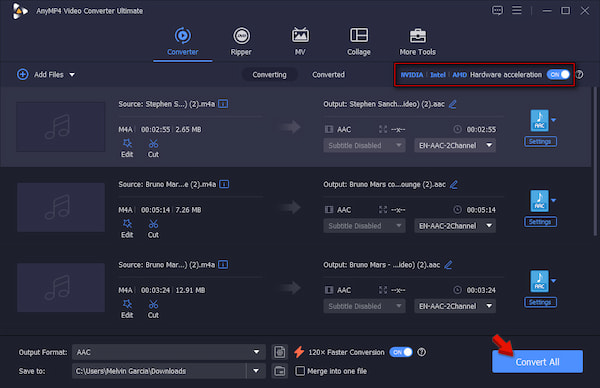
Before we begin the conversion, we play the source files in an M4A player to spot any broken data. After playback, we import 50 M4A files, totaling 420 MB, into AnyMP4. It took only 38 seconds to complete the batch processing.
Which is better, M4A or AAC for iPhone?
To be real with you, there is no real better option between the two formats on an iPhone. M4A is just the file container that holds the AAC. M4A uses AAC for its audio compression, meaning it offers the same audio quality and efficiency on iOS.
Which is better, AAC or Apple Lossless?
Apple Lossless is objectively better for sound quality than AAC. Apple Lossless, or ALAC, preserves every bit of the original audio. Meanwhile, AAC drops some data to make the file size smaller. But if your priority is saving space, AAC is better because you won’t hear any difference.
Are M4A and AAC the same?
No, M4A and AAC aren’t the exact same thing, though they are related. AAC is the compression method that turns sound into data, while M4A is the container that holds that audio data.
M4A is a container format for AAC audio, so the two are used together. M4A files are best if you want to use music from your personal library on Apple devices. Only use AAC if you have an older audio system that requires this format. For your conversion needs, AnyMP4 Video Converter Ultimate lets you convert M4A to AAC easily. It supports batch conversion, fast processing speed, and customizable output settings.
 Posted by Alice Thorne to Glossary
More readings
 How to Convert M4A to WMV File in 2026
How do I open a M4A file on Windows? This post shares 3 easy ways to help you convert M4A to WMV or WMA for playback.
 How to Compress M4A Audio Files using Offline & Online Tools
Are M4A files compressed? Let us discover these possibilities by presenting you with tools to do the process. Also, see how we can do it properly.
 3 Best Ways to Convert MP3 to AAC Without Quality Loss
Learn how to convert MP3 to AAC on Windows, Mac, and online. Compare MP3 vs AAC quality, bitrate tips, and step-by-step guides for 3 conversion methods.
 AAC Audio Compression: Reduce AAC File Size to Save Space
The AAC compression process is more straightforward if we have these reducing audio tools for online and offline usage. You can check out this post to see it.

