Freemake Audio Converter Review: Free vs Paid Alternatives
Summary:
Freemake Audio Converter is a Windows-based software that converts 50+ audio formats, extracts audio from videos, and merges audio. Nevertheless, the three-minute limit of the free version, out-of-date updates, and issues related to the installation procedure make it less preferable. If you want a truly free version, use fre:ac; otherwise, use AnyMP4 Video Converter Ultimate for a comprehensive conversion experience.
Freemake Audio Converter seems a convenient solution when you need to change audio formats, extract music from videos, or combine several tracks. It supports plenty of formats and has a simple interface. However, the free version comes with a three-minute conversion limit. In this Freemake Audio Converter review, we'll cover the supported formats, actual free-tier restrictions, installation safety, and conversion performance. We'll also compare it with other Windows audio converters, both free and paid alternatives.
Part 1. What It Does: Formats, Features & the Fine Print
Verdict: 3.9 out of 5 stars
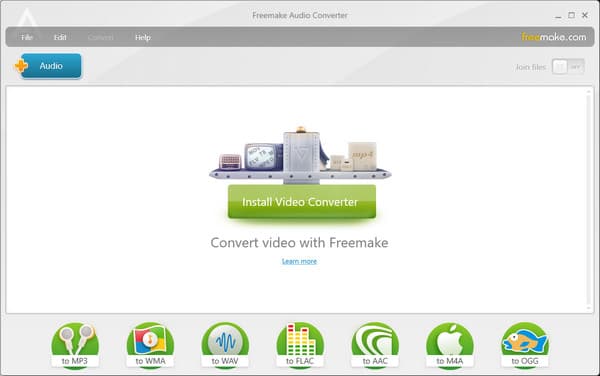
Freemake Audio Converter, developed by Ellora Assets, is pure audio conversion software available for Windows OS. It accepts 50+ input formats and exports MP3, WMA, WAV, FLAC, AAC, M4A, and OGG. The software can also extract audio from video, merge multiple tracks, and automatically add converted files to iTunes. However, the three-minute free conversion holds back other users from using it.
System Requirement(s):
- • Microsoft Windows OS: Windows 11, 10, 8, 8.1, 7, Vista.
- • Intel, AMD, or compatible processor, 1 GHz.
- • .NET Framework 4.5 support.
- • 256 MB or more of RAM for converting.
- • 25 MB of free hard disk space for installation settings.
Part 2. The Catch: Free vs. Paid and the 3-Minute Limit
You’ll definitely be tempted to free download Freemake Audio Converter when you see the completely free, no-limitations claims. But in reality, the software operates on a freemium model, which contradicts this claim. In our testing, there is a strict time cutoff: a 4:30 song limits conversions to 3 minutes. Otherwise, you need to upgrade to the Mega Pack to convert audio longer than 3 minutes or to get unlimited conversion.
| Plan |
1 WEEK TRIAL |
SUBSCRIPTION |
LIFETIME |
| Price |
$40 |
$39.95 per month |
$299 |
| Inclusion(s) |
No Freemake logo
4X Conversion Speed |
Everything in 1 WEEK TRIAL, plus;
FULL HD support
Easy editor
YouTube to MP3 conversion
TV & DVD presets
Subtitles Editor
DVD Burner |
Everything in SUBSCRIPTION |
Part 3. Is Freemake Audio Converter Safe? Installer & Bundled Offers
Is Freemake Audio Converter safe? Yes.
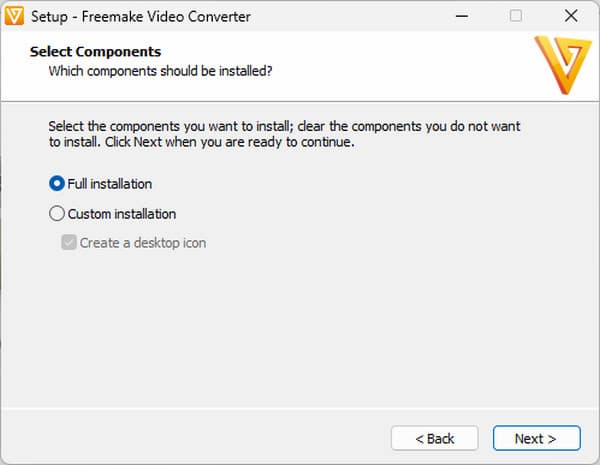
Freemake is legit software, but the installer bundled software offers. The installer will ask you to download additional partner software, and older versions of the Freemake Video Converter installer have received flak for grayed-out options to opt out. To avoid installing unwanted software, download from the website itself and choose the Custom or Full version during installation. Additionally, avoid checking the usage statistics option if it appears on your screen.
Part 4. How to Use Freemake Audio Converter
Freemake offers an easy way to convert your audio files. You simply have to add your audio file, select the desired format, and then save the converted file. See the quick guides below to learn how to use Freemake Audio Converter:
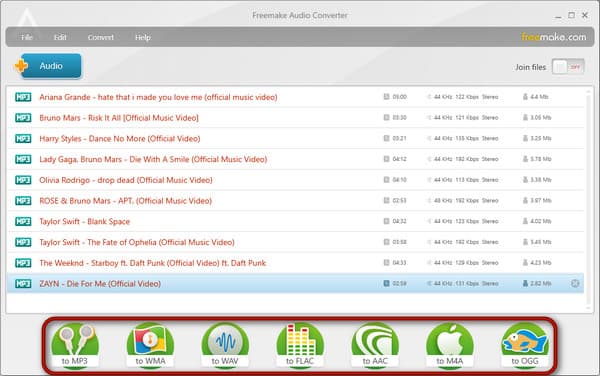
1. Download the software from the official site and install it on your computer. After setup, launch the software and click +Audio to import the audio files for conversion.
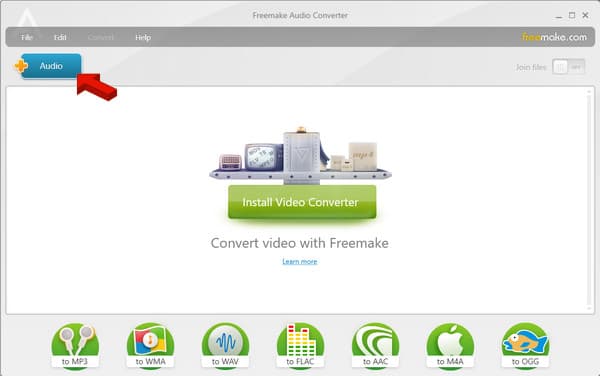
2. In the bottom section of the interface, select an output format. Options are MP3, WMA, WAV, FLAC, AAC, M4A, and OGG.
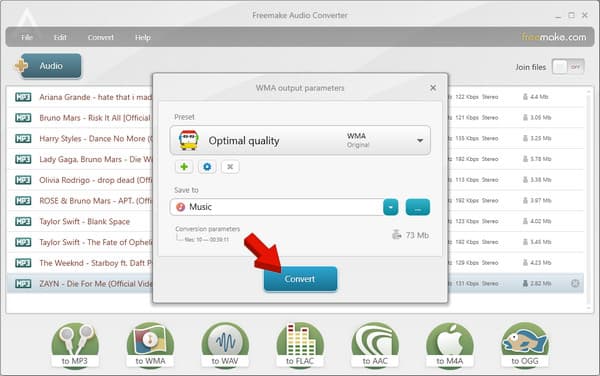
3. The output parameter window will appear to configure optional output settings. Go to Save To to set the output destination, then click Convert to process the audio for conversion.
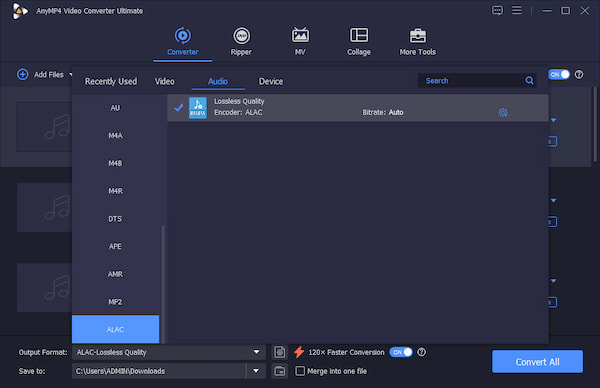
Freemake is convenient for basic audio conversion, but the three-minute limit hinders its usefulness. To overcome the limitations of freemium software, it would be best to switch to a Freemake Audio Converter alternative. AnyMP4 Video Converter Ultimate is a batch audio converter with no length or usage limits.
It can convert hundreds of media files to over 500 formats without crashes or lags. It uses the most advanced hardware-accelerated media processing to achieve 120× speed. Aside from audio-to-audio conversion, it can extract audio from video (MP4-to-MP3 conversion) and rip DVDs to standard audio formats. It is also packed with a toolkit featuring compression, noise removal, sound boosting, and audio sync tools.
Part 5. Performance & Audio Quality: What We Measured
WAV to MP3 Conversion Speed
We converted a four-minute WAV file to MP3 at 320 kbps to measure Freemake's processing speed. The time from the start of the conversion to when the output was ready was 32 seconds. There were also no playback issues, missing sections, or changes in duration.
Batch Conversion of 10 Audio Files
To evaluate batch conversion, we loaded 10 audio files into the converter, and all conversions were performed under the same settings. Processing time was 3 minutes and 43 seconds. We used the free version; hence, the 3-minute limitation imposed by Freemake applies to 3 files that exceeded the threshold and were automatically canceled.
FLAC to MP3: Checking Audio Quality
Here, we converted a FLAC file to MP3 and compared the output file with the original. Since MP3 uses lossy compression, some audio information is removed. There are slight differences in clarity, detail, and playback quality compared to the original lossless quality.
Part 6. Who Should Use Freemake (and Who Shouldn't)
| User type |
Recommendation |
| Short-clip casual users |
Good fit. Freemake works for occasional, basic audio conversions, especially when files are under three minutes. |
| Privacy-averse users |
Not ideal. Its history of third-party software offers may concern users who prefer clean, uncomplicated installations. |
| Album, batch, and lossless users |
Not recommended. The reported three-minute free-tier restriction makes longer recordings and full albums impractical. |
| Mac users |
Not suitable. Freemake Audio Converter is not available on Mac. |
| Security-conscious users |
Download only from the official site, choose correcect installation, and reject promotional offers. |
Part 7. Freemake vs. the Alternatives: Full Comparison
|
Freemake Audio Converter |
AnyMP4 Video Converter Ultimate |
fre:ac |
Format Factory |
| Category |
Audio converter |
All-in-one audio/video converter and editor |
Audio converter and CD ripper |
Multimedia converter |
| Platform |
Windows only |
Windows and Mac |
Windows, macOS, Linux, and more |
Windows only |
| Free-tier reality |
Limits conversions to 3 minutes |
Trial available with feature limitations |
Free |
Free |
| Price model |
Freemium; Mega Pack starts at $40 |
Starts at $18.75 with a free trial |
Free |
Free |
| Audio input support |
50+ |
500+ |
20+ |
100+ |
| Audio output support |
7 |
500+ |
10+ |
10+ |
| Extract audio from video |
|
|
|
|
| Batch conversion & merge |
|
|
|
but no merge |
| Conversion speed |
GPU Hardware Acceleration |
Up to 120× faster |
CPU-bound |
CPU-bound |
| Installer/bundling |
|
|
|
|
| Update freshness |
Version 1.1.9 released on December 6, 2022 |
Version 8.6.12 released on January 20, 2026 |
Version 1.1.7 released on June 18, 2025 |
Version 5.22.0.0 released around March to June 2026 |
| Best for |
Occasional short audio conversions |
Users needing broad format support and extra media tools |
Regular audio conversion and CD ripping |
Windows users who want multiple media conversion tools |
Part 8. FAQs about Freemake Audio Converter
Is Freemake Audio Converter really free?
No, Freemake Audio Converter is not completely free in practice. Though you can download it for free, the free version restricts audio file conversions to 3 minutes per file.
Is Freemake Audio Converter safe?
Yes, it is safe, but it carries some risks of unwanted bundled software or bloatware during installation. The installer frequently attempts to package extra promotional software, third-party apps, or toolbars.
Does Freemake Audio Converter work on Mac?
No, Freemake does not have a native version for macOS and is only built for Windows. If you’re on a Mac, you can use native Mac audio and media converters such as AnyMP4 Video Converter Ultimate.
Conclusion
That's the end of our Freemake Audio Converter review. Freemake has a beginner-friendly interface, supports more than 50 audio formats, and offers video-to-audio extraction, batch conversion, and track merging. However, the three-minute free-tier restriction is difficult to overlook. The outdated version history, inconsistent licensing information, and installation offers also make it less appealing. AnyMP4 Video Converter Ultimate is the alternative we recommend for users who regularly work with audio and video. It supports more than 500 formats, batch conversion, hardware acceleration, audio extraction, and additional editing tools.