dBpoweramp Review: CD Ripping, Price & EAC
Quick Answer: dBpoweramp at a Glance:
dBpoweramp (build R2026-05-25 by Illustrate) is the best paid CD ripper software for Windows and Mac. It checks each rip with AccurateRip. It pulls tags from 5 sites with PerfectMeta. It saves to FLAC,
ALAC, MP3, AAC, WAV, AIFF, Ogg Vorbis, Opus, WavPack, and DSD. You get a free 21-day trial. Then
Reference Personal costs $48 once.
Verdict (8.9/10): Buy dBpoweramp if you have 100+ CDs and want fast conversion with clean song tags. If you do want a free tool and do not mind tweaking settings, just go with Exact Audio Copy.
You pull an old CD off the shelf and slide it into your drive. Track three skips. Plastic discs do not
last forever. Scratches build up, and disc rot slowly eats away at rare songs. You need clean copies saved on your PC before those tracks are gone for good.
That is why you are reading this dBpoweramp review. Here, we'll look at its CD Ripper, Music Converter,
AccurateRip checks, PerfectMeta tags, file formats, and price. We'll also compare dBpoweramp vs EAC. Is the paid tool worth the money, or can a free CD ripper do the same job?
We'll also look at one clear limit: dBpoweramp works with audio. It does not convert video or rip DVDs.
If you work with video files too, you'll need another tool.
Let's get into it.
What Is dBpoweramp? A Quick Look at This CD Ripper
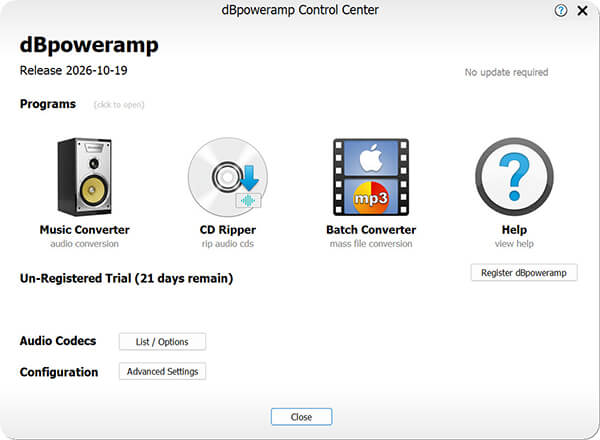
dBpoweramp is an audio tool made by Illustrate. It has two main parts: CD Ripper and Music Converter.
You can use CD Ripper to copy tracks from a music CD to your computer. You can save them as FLAC, ALAC,
MP3, WAV, and other audio files.
Music Converter works with audio files that are already on your computer. You can use it to change file
formats, edit tags, and apply audio effects.
The main reason people choose dBpoweramp is its mix of secure CD ripping, AccurateRip checks, and
PerfectMeta tags.
Here is what it can do:
- • Rip music CDs to digital audio files.
- • Check rips with the AccurateRip database.
- • Search for track names, album names, artists, and cover art.
- • Convert audio files between supported formats.
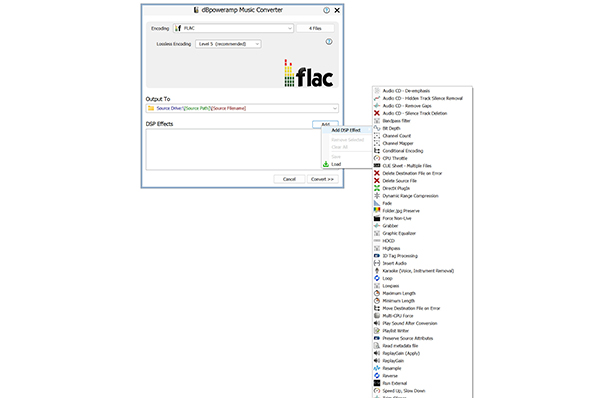
- • Create more than one output format from a rip with Multi-Encoder.
- • Apply audio DSP tools during a rip or conversion.
- • Work with Windows and macOS.
There is one thing to keep in mind. dBpoweramp is not a video converter. It does not convert MP4, MKV, or
other video files. It also does not replace a DVD ripper.
I tested dBpoweramp Reference R2026-05-25 on Windows 11 with a USB drive. I ripped 25 CDs over three
days. My pile had scratched discs, box sets, and hidden tracks. Here is how it did:
| Test Area |
Score |
What I Saw in My Test |
| Rip Accuracy (AccurateRip) |
9.5 / 10 |
Matched AccurateRip checks fast. Caught bad spots on scratched discs. |
| Tags & Cover Art (PerfectMeta) |
9.3 / 10 |
Found clean track names and cover art on 24 of 25 discs. |
| Formats & Speed |
8.8 / 10 |
Converted FLAC, ALAC, MP3, and DSD across all CPU cores. |
| Value ($48+ Audio-Only) |
7.6 / 10 |
Fair one-time price for big CD shelves. Does no video or DVD work. |
dBpoweramp Price and Editions: What You Pay
Let's check the price tag. When people ask how much does dBpoweramp cost, old forum posts often mix them up. Illustrate packs CD Ripper and Music Converter into one Reference app. You don't buy them apart now.
You can run the full dBpoweramp free trial for 21 days. There are no track caps during that time. Once
the trial ends, you pick one of three plans. You pay once, not each month:
| Plan |
Price |
Devices |
Best For |
| Reference Personal |
$48 (one-time) |
1 PC or 1 Mac |
Home users ripping personal CD shelves. |
| Reference Family Pack |
$84 (one-time) |
Up to 5 PCs + Macs |
Homes with both Windows PCs and Macs. |
| Reference Business |
$85 (one-time) |
1 work PC |
Studios, radio stations, and paid shops. |
Your key never dies. You get free updates for 2 years. After that, your app still works for life. Skip
old posts about a $26 Power Pack add-on. Illustrate ended that years ago. Want to see other dedicated CD ripper software? Keep reading to see how
free tools compare.
dBpoweramp vs EAC: Ripping Accuracy Tested
Look up dBpoweramp vs EAC on Reddit's r/audiophile or Audio Science Review. You will see huge debates.
Exact Audio Copy (EAC) is free and loved by audio fans. Does dBpoweramp rip cleaner sound than EAC?
No, and that is good news. Both apps make bit-identical files when set up right. Illustrate actually
built AccurateRip. Both dBpoweramp and EAC check that same database today.
Here is how dBpoweramp AccurateRip checks work on your discs:
- • Drive Offset Fix: CD Ripper reads your drive's sample offset and fixes it right away.
- • Fast First Pass: It rips each song once. Then it checks the code against millions of
rips online.
- • Secure Rip Mode: If a song fails, or if your disc is scratched, it turns on Secure Rip. It uses C2 pointers, clears drive cache, and re-reads bad spots.
- • Hidden Tracks: It finds HTOA (Hidden Track One Audio), reads ISRC and UPC codes, and
saves CUE sheets.
The real gap in dBpoweramp vs EAC is speed. EAC takes 20 minutes to set up. It also reads clean discs
twice. dBpoweramp works out of the box. It finishes a clean CD in 2 to 4 minutes.
PerfectMeta and Batch Tagging: Why Users Pay
Clean audio means little if files say Track 01 by Unknown Artist. This is where dBpoweramp earns its $48
price.
Most free apps check one database and dump typos in your folders. dBpoweramp uses PerfectMeta. When you
put in a CD, it checks five sites at once: GD3, Discogs, MusicBrainz, freedb, and SonataDB.
It compares all five matches. It fixes spelling errors and grabs sharp cover art. In my 25-disc test,
even rare 1990s live CDs loaded with full song names and 1000×1000 art.
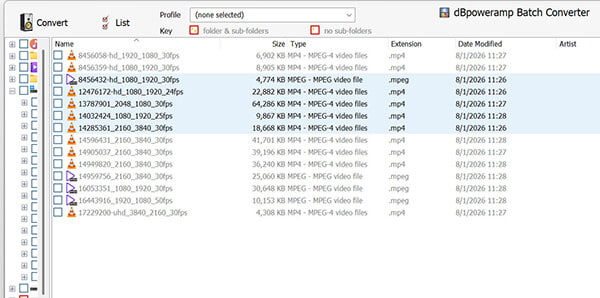
You also get custom file names and File Explorer tools. Right-click any song in Windows and click Edit
ID-Tags. Have thousands of messy songs already? Illustrate sells PerfectTUNES for bulk fixes, or you can try other music metadata editor tools to clean old folders.
Audio Formats, Codecs, and Multi-Encoder Tools
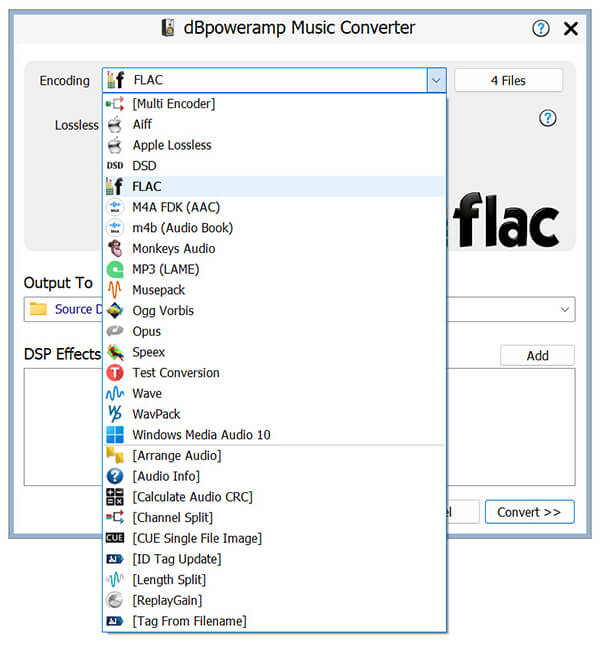
Before you rip 500 CDs, pick a file format. Buyers often ask about dBpoweramp FLAC or ALAC. It supports
both plus eight more codecs.
You can rip and convert FLAC, ALAC (.m4a), MP3 (LAME), AAC, WAV, AIFF, Ogg Vorbis, Opus, WavPack, and
DSD. Not sure if you want open-source FLAC or Apple's ALAC? Read this FLAC vs ALAC lossless audio comparison first.
Two things stood out in my tests:
- • Multi-Encoder (rip once, get two formats): Never rip a CD twice. Save a full-quality FLAC to your backup drive. At the same time, save a 320 kbps MP3 to your phone folder. You can also convert FLAC to MP3 later for portable players.
- • Built-In DSP Effects: Run DSP filters while you rip. Decode HDCD discs to 24-bit, level
volume with EBU R128, write ReplayGain tags, and use the ARDFTSRC resampler.
How to Rip a CD with dBpoweramp: 6-Step Guide
Want to know how to rip a CD with dBpoweramp fast? Follow these six steps:
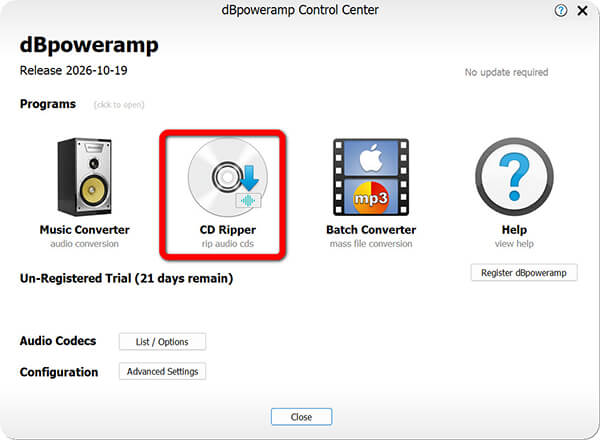
1. Get the 21-day trial from the official dBpoweramp
site and install it. Open dBpoweramp Control Centre and click CD Ripper.
Put an audio CD in your drive. Wait five seconds for PerfectMeta to load tags. Click Meta on
the top bar to check or fix track names and cover art.
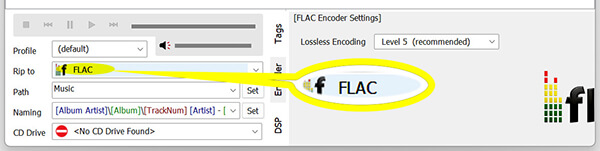
2. Go to the bottom left next to Rip to.
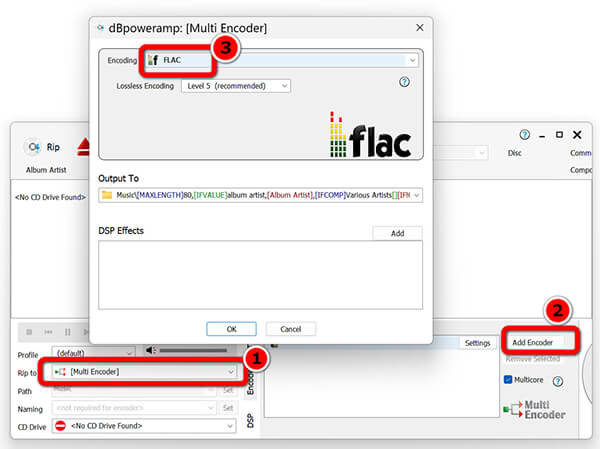
Open the menu and pick FLAC for lossless files, or pick Multi-Encoder for two
formats at once.
If you picked Multi-Encoder, click Add Encoder and choose FLAC.
Click Add Encoder again and pick mp3 (Lame) at 320 kbps.
3. Click Rip at the top left. Watch the
Rip Status column on the right. Each good song shows a green Accurate badge.

To convert old songs later, select your files in File Explorer. Right-click them and click Convert
To to open dBpoweramp Music Converter.
Where dBpoweramp Stops: The Audio-Only Limit
Here is the catch in this dBpoweramp review: it does audio only. It cannot open MP4 or MKV videos, rip DVDs, or separate audio tracks from video files. Drop a concert video into Music Converter, and it rejects the file.
That is where AnyMP4 Video Converter Ultimate helps out. It does not replace dBpoweramp for CDs. Instead, it handles everything else. You can convert 500+ video and audio formats (MP3, AAC, FLAC, WAV, MP4, MKV), rip DVDs, and pull clean
audio from videos with GPU speed on Windows and Mac.
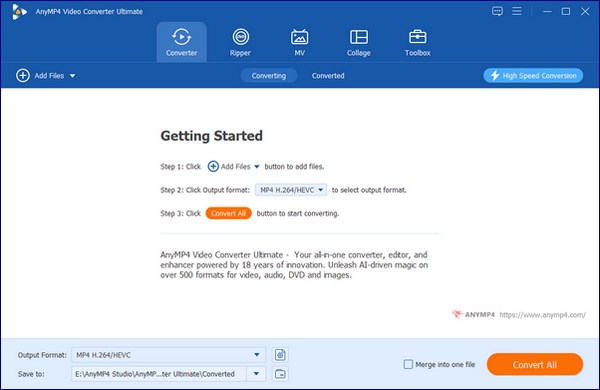
Need to pull audio from a video file? Follow these four steps in AnyMP4 Video Converter Ultimate:
1. Open AnyMP4 Video Converter Ultimate
on your PC or Mac. Stay on the Converter tab and click Add Files at the top
left to load your videos.
2. Click the Output Format menu at the
bottom left. Switch to the Audio tab at the top.
Pick MP3, FLAC, or WAV on the left.
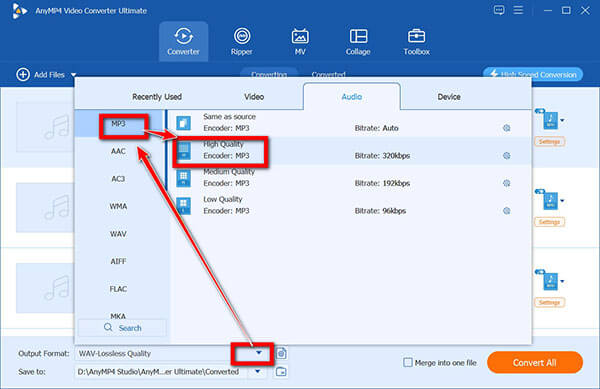
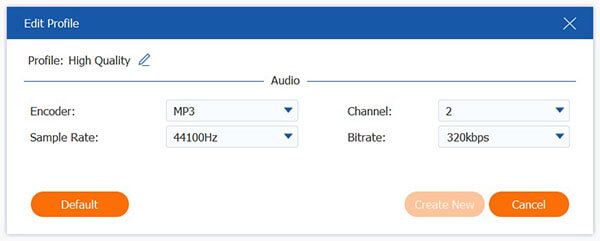
Then click a quality preset like Lossless Quality or 320kbps on the right.
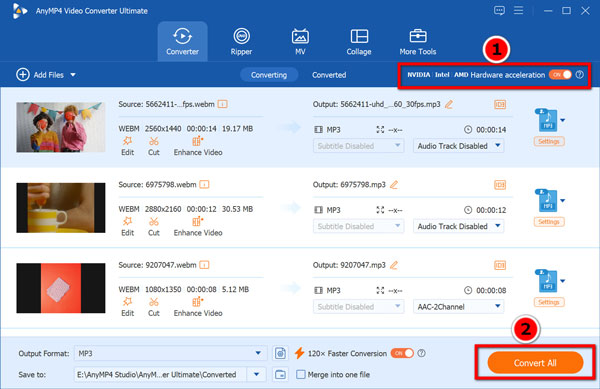
3. Pick your output folder at the bottom next to
Save to. Click Convert All at the bottom right to export your tracks.
dBpoweramp vs EAC vs Nero vs AnyMP4
Not sure which app fits your desk? Compare dBpoweramp Reference against Exact Audio Copy, Nero CD Ripper,
and AnyMP4 Video Converter Ultimate across 14 specs:
|
Primary Role |
Secure CD Ripping |
Error Recovery |
Accuracy Check |
Metadata Sources |
Library Tag Tools |
Audio Formats |
Multi-Encoder |
DSP & ReplayGain |
Multi-Drive Rip |
Video & DVD Work |
OS Support |
Price Model |
Best For |
| dBpoweramp Reference |
Paid CD ripper + audio converter |
Yes (AccurateRip creator) |
C2, offset, cache defeat, HTOA |
AccurateRip database check |
PerfectMeta (5 sources at once) |
Right-click Edit ID-Tags + PerfectTUNES |
FLAC, ALAC, MP3, AAC, WAV, AIFF, Ogg, Opus, WavPack, DSD |
Yes (rip 2+ formats at once) |
HDCD 24-bit, EBU R128, ReplayGain |
Yes (Batch Ripper) |
(audio-only) |
Windows + macOS |
$48 / $84 / $85 one-time |
Fast, accurate CD ripping + tags |
| Exact Audio Copy (EAC) |
Free secure CD ripper |
Yes (community gold standard) |
Deep manual drive controls |
AccurateRip plugin |
Single / community sources |
Basic filename templates |
WAV + external CLI encoders |
|
Basic normalize only |
Single drive only |
(audio-only) |
Windows only |
Free |
Free, slow single-CD rips |
| Nero CD Ripper |
CD ripper inside Nero suite |
Basic ripping only |
Limited error checks |
|
Gracenote |
Basic tag edit |
MP3, AAC, WMA, WAV |
|
Limited |
Single drive |
Requires full Nero suite |
Windows only |
Paid suite bundle |
Quick rips for Nero owners |
| AnyMP4 Video Converter Ultimate |
All-format video & audio converter |
(not a CD ripper) |
N/A |
N/A |
Video/audio tag editor |
Built-in media metadata editor |
MP3, AAC, FLAC, WAV, OGG, AIFF, ALAC + more |
Batch convert multiple files |
Volume boost & audio sync |
N/A |
500+ formats, DVD rip, video-to-audio |
Windows + macOS |
Free trial + paid license |
Video conversion, DVDs & audio extraction |
Which tool should you pick?
- • Have 100+ CDs and want clean tags fast? Buy dBpoweramp Reference ($48).
- • Have 20 CDs and want a $0 tool? Use Exact Audio Copy.
- • Work with MP4 videos or concert DVDs too? Pair dBpoweramp with AnyMP4 Video Converter Ultimate.
Honest Pros and Cons from Real User Reviews
I read user threads on Reddit (r/audiophile), Audio Science Review, and software review sites. Owners and
buyers agree on these pros and cons:
PROS
- Fast AccurateRip Checks: Reddit users love how fast dBpoweramp checks clean discs compared
to EAC's slow default mode.
- Clean Multi-Source Tags: Merging five tag sites in PerfectMeta saves hours on classical,
jazz, and box-set CDs.
- Multi-Encoder Time Saver: Fans love ripping a lossless FLAC file for home and an MP3 copy
for the car in one pass.
- Multi-Core Batch Speed: Music Converter converts thousands of files at once using one thread
per CPU core.
- Pay once: Buyers love paying $48 once with no monthly bills.
CONS
- Crowded Menus: New users find the DSP and encoder screens dense at first.
- Costs $48: Free tools like Exact Audio Copy and fre:ac rip CDs for $0.
- Audio only: You cannot open videos, rip sound from DVDs, or convert MP4 clips.
- Two-year update limit: Your license works forever. But big upgrades after two years cost
extra.
- Busy menus: The DSP and encoder screens look crowded to new users at first.
FAQs About dBpoweramp
Is dBpoweramp free?
No. You get a full 21-day free trial. After 21 days, a Reference license
starts at $48.
Which audio formats does dBpoweramp support?
It supports FLAC, ALAC, MP3, AAC, WAV, AIFF, Ogg Vorbis, Opus, WavPack, and
DSD, plus HDCD 24-bit and EBU R128 DSP tools.
Can dBpoweramp fix tags on old music files?
Yes. Right-click any song in Windows File Explorer and click Edit ID-Tags, or
use PerfectTUNES for big folders.
Does dBpoweramp work on Mac?
Yes. Illustrate makes a native Mac app for macOS 11 Big Sur through macOS 26
Tahoe.
Is dBpoweramp a subscription?
No. You pay once, and your key never expires. You get free updates for two
years.
Final Verdict: Is dBpoweramp Worth It?
So, is dBpoweramp worth it?
Yes, if your time beats $48. In this dBpoweramp review, it earned 8.9 out of 10. No other CD ripper beats
its mix of AccurateRip checks, PerfectMeta tags, and speed.
- • Ripping 100+ CDs at home: Buy dBpoweramp Reference Personal ($48). Need it
on more than one PC or Mac? Grab the Family Pack ($84).
- • Ripping a small stack for free: Download Exact Audio Copy. Spend 20
minutes to set it up.
- • Working with videos, DVDs, and audio: Keep dBpoweramp for CDs. Add AnyMP4 Video
Converter Ultimate to convert 500+ video and audio formats.
Ready to start? Try the free 21-day dBpoweramp trial to rip your CD shelf today. And try
AnyMP4 Video Converter Ultimate free whenever you need fast video conversion or audio extraction.