Any Video Converter Review: Stick to Free or Upgrade to Pro
Summary:
Any Video Converter is a full-featured software that is used for media conversion, video downloading, video compression, and editing. The Free version is good for simple conversions, while the Ultimate edition has premium features and AI tools. However, upgrade prompts, inconsistent conversion speed, and limitations on paid features diminish its value. Before committing, compare it with alternatives like AnyMP4 Video Converter Ultimate.
Video conversion shouldn't be complicated or require an expensive subscription. However, finding a reliable tool is not always that easy. Any Video Converter promises an easier way to convert, download, and edit videos. But is the free version still worth using? This Any Video Converter review explores its features, performance, advantages, limitations, and best alternatives. Our goal is to help you decide whether the free version is enough or whether paying for a premium converter offers better value.
Part 1. The Verdict First: Any Video Converter in 60 Seconds
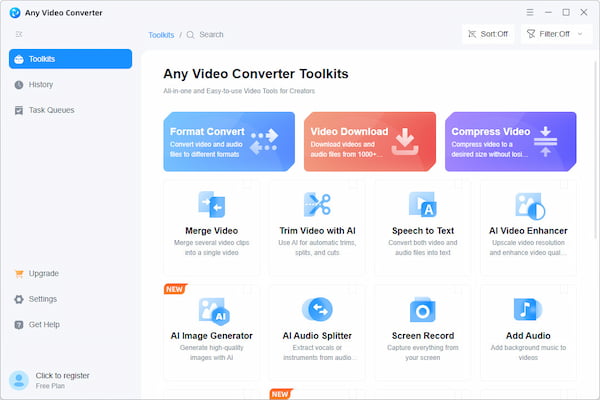
Any Video Converter Free and Ultimate Edition Verdict
Overall Rating: 4.2 out of 5 stars
- • Free: The Free version is a good option for converting standard media files into basic formats.
- • Ultimate: The Ultimate edition is best for users who want additional tools and full-feature access.
The Free version is a good starting point if you only convert a few small files occasionally. However, go with the Ultimate edition if you regularly process large files, need to download online videos, require DVD tools, or want access to basic and advanced editing features.
Part 2. What Any Video Converter Is & What Each Edition Costs
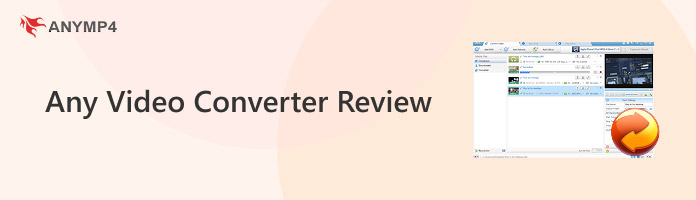
Any Video Converter, also known as AVC, is a multimedia software developed by AnvSoft. First released in 2006, it was originally made to convert media files into other formats. Later, it expanded its services to include tools for video downloading, DVD burning, and editing. The Free version 9.2.6 and Ultimate version 9.1.5 are both available on Windows and Mac. The software has also received the CNET Downloads 5-star award in 2012 for its Windows version. This recognition helps establish its name, but it should not be treated as proof of the current version's performance or value.
| Pricing/Plan |
Monthly |
Annual |
Permanent |
| Free |
$0 |
$0 |
$0 |
| Pro |
$19.95 |
$39.95 |
$79.95 |
| Ultimate |
$29.95 |
$69.95 |
$89.95 |
Part 3. What We Measured: Speed, Formats & Quality
We put the Any Video Converter free software to the test to see how it performs in several areas. These include conversion speeds, format and profile depth, batch processing, audio extraction, video downloading, editing tools, and GPU acceleration. Here are the results of our test:
Conversion Time: We use 10 MP4 files with different resolutions, totaling 475.88 MB, as sample test files. It took only 17 seconds to convert MP4 to MKV using the default output settings. However, if you need 4K/HEVC conversion, you need the Pro or Ultimate version.
Format and Profile Depth: The available output formats were limited to 11 video and 9 audio formats. Beyond common media formats, it also supports device presets (iPhone/Android).
Batch Conversion: Batch video conversion is available in both the Any Video Converter freeware and upgraded versions, with no file-count restriction.
Audio Extraction: AnvSoft can extract audio from video files and save it in a supported audio format. In our listening check, the resulting audio showed minimal degradation.
Video Downloader: The Free edition allows you to download supported online videos without watermarks or length limits. However, the supported website selection is limited to 10+ websites only compared with Ultimate.
Editing and Trimming Tools: The tools for trimming, cropping, and merging clips are too basic. These are only useful for quick edits, which limits their use in professional video projects.
CUDA and GPU Acceleration: The free Any Converter Video advertises CUDA/NVENC hardware acceleration. However, the benefit depends on the graphics card, driver support, source and output codecs, and selected settings.
Part 4. Free vs Ultimate: The Honest Value Breakdown
| Free |
VS |
Ultimate |
|
Format Conversion |
|
| Limited |
Video Download to 1000+ Sites |
|
| Limited |
Video Edit |
|
| |
DVD Burn |
|
|
Premium AI Features Access |
|
|
4K/8K Video Upscaling |
|
| Limited |
Preset Output Settings for Video Conversion and Download |
|
|
Individual or Multiple Audio/Subtitle Tracks Selection |
|
The upgrade-nag reality: Free is not merely a short trial; conversion, video downloading, and basic editing are available without a paid license. However, custom presets, DVD burning, and AI features will prompt you to upgrade when you try to use them.
Part 5. How to Use Any Video Converter
AVC is primarily for video conversion; additional tools and features were added in response to high demand. In this section, we will show you how to use Any Video Converter to convert media files using the Free edition.
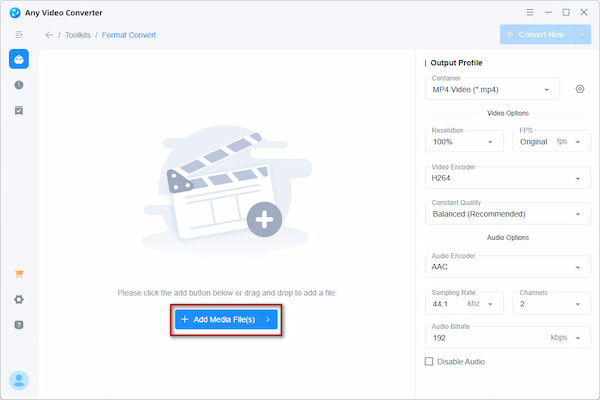
1. In the home interface, open the Format Converter and click +Add Media File(s). Select the video you want to convert from your computer to import.
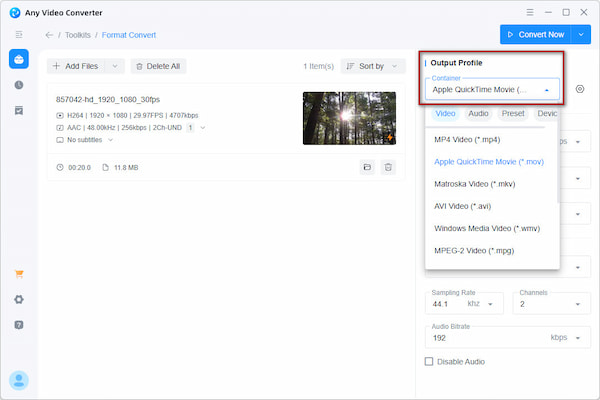
2. Go to Output Profile and click the Container field to select a new format. You can also adjust the Video and Audio Options to your preferences.
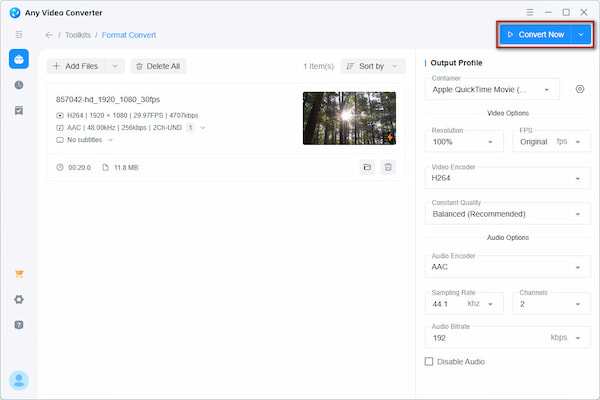
3. Click Convert Now to start the conversion process. During conversion, you will see the progress bar; wait until the queue finishes.
Note
The AVC Free edition supports batch conversion, meaning there's no need to repeat the process for every video individually. For basic video conversion, the Free edition is sufficient.
Part 6. Is Any Video Converter Safe to Download?
Yes, it is safe to download. However, safety depends on how you obtain the installer. Get the software from the official site and avoid third-party downloads. Some installers, mainly older ones, have been found to offer bundled software, such as ad-supported offers.
Part 7. Any Video Converter vs the Best Alternatives
|
Price |
Platform |
Supported Formats |
Output Quality |
Batch Conversion |
Conversion Speed |
Editor |
Best for |
| Any Video Converter |
Starts at $19.95 with free edition |
Windows and Mac |
20 video and audio formats + device presets |
Up to 4K/8K |
|
Fast |
Basic and advanced AI tools |
Occasional file conversion |
| AnyMP4 Video Converter Ultimate |
Starts at $37.50 with a free trial |
Windows and Mac |
500+ media formats and device presets |
Up to 4K/8K |
|
Up to 120× conversion speed |
Basic and advanced AI tools |
Converting media files to hundreds of formats plus extra media tools |
| HandBrake |
Free |
Windows, Mac, and Linux |
MP4, MKV, and WebM |
Up to 4K |
|
Fast |
Basic editing tools |
Advanced video transcoding |
| Freemake |
Starts at $39.95 with a free trial |
Windows |
500+ media formats and device presets |
Up to 4K |
|
Normal Speed |
Basic editing tools |
Quick free conversion |
| WinX HD |
Starts at $59.95 with a free trial |
Windows and Mac |
500+ media formats and device presets |
Up to 4K/8K |
|
Fast |
Basic editing tools |
Large HD conversion |
Our Recommendation:
Any Video Converter Free is a good choice for occasional conversions. If you want more control without paying, HandBrake is the strongest alternative. If you need broader format support, an advanced toolkit, 4K/8K conversion, and are willing to pay, go with AnyMP4 Video Converter Ultimate.
Part 8. The Honest Pros & Cons
PROS:
- Convert video formats and save with no watermark for free.
- Batch conversion is supported even without paying for an upgrade.
- Extract audio from videos with minimal degradation in quality.
- Access to basic editing tools.
- Adjustable video and audio settings before conversion.
CONS:
- Most of its advanced tools require access to the Ultimate version.
- Loading and analyzing source files took longer.
- Limited video and audio output formats.
- Free, Pro, and Ultimate offer different tools.
- Editing tools are too basic.
Part 9. FAQ about Any Video Converter
Is Any Video Converter really free?
No, AVC has a Free edition, but it is not a really free converter. It operates in a freemium model, meaning there are functional limits that require an upgrade.
Does Any Video Converter have a YouTube Downloader?
Yes, the software has a built-in YouTube downloader. However, some users report that YouTube's updates break the downloader, causing downloads to fail.
Does Any Video Converter add a watermark?
No, standard basic conversions in AVC do not add a watermark to your output video. However, you can use the Add Watermark tool if you want to add your own text or image watermark. In case your video source has a watermark, use a Video Watermark Remover first.
Conclusion
This Any Video Converter review finds that the Free edition is the best option for occasional or even everyday conversion. However, premium restrictions and unreliable speed claims need consideration. We suggest starting with the free version first; if you need more control, compare the Ultimate version with AnyMP4 Video Converter Ultimate before spending money. See how they differ in format support, conversion speed, and output quality.