
Quick Answer:
DAT converters help open and convert DAT files into usable formats. VLC media player stands out for free basic playback and simple conversions. For professional-grade editing and rapid processing, AnyMP4 Video Converter Ultimate is ideal. Meanwhile, Movavi offers a user-friendly desktop experience with high-quality output, and 123Apps provides a quick online solution that requires no installation.
DAT files are a type of data file that can store video, audio, or other raw information depending on the program that created them. Unlike common media formats, DAT files are not easy to open or play directly on most devices. Because of this, users need a dedicated tool to access and use their content properly. This post will introduce the best DAT converters available today. We will help you choose the right tool for your needs. We will discuss each converter in detail, highlighting its features, pros, and cons. We aim to guide you in finding the most effective and convenient solution for opening and converting DAT files.
DAT is a generic data file format commonly used to store information in a structured or raw form. It is often associated with video files from VCDs, which contain MPEG-encoded video and audio data. DAT files are not standardized, so they require specific programs to open or convert them into widely supported formats like MP4 or MP3.
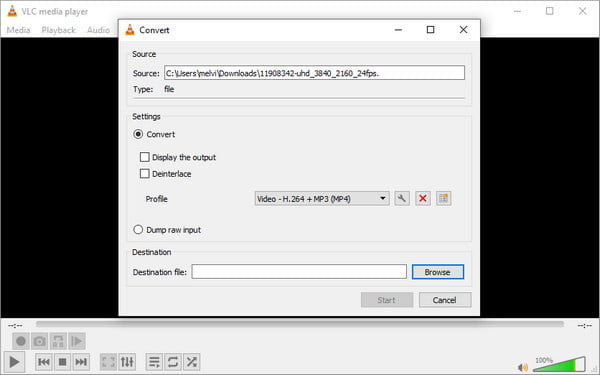
VLC Media Player is a multimedia player that can also work as a DAT file converter. It can open DAT video files extracted from VCD discs and convert them into standard media formats through its Convert/Save feature. You can also use it as a DAT player, which allows you to adjust codecs, resolution, and bitrate. In addition, it supports deinterlacing, synchronization, and trimming.
What to Expect With VLC Media Player:
PROS
CONS
VLC Media Player is a practical choice for basic DAT file conversion. It handles most DAT audio and video files without extra codecs. However, VLC is primarily a media player so that conversion can be slower and less stable.
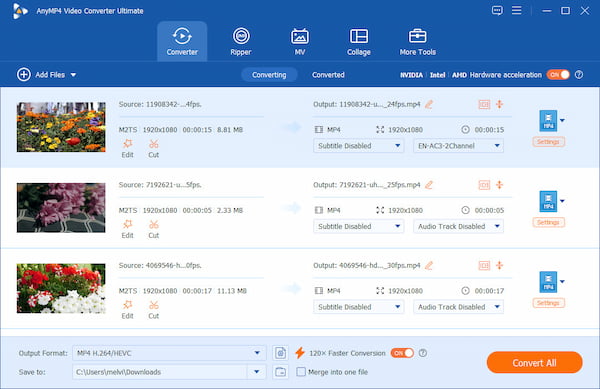
AnyMP4 Video Converter Ultimate is an all-around multimedia converter that is fully compatible with Windows 8-11 and Mac OS X 10.12-15. It can handle both DAT video and DAT audio files and convert them into modern formats. It can output MP4, MOV, AVI, MKV, MP3, AAC, FLAC, and 500+ other formats. It also provides extensive output customization options, allowing you to adjust encoder, bitrate, frame rate, resolution, sample rate, and channel settings.
Secure Download
Secure Download
In addition to format conversion, it includes built-in editing tools for cropping, rotating, trimming, merging, applying filters/effects, adding subtitles, and modifying audio tracks. It also adopts hardware acceleration technology to speed up DAT conversion while maintaining quality. This DAT file format converter features a Media Metadata Editor for editing title, artist, genre, and cover art.
What to Expect With AnyMP4 Video Converter Ultimate:
PROS
CONS
AnyMP4 Video Converter Ultimate is the best DAT converter software for those who need more than basic file conversion. It converts DAT to MP4 and 500+ other formats, offers extensive output customization, and includes editing and enhancement tools.
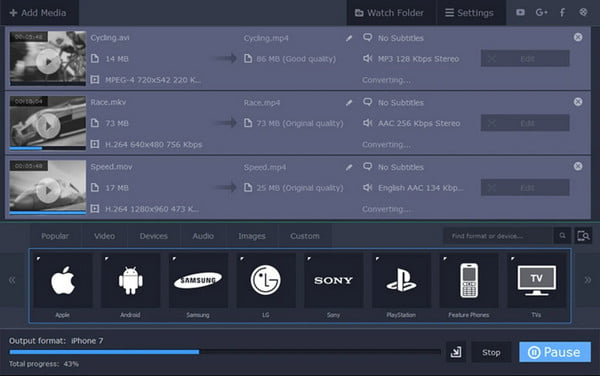
Movavi Video Converter is a professional multimedia converter that can operate as a DAT file converter. It can convert DAT video files and DAT-based media into MP4, AVI, MOV, MKV, WMV, MP3, and FLAC. In addition to conversion, Movavi includes simple editing measures such as trimming, rotating, color adjustment, stabilization, and file merging.
What to Expect With Movavi Video Converter:
PROS
CONS
Movavi Video Converter is a reliable professional tool for converting DAT video and audio files to modern formats such as MP3. It supports hardware acceleration, batch processing, and output customization features. However, its full capabilities are locked behind a paid license.
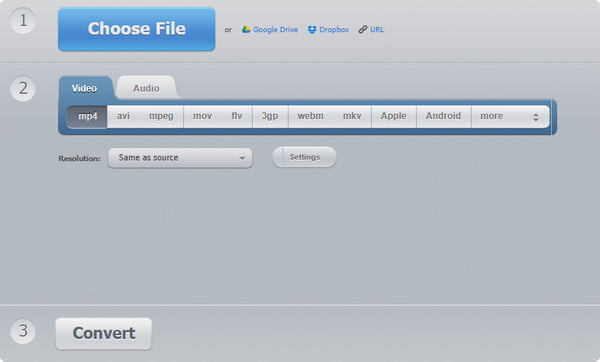
123Apps is a browser-based multimedia toolkit that serves as a free online DAT converter. It allows you to convert DAT video and audio files to MP4, MP3, FLAC, and other standard formats. This DAT converter offers basic output customization options, including choosing a file format, adjusting basic quality settings, trimming, and applying light edits.
What to Expect With 123Apps:
PROS
CONS
123Apps offers a convenient browser-based solution for quick DAT file conversion without requiring installation. It is useful for fast, lightweight conversions of DAT video and audio files into common formats. However, it has a file size limit of 500 MB.
Is it safe to use online DAT converters?
Yes, online DAT audio file converter tools are safe if you use trusted platforms. However, since files are uploaded to external servers, there is always a risk to privacy. It is best to use reputable sites with secure HTTPS connections and avoid uploading confidential files.
What formats can DAT files be converted into?
You can convert DAT files into many modern formats depending on the converter you use. Common output formats include MP4, AVI, MOV, and MKV for video, and MP3, AAC, WAV, or FLAC for audio. These formats make DAT files easier to play on most devices.
Can I convert only part of a DAT video?
Yes, many converters allow partial conversion of DAT videos by trimming or selecting a specific segment before exporting. This feature lets you extract only the necessary portion of the video, rather than converting the entire file. For this task, you can use AnyMP4 Video Converter Ultimate.
In conclusion, a DAT converter plays an essential role in making inaccessible DAT files usable. It converts DAT files to widely supported formats, including MP4, MP3, and others. With the tools discussed in this article, you can choose from simple online converters, powerful desktop software, and professional all-in-one solutions. Among these options, AnyMP4 Video Converter Ultimate stands out as a highly reliable choice. It offers fast conversion speed, high-quality output, and advanced editing features. It supports both DAT video and audio conversion while offering extensive customization and hardware acceleration for better performance.
Secure Download
Secure Download
 Updated by Alice Thorne to Convert Video, Converter
More readings
 Wonderfox HD Video Converter Factory Pro: Should You Buy It
Unsure if you should buy and download HD Video Converter Factory Pro? Please use this review as a guide to learn if the platform is good for your needs.
 Top 2 WebM to WMV Converters to Change WebM to WMV Format
Are you looking for a WebM to WMV Converter? Read the following 2 powerful tools to convert WebM to WMV without losing quality.
 Top 6 MKV Converter | Online & Desktop
This page lists the top 6 MKV converter online and desktop. You can convert to/from MKV from/to MP4, MOV, WMV, AVI, WMV, FLV, WebM, and more.
 5 Best 3D SBS Converters in 2026 for VR & 3D TV (AI Enhanced)
Discover the best 5 3D Side-by-side video converter software in this article to convert 3D anaglyph videos to 3D SBS movies for VR headsets.
 Add your comments to join the discussion here