How to Fix Screen Recorder Black Screen (Windows 10/11)
Quick Answer:
Why your recording came out black?
A screen recorder black screen has two causes. Your capture settings are wrong. You can fix that in about two minutes. Or the app blocks capture on purpose, and no recorder gets through.
4 fixes to solve a screen recorder black screen:
Try them in this order. Change the capture mode first. Then turn off browser acceleration. Then send both apps to the same GPU. And turn Game Mode off. Still black? The app is protecting the video.
You may encounter such situation when you try to record a screen:
You hit record. The timer runs. The audio comes out clean. Then you open the file and get a black rectangle.
Screen recorder is black screen while or after recording is most of you may meet. When you lose a two-hour session that way, then you spend a whole evening on fixes that could never work. Most guides never ask which problem you have.
Do not worry; here, we will explain that clearly. A black screen in a screen recorder has two causes. Your settings are wrong. You can fix those in about two minutes. Or the app blocks capture on purpose, and no recorder gets through. This guide splits them apart and shares a detailed guide to tell you how to fix that.
How We Tested These Black Screen Fixes
- I ran this on two machines for a week. A Windows 11 desktop with an RTX 4070. A Windows 10 laptop with Intel UHD 620 graphics. That laptop has no dedicated card.
- The mix mattered. Half the black screens I hit only showed up on one machine.
- I ran five scenes on both machines. Two were the same game, first in exclusive fullscreen, then in borderless. One was a Chrome tab with acceleration on and then off. The last two were Netflix and an iPhone over USB.
- For every run I wrote down five things. Did the file show video? Was the whole frame black, or just the video area? Which fix cleared it? How long did that take? And did the sound still work?
- That last one is the best clue in this guide. More on it further down.
|
Skill level |
Clears black from |
Time to fix |
Works on DRM video |
Records a phone screen |
Cost |
| Fix 1: AnyMP4 |
Beginner |
Mode mismatch, window, phone |
About 2 min |
|
|
Free trial, then paid |
| Fix 2: Windows |
Beginner |
GPU, Game Mode, driver |
About 5 min |
|
|
Free |
| Fix 3: OBS |
Intermediate |
Hook failure, overlays |
About 10 min |
|
|
Free |
| Fix 4: Browser |
Beginner |
Browser tabs |
Under 1 min |
|
|
Free |
Why Some Apps Record Black by Design
Windows has two capture paths. Desktop Duplication copies the desktop image. The newer Windows Graphics Capture API asks each app to hand over its frames. Both depend on the app saying yes.
Netflix, Disney+, Prime Video and most streaming sites say no. So do banking apps, some exam browsers, and a growing number of games. They set a protected flag. Or they run HDCP on the output. Windows will not hand over those pixels. The recorder gets a black rectangle. Sound is not flagged. That is why you still hear the audio.
No paid tool changes this. If a guide promises to record Netflix, it is either broken or lying.
The legal workaround is the download button. Netflix allows offline downloads on phones and tablets. Amazon does the same. Our guide to recording apps that block capture lists which ones block. It also lists the ones that only pretend to.
Fix 1: Switch Capture Mode in AnyMP4 Screen Recorder
Best for: Anyone whose recorder saves black video in a normal app. Also anyone recording a browser or a game. And anyone who needs to record a phone screen.
My preview was black before I hit record. That is the clue. A recorder that cannot see the screen tells you early. You just have to look.
Most black screens in normal apps come from a mode mismatch. The recorder asks Windows for the full display. The app draws somewhere else. Fullscreen games and browsers with acceleration do this every time.
AnyMP4 Screen Recorder lets you pick the surface first. Window mode grabs one window by its handle. Game mode grabs the game. Phone mode grabs a mirrored device. You name the target instead of guessing.
The main window lists four modes. The preview panel is on the right. Black preview before you start? The mode is wrong already. There is no command line to type, and no registry to edit.
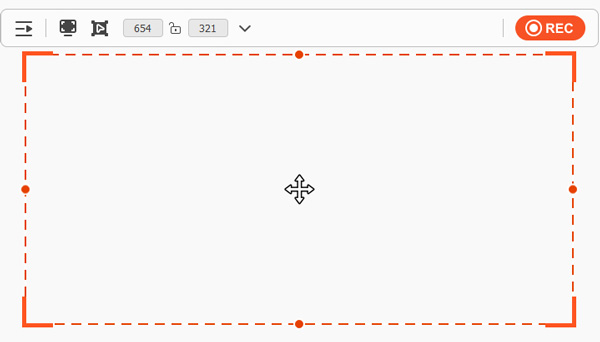
1. Switch from full screen to window. Run this software, pick Screen Recorder, then Window in the capture list. Select your app from the dropdown. Full screen fails most on a laptop with two GPUs.
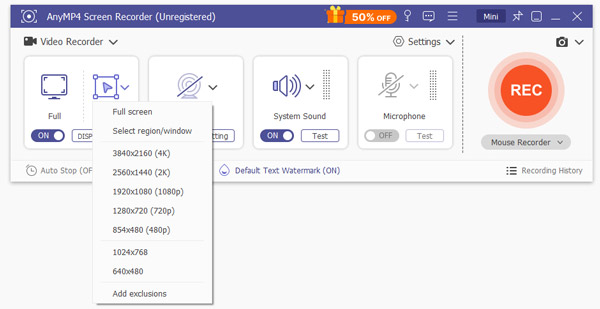
2. Turn on the cursor. Enable cursor highlight in the mouse settings. It is a free test. If the pointer shows but the app does not, the recorder sees your desktop and not that window. Jump to Fix 2.
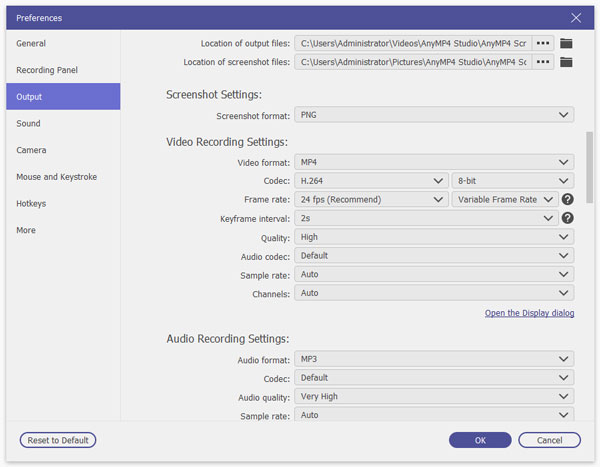
3. Match the output to the job. Click the gear icon. Pick 4K UHD at 60fps if cursor motion matters. Drop to 1080p for a bug report. That file is about a quarter of the size.
4. Record ten seconds. Play the clip back before you record anything long. Ten seconds of doubt beats forty minutes of black.
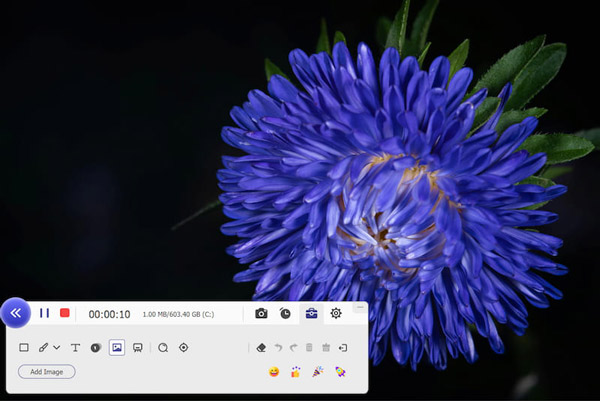
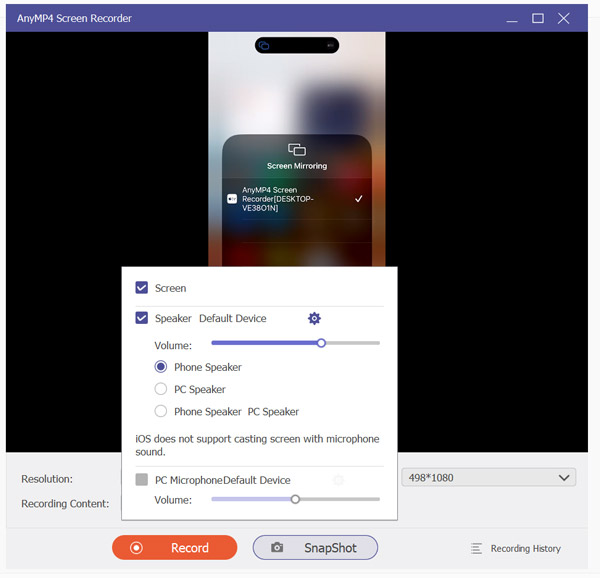
5. Recording a phone? Use Phone Recorder. Plug the iPhone in over USB, or pair it over Wi-Fi. Pick Phone Recorder, then mirror. The phone screen lands as real video. Most desktop recorders grab the mirror window and save an empty frame.
A game in fullscreen mode can still come out black. Switch it to windowed first.

One thing this cannot do is beat DRM. No tool can. If the file is still black after all six steps, the app blocked you on purpose. Skip to the DRM section.
Want the short version first? Read our best screen recorder comparison. It covers the three tools I keep installed.
Fix 2: Fix Black Screen Recording in Windows
Best for: Anyone whose preview is black in every mode, window mode included. That points at Windows, not the app.
Before you touch any recorder, check which card it runs on. Not the mode. The card.
Windows sends each app to one GPU. On a laptop with two cards, it often picks the low-power chip for the recorder. Your game gets the strong chip. The recorder grabs an empty frame. Nothing draws on its card.
Four steps. No downloads. Most people try to fix black screen recording by reinstalling the app. That rarely helps. This Windows 11 screen recorder guide walks the whole setup.
1.Reset the display driver. Hold Windows, Ctrl, Shift and B together. The screen flashes once. Nothing else changes.
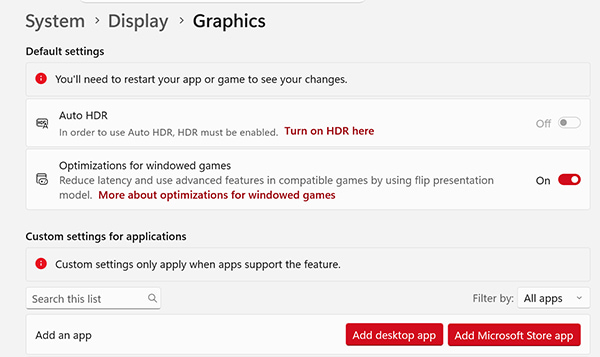
2. Point both apps at the same card. Open Settings, then System > Display > Graphics. Click Browse and add the recorder's exe. Add your game's exe as well. Set both to High performance, then restart both.
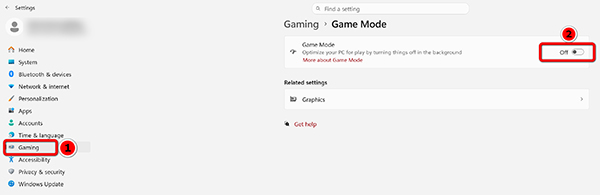
3. Kill Game Mode and Game Bar. Open Settings, then Gaming. Toggle Game Mode off. Toggle the Game Bar off too. Retest.
4. Try window mode.
Switch the game from fullscreen to windowed. Then retest. Game Bar's own recorder has its own capture limits. It fails more often on a laptop.
Note: Game Mode raises frame rates in some titles. Turn it back on after you finish recording.
Game Bar records black screen on the same machines where a desktop recorder works fine. Same cause, one more tool.
This is the fix that took me longest to find. Both apps looked fine on their own. Nothing on the settings screen said they were on different cards. I caught it in Task Manager. The recorder sat at 0% GPU. The game sat at 90%.
Fix 3: Fix OBS Black Screen (Game Capture & Window Capture)
Best for: OBS users with a black Game Capture. Also a Window Capture that stays black. Their Display Capture still works.
A thread on r/obs reads "OBS game capture black screen even when run as admin". It has more than two hundred replies. The fix that ends it is almost always one dropdown. One setting.
The classic OBS game capture black screen comes from a hook that never attached. Game Capture works by injecting a hook into the game process. Anti-cheat blocks the hook. Game Mode blocks it. A second overlay blocks it. When the hook fails, the source renders black and the audio keeps running.
1. Change the hook rate. Right-click the Game Capture source, then Properties. Find Hook Rate. Set it to Fastest.
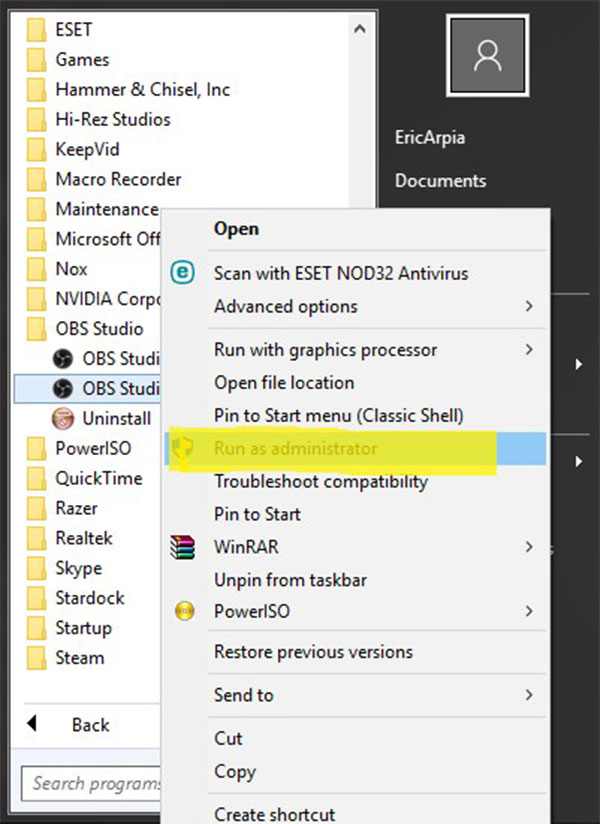
2. Run OBS as admin. Right-click the shortcut, then Run as administrator. Match the game's display mode. Both borderless, or both fullscreen.
3. Switch to Display Capture. Add a Display Capture source. Pick the right monitor. It records your whole desktop, so hide other windows first.

4. Close your overlays. Kill RTSS and MSI Afterburner. Turn off the Discord and Steam overlays. Two hooks in one game means one of them loses.
Pitfall: Valorant and similar titles block hooks on purpose. Display Capture is your only route. Some of those block that too.
Hook Rate at Fastest cleared a capture that had survived two driver reinstalls. I found it after an hour of forum reading. That is why it sits first here. Our longer guide covers the permission steps. It shows how to fix OBS black screen from a cold start. I skipped those.
Fix 4: Fix Black Screen When Recording Browser Tabs
Best for: Anyone whose video is black only in Chrome or Edge tabs. Every other window records fine.
This one is easy. Almost too easy.
Browsers send video through a GPU path that many recorders cannot hook. Turn acceleration off, and the browser draws on the CPU instead. Every recorder can grab a CPU frame.
1. Turn off Chrome acceleration. Open Settings, then System. Switch off "Use graphics acceleration when available". Relaunch Chrome. That switch only shows up after a full restart. A tab refresh will not do it.
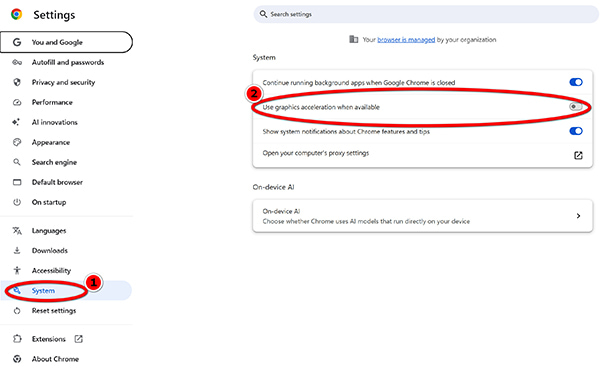
Same thing in Edge. Open Settings, then System and performance. Turn it off. Restart Edge.
2. Record that tab again.
The symptom points at the fix. One tab goes black. Everything else is fine. That is acceleration. Nothing else acts that way. Want to skip the switch? Try this Chrome screen recorder route. It skips the browser layer.
AnyMP4 Screen Recorder: 4 Modes That Skip Black Screens

A screen recorder black screen usually starts with a full display grab. AnyMP4 Screen Recorder draws on its own surface. The grab misses it. This one asks which surface you want first. Window, game, phone, or monitor. A named surface cannot be missed.
| What goes wrong |
Mode to pick |
What you get |
| A full-screen game |
Game Recorder |
4K, 60fps, H.265, no cap |
| A window behind another |
Game Recorder, locked |
records in the background |
| A mirrored phone |
Phone Recorder |
phone screen as real video |
| A tab with acceleration on |
Screen Recorder, window |
one window, by handle |
| A second monitor |
Screen Recorder, monitor |
the display you name |
| Sound but no picture |
Audio Recorder |
checks mic and system |
Four modes cover six cases. Cover the window with a browser and it keeps recording. You can drop the windows you do not want in the frame.
- • Live preview: It runs before you hit REC. A black preview means a black file.
- • No time limitation: The paid build keeps recording past the hour mark.
- • GPU acceleration: It holds the frame rate where a software grab drops frames.
- • Real-time editing: While recording, it gives more editing features like whiteboard, draw, highlight, etc.
No scene list. No hook rate. No command line. Pick a mode, then hit record.
One limit stay put. Protected video records black here too. You see that in the preview, not in an exported file.
FAQs About Screen Recorder Black Screen
Why is my screen recording black but the audio works?
The video surface failed, not the sound. It is one of three things. The app blocks capture. The recorder and the app sit on different GPUs. Or the hook never attached. Check those before you touch any audio setting.
Why does my recorder save Netflix as black video?
Netflix marks its video as protected. The system will not hand those pixels to any recorder, paid or free. Use the offline download feature in the Netflix app instead.
Does turning off hardware acceleration fix Chrome black screen recordings?
Often, yes. But only when the black hits browser tabs and nothing else. If every window is black, acceleration is not your problem.
Conclusion
A black recording in a screen recorder is either a setting you can fix in minutes. Or it is protected video that no recorder can touch. Work out which one first.
- • Black in one app only: window mode, Fix 1.
- • Black in everything, on a laptop: GPU and Game Mode, Fix 2.
- • Black in OBS Game Capture: hook rate, then Display Capture, Fix 3.
- • Black in browser tabs only: acceleration off, Fix 4.
- • Black on Netflix or a banking app: DRM. Use the download button.
Still stuck? Try AnyMP4 Screen Recorder and record one ten-second clip in window mode. If that clip comes out clean, the app was never your problem.




 Add your comments to join the discussion here