
MXF is the prefix abbreviation of the Material Exchange Format, which supports an array of different streams of coded "essence" as a "container" or "wrapper" format. At present there is no any kind of "wrapper" format to meet all the needs of broadcast production. MXF has full time code and metadata support, and is intended as a platform-agnostic stable standard for future professional video and audio application, MXF is a "container" or "wrapper" format instead of compressed format, it doesn't guarantee that each of MXF file can be identified by any kind of decoder.
AVI (Audio Video Interleave) is a multimedia container format introduced and developed by Microsoft, which can contain both audio and video data in a file container that allows synchronous audio-with-video playback. AVI format is popular throughout the world. AVI video would be compatible with most mainstream portable player devices after converting MXF video to AVI.
To help you watch MXF file shot by your Panasonic P2, Canon, or Sony XDCAM camcorder on any kind of video player device, AnyMP4 MXF to AVI Converter - the best MXF to AVI Converting software, can convert MXF to AVI for playback on your Android phone, Game console, and other media device.
The step-by-step tutorial shows you the best solution on how to convert MXF files to AVI in amazing speed.
Secure Download
Secure Download
Here you can download this MXF to AVI Converter and install it, and add MXF video to the program by clicking "Add Video" button. It will provide two ways for you to add the video, select "Add Video" option to open your video folder to add video one by one; and select "Add Folder" option to batch loading your videos to the program.
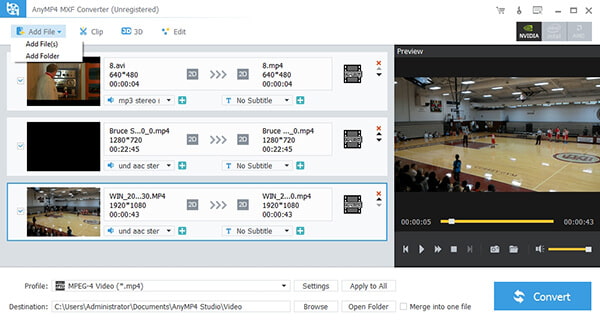
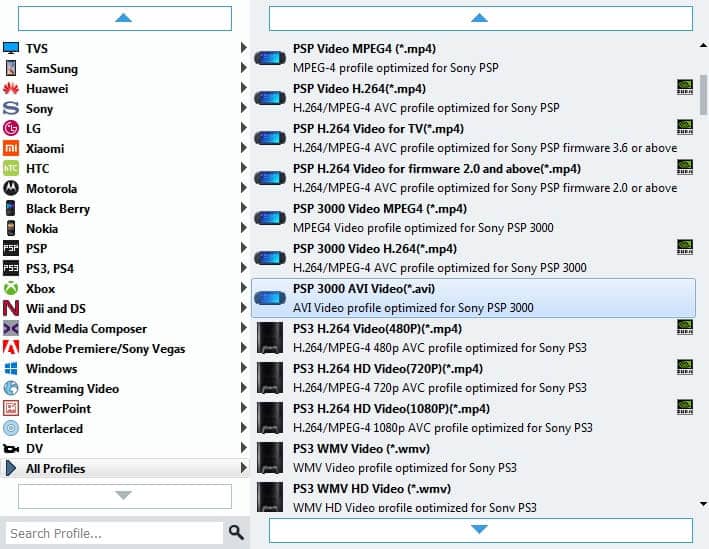
To convert MXF to AVI, you should select AVI format as the output format. Click "Profile" drop-down arrow to open the profile list, and then choose the AVI format from the classified profile list. Another way to set profile while you put the cursor on the loaded file list, click the Profile drop-down option to open the Profile drop-down list and select AVI as the output format.
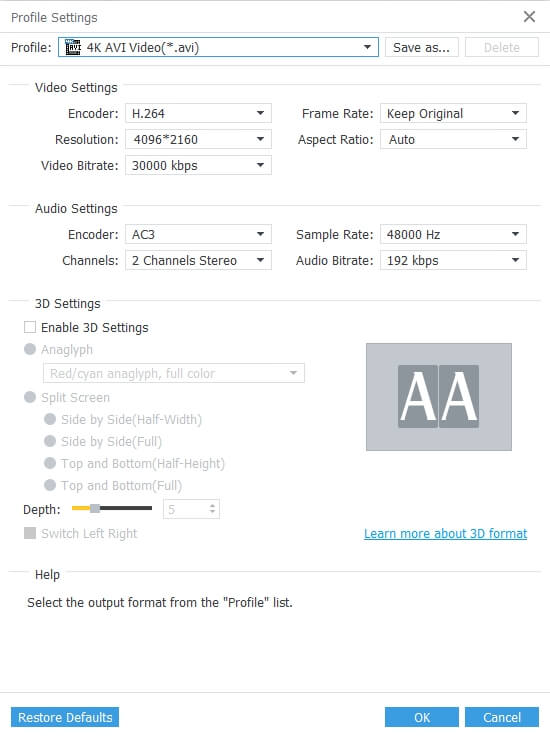
Click "Settings" button in the main interface to open the Profile Settings window. Here you can define the video settings like Encoder, Frame Rate, Resolution, Aspect Ratio and Video Bitrate, and the audio settings such as Encoder, Sample Rate, Channels and Audio Bitrate.
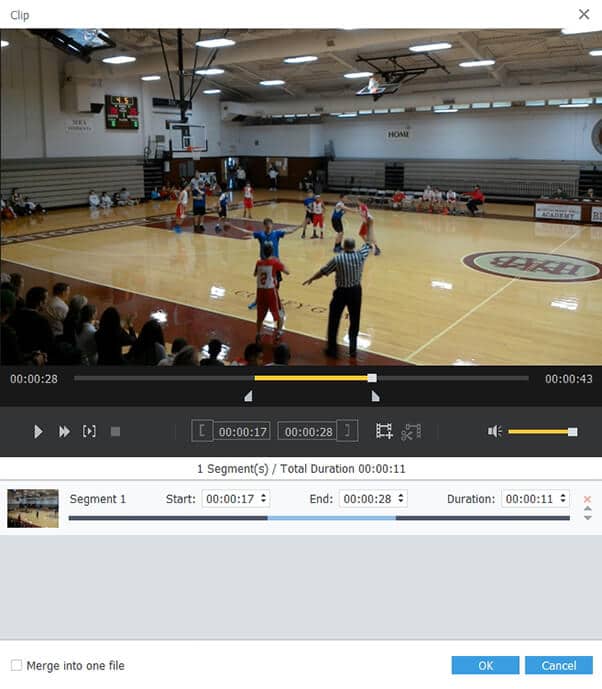
Act as the professional Mac MXF video editing software, MXF to AVI Converter can help you edit the video effect such as trimming video length, cropping video frame, adding image/text watermark, and adjusting the video effect. Here is the "trimming screenshot" for you to view.
Click "PreClick "Merge" button to join several selected video clips together, and you can rename the merging video.
Click "Convert" button to begin converting MXF to AVI.
 Updated by Joan Aimee to Convert Video
Related Articles
 Efficient Tutorial to Convert MP3 to 320kbps on Windows and Mac OS
Want to get the best audio quality of your MP3 files? It is easy to produce MP3 320kbps with audio or video files if you follow our step-by-step guide.
 Top 7 Methods to Convert MP4 to FLV
You can use professional MP4 to FLV Converters to manage video conversion easily.
 How to Turn MP4 into GIF With Top 5 Methods
Ever wonder how to turn your MP4 videos into GIF images? Don't worry. Read on and learn, this article will introduce 5 methods for you to achieve it.
 Top 10 FLV to MP4 Converters You Should Know
Would like to find a useful converter for FLV to MP4? just check out from the article.
 Add your comments to join the discussion here
