
At a Glance / Key Takeaways:
Did you download an M4B audiobook only to find that your Android phone or Windows media player can’t play it? Or are you looking for a way to convert it to MP3 without losing your chapters? In this article, we will discuss everything you need to know about the M4B file format, including its development background, its main uses, how it compares to other formats, and how to access M4B files to help our readers enjoy audiobooks.
M4B files were originally developed for the Apple Books app to make audiobooks more accessible and easier to use on the program. It was compressed using the MPEG-4 standard and uses the modern AAC codec. Given this background, M4B is an excellent container format. It can preserve complex metadata such as chapters and bookmarks without issue, helping audiobook listeners easily return to the part of the book where they left off.
Unfortunately, the development foundation of M4B is optimized for the Apple ecosystem, making its compatibility a major disadvantage. It is not supported locally by built-in media players in the Android and Windows ecosystems.
Since M4B files are designed exclusively for modern audiobooks, they are built as a stable, capable container format that allows setting chapters and bookmarks in the digital audio file. Over the years, the file has become available outside the Apple Books app; it is not one of the standard audio formats for listening to audiobooks.
M4B and M4A are virtually the same format. They are both compressed using the MPEG-4 standard and use the same AAC codec. However, their difference lies in how they are used. M4B is designed exclusively for audiobooks, and M4A is meant for standard music files, offering superb audio quality while maintaining an impressive compression rate.
Along with M4B, MP3 is also a popular audiobook format. It has near-universal compatibility, superior to M4A. However, MP3 files have lower audio quality and do not support built-in chapter bookmarking. Despite the quality setback, the universal availability of MP3 players still makes it good enough for audiobook use.
When opening M4B files natively on Mac or iOS, you will encounter no compatibility or playback issues. This is true whether you are playing a downloaded M4B file or one that was downloaded from Apple Music. M4B files are exclusively designed and optimized for Apple.
Once M4B files are exported from Apple devices, you will be vulnerable to compatibility issues if you use your computer's built-in multimedia player. As such, you need to download third-party music players such as iTunes or VLC Media Player.

Another challenge when handling M4B files is that such programs are often DRM-protected. You have to know whether Digital Rights Management protects the M4B file you will open to avoid any legal or piracy issues.
To learn how, check your file’s information. Under the file tab, check whether it is indicated if it is a “Protected AAC audio file”. If it was labeled as such, it has FairPlay DRM protection. However, if it is marked as “Purchased AAC audio file” or “AAC audio file," you can use or share the file freely, as it is not DRM-protected.
The file's origin also indicates its DRM status; it is DRM-protected if it was purchased from the Apple Store or iTunes. If it is downloaded from third-party sources, it is not DRM-protected.
Although M4B is highly practical for its intended purpose as an audiobook, it has several compatibility limitations. It is fully optimized for the Apple ecosystem, and although it is playable on third-party music players, it is subpar in terms of universal compatibility. For example, M4Bs are not playable on car stereos or Android devices.
With this compatibility issue explained, the need to convert M4B files to MP3 should be clear.
When it comes to converting audiobook files, standard online converters often fail—either they impose strict file size limits (audiobooks are huge!) or they degrade audio quality. For a seamless, desktop-level solution, we recommend AnyMP4 Video Converter Ultimate. It is a robust multimedia toolkit designed to handle large audio and video files with zero quality loss.
Audiobooks are long, typically 10 to 30 hours. Instead of leaving your computer on all night, AnyMP4’s hardware acceleration tech converts massive M4B files to MP3 in a fraction of the time, letting you load up your phone and hit the road sooner. This was all made possible by the program's GPU acceleration system.
To further enjoy the benefits of GPU acceleration, the program can organise entire libraries instantly. If you have a collection of dozens of downloaded, DRM-free M4B audiobooks, you don’t need to convert them one by one. You can drag and drop entire folders, set the output to MP3 or FLAC, and walk away while the software does the heavy lifting. Batch conversion and GPU acceleration are a perfect combination.
Finally, customizable audio settings from high-quality to lossless quality audio are another notable option in the program. AnyMP4 allows you to customise the bitrate and sample rate, ensuring the narrator's voice remains crisp, warm, and free of a robotic sound. These are all supported by the program's built-in metadata editor, which retains your M4B’s ID3 tags and metadata, keeping your audiobook’s title, author, and cover art intact.
To learn how to use the program for M4B conversion, make sure to read our three-step guide below. Do not forget to download it as well to make it easier to learn how to use AnyMP4 Video Converter Ultimate.
Secure Download
Secure Download
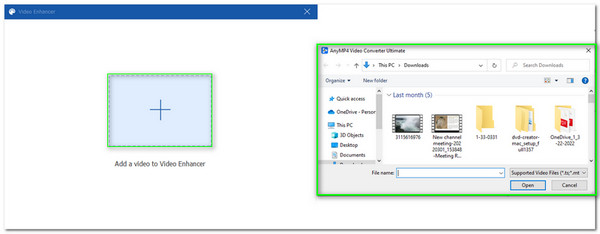
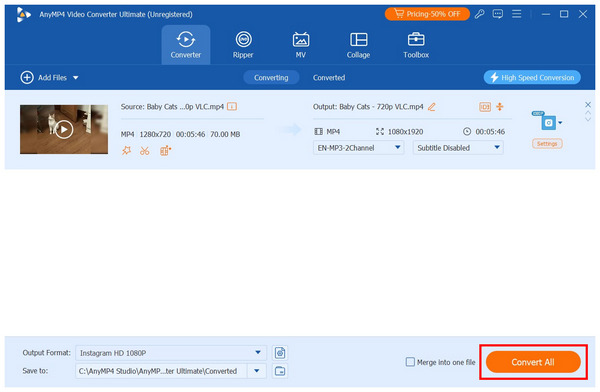
1. Open AnyMP4 Video Converter Ultimate, then click Add Files to import the M4B file you want to convert to MP3.
2. Wait for the M4B file to upload, then select Output Format and choose MP3 from the output options. Among the conversion profiles, we recommended Same as Source for lossless conversion.
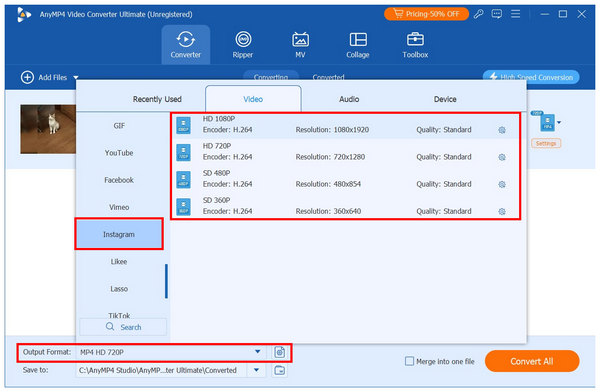
3. Once the conversion profile is selected, click on Convert All back in the Converter tab to begin producing your converted MP3 file.
Can I play M4B files natively on an Android device?
No, you cannot. You need third-party music players. Built-in tools on Android devices cannot play the M4B format.
How do I convert an M4B file to MP3 without losing chapter markers?
This is not possible. You have to convert your M4B files to MP3 to avoid losing chapter data. Once they are converted to MP3 format, the bookmarks will be lost.
Are all M4B files downloaded from iTunes DRM-protected?
Yes, they are. iTunes media are DRM-protected. They are hard to share and may even be illegal.
Can VLC Media Player open and play M4B files?
Yes, it can. VLC supports M4B files. Its versatile compatibility is one of its greatest strengths.
What is the main difference between M4B and M4A audio formats?
They are practically the same. In terms of compression option, codec, and quality. They only differ in how they are used since M4B is for audiobooks and M4A are for music files.
Now that we have discussed what an M4B file is, it all boils down to its primary purpose as an audiobook format well-equipped with chapter management, bookmarks, and other advantages as a container file. To open M4Bs, always remember that you can do so using Apple Books or VLC; however, cross-device problems can only be solved by converting them to MP3 or other universal audio formats. If you are looking at this solution, make sure to download and use AnyMP4 Video Converter Ultimate, as it can convert M4B to M4A, MP3, or another audio format of your choice.
Secure Download
Secure Download
 Updated by Alice Thorne to Glossary
More readings
 What Is an MP4 File? Ultimate Guide to the MP4 Format (2026)
Wondering what the MP4 format is? Learn what MP4 stands for, how it differs from MP3, and how to safely open or convert the world's most popular video file.
 FLAC: The Complete Guide to Lossless Audio in 2026
Learn what FLAC is, how it compares to MP3 and ALAC, when you should NOT use FLAC, and the best free FLAC players and converters for 2026.
 WAV: What Is It, and How to Play This Audio Format
Discover the best software that you can use to listen to or convert your large WAV audio files into a more portable format friendly for your device storage.
 What Is FLV? Defining the Flash Video and How to Access it
This informative post will focus on what FLV is. Additionally, we will present tools for playing and converting these files. Check the answers you need here!
 Add your comments to join the discussion here