
At a Glance
If you just downloaded what you thought was a full-length movie, only to find a microscopic 2KB file that refuses to open, you're dealing with an M3U8 file. You double-click it expecting a crisp video, but you get total silence. Media players throw weird error windows, your phone screen stays completely black, and you're left staring at a file that's smaller than a basic text message.
No worry. This guide will explain exactly what this text-based playlist is, why renaming it to MP4 does absolutely nothing, and how you can easily stream or convert it for smooth offline viewing on Windows 11, Mac, or your mobile screen.

To understand the M3U8 file format, you have to stop thinking of it as a traditional video file like an MP4 or an MKV. It is not a container that holds video frames or audio tracks. Instead, picture it as a highly detailed treasure map.
When you open a normal video file, your software reads the video and audio tracks packed neatly inside that single file. But when a website streams a live show using HTTP Live Streaming (HLS)—a smart streaming tech created by Apple—it does things differently. It chops the massive video file into thousands of tiny pieces. These pieces are called stream segments (.ts files), and each one lasts only a few seconds. The M3U8 file is simply the plain-text blueprint that tells your media player exactly where those loose pieces live online and what order to play them in.
Modern web streaming has a massive secret weapon: HTTP Live Streaming. When you watch a live stream on Twitch or a movie on Netflix, the video quality changes based on your internet speed. If your Wi-Fi drops a bar, the video gets a little bit blurry instead of freezing up completely.
This happens because the master M3U8 file can point to different quality options for the exact same stream. It acts as a universal UTF-8-encoded audio playlist and video index. Because it uses UTF-8 text formatting, it can write down web links and file names using almost any language alphabet on earth without breaking the underlying code.
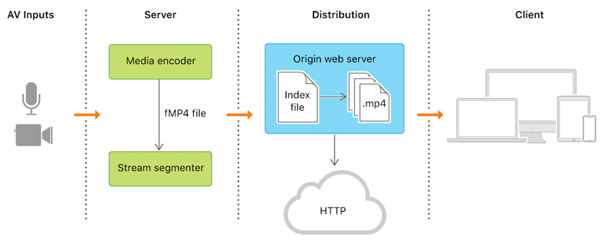
Look at the diagram above. The original video goes through a segmenter tool that chops it up into tiny fragments. Your media player reads the main index file (the M3U8) first, then pulls down those small video segments one by one over basic web channels.
Inside that text playlist, the locations of the video fragments are written down in one of two ways:
Because it only holds text directions, the actual file size of an M3U8 is incredibly small. It's literally just lines of plain text that you can open with any simple text editor on your computer.
If you download an M3U8 file, you're only downloading the map, not the treasure. If your internet goes out, your media player won't be able to fetch the web links written inside the map, leaving you with zero video to watch offline.
Let’s look inside one of these files. If you open an M3U8 with a notepad app, it looks a lot like this:
Plaintext
#EXTM3U
#EXT-X-VERSION:3
#EXT-X-TARGETDURATION:10
#EXTINF:10.000,
https://media.example.com/segment1.ts
#EXTINF:9.500,
https://media.example.com/segment2.ts
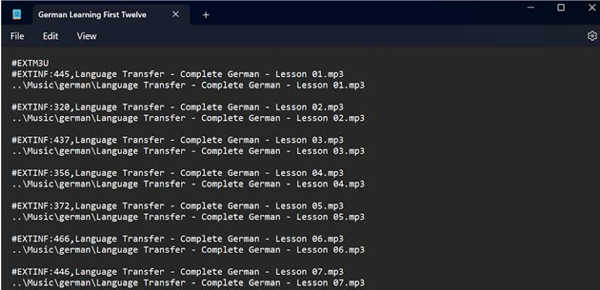
Here's exactly what those text tags mean when your player reads them:
You might run across older files that drop the "8" at the end, leaving you with a standard .m3u extension. They do almost the same exact job, but the difference comes down to old compatibility and language support.
The original M3U format was built a long time ago, mostly for simple Winamp music playlists. It usually saved text using your computer's local default language system (like Latin-1). This worked fine for standard English song names. But if a music track used Japanese, Arabic, or Chinese characters, the text would turn into unreadable gibberish, causing the music player to fail.
M3U8 fixes this mess by forcing UTF-8 text encoding. This universal standard supports every language character smoothly. Since modern web broadcasting is global, every major site—like YouTube Live and Twitch—relies 100% on M3U8 to deliver video to different devices worldwide without text errors.
One of the biggest traps people fall into is trying to force a fix by changing the file extension. It seems easy: you right-click the file, hit rename, delete .M3U8, and type .mp4 instead.
It will not work. Here is why.
Changing an extension only changes the label on the outside of the box; it doesn't change what's actually inside. When you label a file .mp4, you're telling your computer to expect a formal video container holding specific video codecs (like H.264) along with audio tracks.
The Container Barrier: A real video container stores packed binary media data. A playlist file only stores text-based web addresses.
When your media player tries to open a renamed M3U8 file, it looks for raw video data but finds plain text words like #EXTM3U. The player immediately gets confused, throws a "corrupt file" error, and gives up.
Years ago, back when the web used old formats like FLV, you could sometimes trick basic players because Flash files were single, continuous videos. But Flash is long gone. In 2026, web video is completely broken down into loose pieces. To turn a playlist into a real video file, you can't just change the name—you have to download all the linked segments and stitch them together.
Depending on whether you want to watch a live feed right now, look at the source text, or download the whole thing for a long trip away from Wi-Fi, you have three clear choices.
Look, if you are tired of staring at that annoying loading wheel and just want a normal video file on your hard drive, a solid media tool is your best bet. A super popular shortcut right now is a browser extension called HLS Downloader. It pops right into Chrome or Firefox and does all the tedious grunt work for you. Instead of making you manually copy and paste thousands of split web links by hand, you literally just feed it your local playlist file or master link. The plugin reads the text map, queues up all those tiny stream pieces, and glues them back together into one clean, high-quality MP4 file.
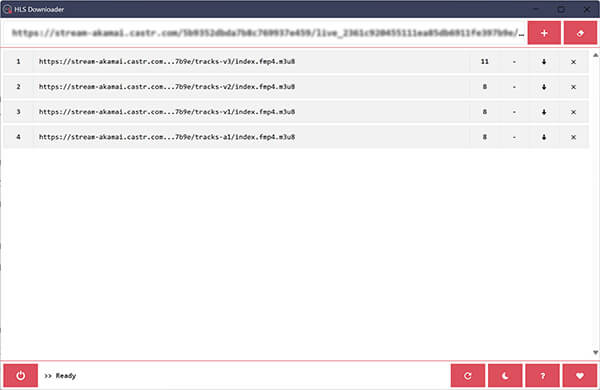
However, many modern streaming sites protect their M3U8 feeds with strict DRM (Digital Rights Management) or security keys. If you try to paste an encrypted streaming link into a standard downloader, you'll get a generic "403 Forbidden" or "Network Timeout" error, and the download will fail.
When a playlist is locked down tightly by the website, you need a different plan. That is where AnyMP4 Screen Recorder comes into play as the ultimate backup solution.
Instead of fighting with broken download links or decryption errors, you just play the live stream link in your browser or an app like VLC. Then, open the screen recorder to capture the footage directly from your screen. It records clean, smooth video with perfect system audio, completely ignoring any format blocks. It turns a frustrating technical roadblock into a simple "what you see is what you get" fix, ensuring you can save absolutely any live broadcast for offline viewing.
Secure Download
Secure Download
If you don't care about saving the video file for later and just want to watch the live stream right now on your computer, VLC Media Player is one of the easiest M3U8 player options. It works perfectly on Windows 11, macOS, and Linux.
To open M3U8 streams directly inside VLC:
1. Run VLC Media Player on your Windows or Mac computer.
2. If you are on Windows, press Ctrl + N (or Cmd + N on a Mac) to open the Network Stream panel.
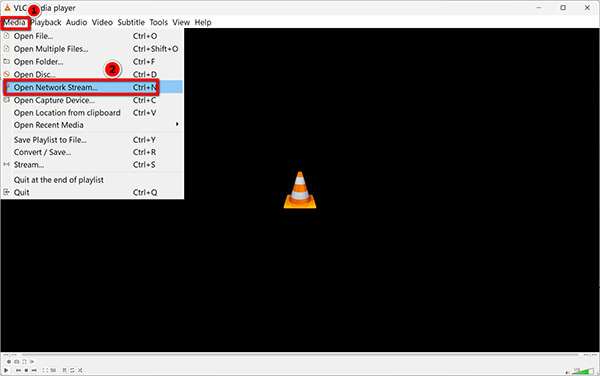
3. Paste the live M3U8 web link straight into the URL box.
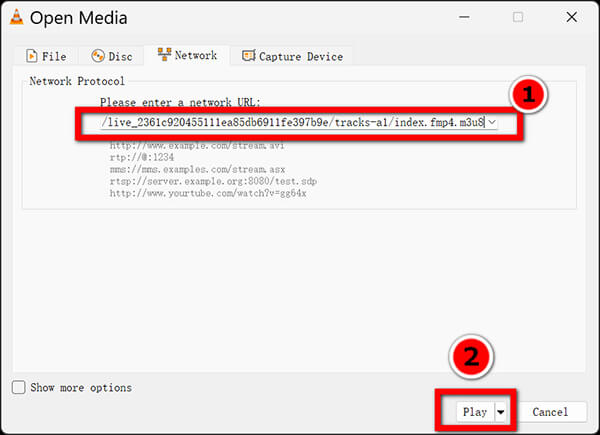
4. Click Play.
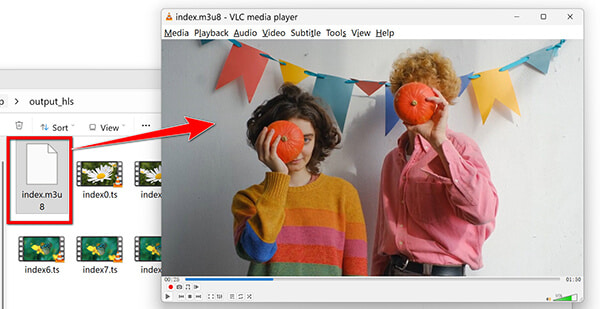
VLC will stream the internet feed dynamically, reading the playlist text in real time and buffering short segments right before they hit your screen.
If your stream keeps stuttering or stopping in VLC, it's usually because the stream provider updates the playlist faster than your app can read it, or your internet is having brief hiccups. Try going into VLC's advanced settings and increasing the "Stream Output Caching" value to a few thousand milliseconds. This gives your player a bigger safety buffer to stop that annoying buffering.
If you are a developer or just curious to see exactly where a live stream pulls its video segments from, you can view the raw text yourself.
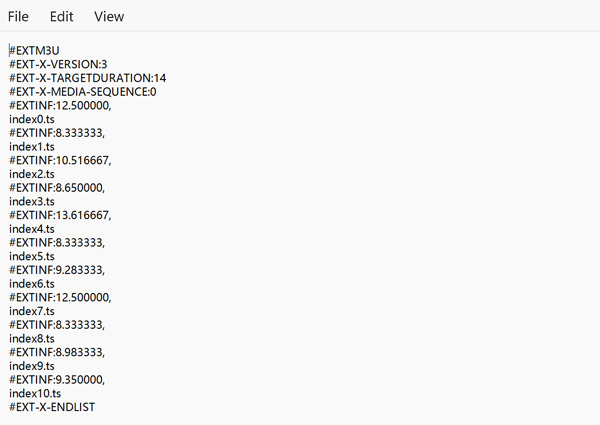
Once inside, you can read the links, check the segment times, or even copy a specific .ts link to see if the video hosting server is online. Just make sure you don't accidentally change or delete the tags if you plan on opening the file in a media player later, as an incorrect text edit can ruin the entire map.
Can I convert an M3U8 file to MP4 just by renaming the extension?
Absolutely not. Changing the file extension is just a cosmetic trick—it only changes the label on the outside of the box. Since an M3U8 file is 100% plain text and web links, typing .mp4 at the end won't magically create video pixels out of thin air. The file stays as plain code. The second you try to open it, your media player will look inside, see a wall of text instead of actual video data, get totally confused, and throw a nasty error. If you want a real, playable MP4, you have to use an actual converter or downloader app to pull down the real footage.
Why is my M3U8 file only a few kilobytes in size?
It is small because it doesn't hold any real video frames or audio tracks. It is purely a text document filled with configuration tags and URLs pointing to the exact web spots where the real video fragments live.
Is it safe to open M3U8 files?
Yes, it is generally very safe. Because they are plain text files, opening them in a text editor like Notepad cannot run dangerous viruses on your computer. However, if you are loading an unknown M3U8 stream link into a media player, make sure you trust the website, as malicious links can sometimes exploit unpatched bugs in old media player apps.
How do I play an M3U8 file on Chrome or Safari?
Safari handles HLS streaming links natively; you can paste an M3U8 link straight into the Safari address bar, and it will play. Google Chrome does not support them out of the box on desktop computers. To play M3U8 files on Windows 11 or Mac using Chrome, you need to install a free browser extension like "HLS Player" or "Native HLS Playback" from the Chrome Web Store.
An M3U8 file is the blueprint for a streaming media broadcast, not the video itself. Understanding this difference is the key to solving most playback errors. If you want to test a live stream link, dropping it into a free tool like VLC is your quickest route. However, if your goal is archiving, editing, or ensuring flawless offline playback on mobile devices, learning how to convert M3U8 to MP4 for offline use with a dedicated conversion app is the most practical step.
Have you encountered a specific error code when loading a playlist? Leave a comment below with your OS version, and our technical team will help you troubleshoot the connection.
Secure Download
Secure Download
 Updated by Alice Thorne to Glossary
More readings
 What Is a QCP File & How to Open It? (2026 Guide & Converter)
Wondering what a QCP file is? Discover the history of this legacy audio format, why it won't open on modern devices, and the best tools to convert QCP to MP3.
 What Is an MXF File & How to Open It? (The Ultimate Guide)
What is an MXF file? Discover everything about the MXF file format, why pros use it, how to easily open .mxf files, and how to convert them.
 How to Open and Convert Recorded MTS Files: A Full Guide
Do you want to learn how to watch videos saved in the MTS file type? Read this article for a detailed guide to help you access recorded videos in MTS format.
 Everything You Need to Learn About the TS Video File Format
Do you want to learn what the TS format is and how to open and convert such video files? Read this article for a full guide to know everything about it.
 Add your comments to join the discussion here