
Quick Summary:
A CAF file is Apple's Core Audio Format, designed for high-quality, long-duration audio recording and editing. It works best within Apple ecosystems but may face compatibility issues on Windows and other platforms. Converting CAF files with AnyMP4 Video Converter Ultimate makes playback and sharing easier.
Apple is known for developing its own media formats to ensure smooth compatibility across its devices and software ecosystem. One of these formats is CAF (Core Audio Format). Many non-Apple users are unfamiliar with it, resulting in playback and compatibility issues when encountering the file. To help you better understand this format, this post will explain what a CAF file is and how it differs from other formats. We will also discuss its common use cases, platform compatibility, and playback support. As a bonus, you will learn how to convert CAF files for easier playback on different devices and operating systems.

What is CAF file?
CAF, short for Core Audio Format, is an audio container format developed by Apple for storing and managing high-quality digital audio data. It supports various audio formats, including uncompressed PCM, compressed audio, and metadata such as markers and annotations. It is commonly used in professional audio production, especially on macOS and iOS.
Unlike FLAC, CAF, WAV, and AIFF are uncompressed audio formats that can store uncompressed audio. However, these formats differ in structure and limitations. WAV and AIFF are older formats with rigid file-size constraints and limited metadata flexibility. In contrast, CAF audio files support virtually unlimited file size. It also handles modern audio features more efficiently, such as multi-channel recordings and extended metadata.
Use CAF when you anticipate your file size exceeding 4GB (approximately 6.7 hours of CD-quality audio). It ensures you avoid the file size limitations of WAV and AIFF while maintaining high audio quality and full metadata support.
CAFs are preferred in professional audio environments because they eliminate time-based recording restrictions. Instead of splitting sessions into multiple files, it allows recording continuously for hours without interruption. The structure of Apple Core Audio CAF ensures stability even during extremely long recordings.
CAF files are known for their resilience in the face of unexpected system failures. Many DAWs support safe recording, meaning audio data is written to the file progressively. If a crash or power loss occurs, most of the recorded content is still preserved.
CAF supports rich metadata integration, allowing you to embed timecode, markers, notes, and track details directly into the file. It also handles complex multi-channel audio setups far better than traditional formats. In modern workflows, CAF is chosen for its ability to maintain both technical precision and detailed session organization within a single file.
If you are a field recorder or live sound engineer, set your DAW to record in CAF to ensure a hard save of your data. It minimizes the risk of data loss during unexpected interruptions and guarantees that your recordings are continuously written and preserved.
CAF file is fully supported across Apple devices and professional macOS audio applications. Within the Apple ecosystem, it delivers smooth playback, editing, and recording performance without compatibility issues. The iOS CAF audio format is optimized for seamless integration, ensuring stable workflows across Apple hardware and software environments.
Outside Apple systems, CAF support is limited. Many Windows-based audio players and editors cannot open CAF files without additional plugins or conversion tools. It makes CAF less practical for cross-platform sharing, especially when working with non-Apple software.
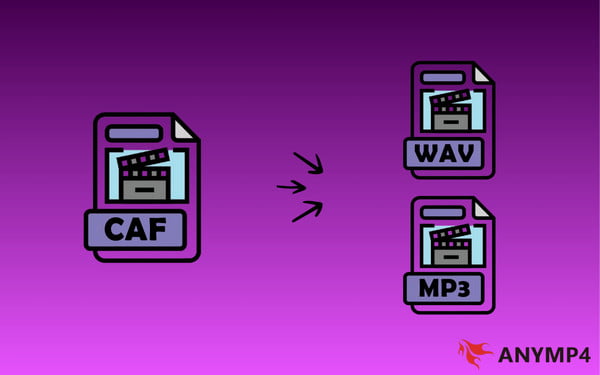
To ensure broader usability, many users convert CAF to WAV or MP3 format. WAV is preferred for maintaining lossless quality during professional exchanges, while MP3 is used for smaller, shareable files. Conversion ensures compatibility on editing platforms, media players, and OS.
Always convert CAF to WAV before sending files to a collaborator who uses a Windows-based PC to avoid errors. It ensures smooth playback, editing compatibility, and prevents workflow interruptions.
AnyMP4 Video Converter Ultimate is a multi-format media conversion software fully compatible with Windows 8-11 and Mac OS X 10.12-15. It can convert, edit, and enhance audio and video files efficiently. It allows you to convert CAF files to MP3, WAV, AIFF, OGG, AAC, and 500+ other video/audio formats. It also lets you adjust encoder settings, resolution, bitrate, and other output parameters for optimized results. Additionally, it includes built-in editing tools that let you crop, rotate, apply effects/filters, adjust subtitles/audio tracks, and more. Remarkably, it adopts acceleration technology to facilitate the conversion process.
Secure Download
Secure Download
What to Expect with AnyMP4 Video Converter Ultimate:
Here's how to convert CAF audio files:
1. Upon opening AnyMP4 Video Converter Ultimate, the Converter tab opens by default. Click + Add Files to import your Core Audio Format files. If you want to convert multiple CAFs at once, select Add Folder instead.
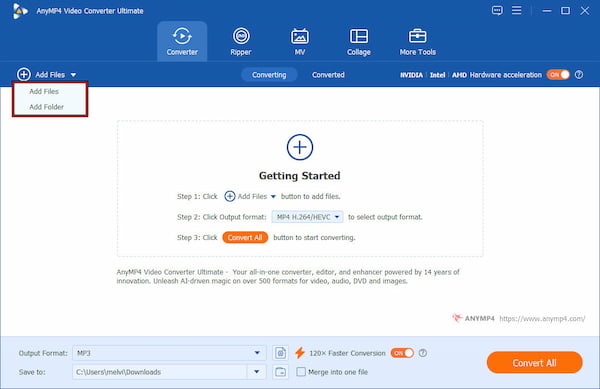
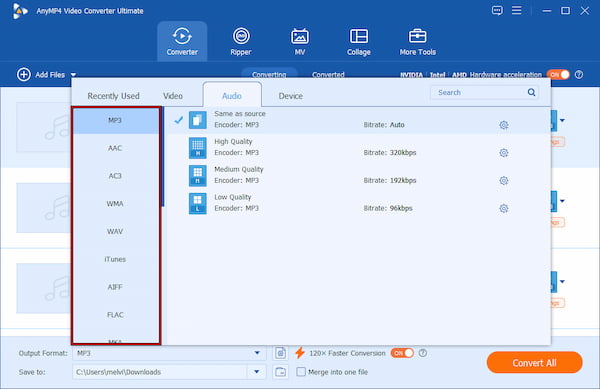
2. Navigate to the Output Format selector and switch to the Audio or Video category. You can choose MP3, WAV, AAC, FLAC, and OGG depending on your playback needs. For better optimization, use Custom Profile to fine-tune encoder, sample rate, bitrate, and channel settings.
3. Select your output destination using the Save To selector to organize your converted files. Before starting, enable Hardware Acceleration to speed up the conversion process. Then click Convert All to begin batch processing and convert your CAFs to universal formats.
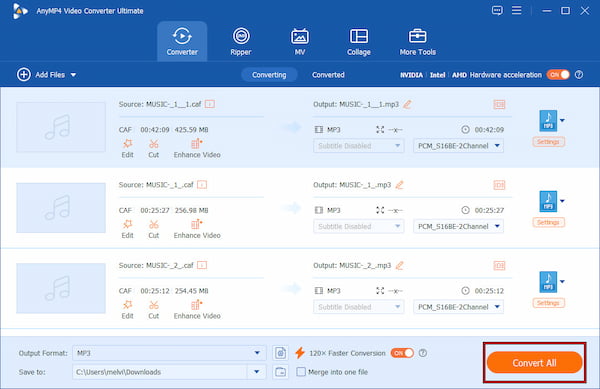
When handling an audio CAF file, AnyMP4 Video Converter Ultimate provides an efficient way to improve playback compatibility. As the best CAF to MP3 converter, it supports high-quality conversion while allowing you to customize bitrate, encoder, and sample rate settings. In addition to common audio formats, you can use this software to convert CAF to OGG.
Can I play .caf files on my iPhone?
Yes, iPhones natively support CAFs because it is an Apple-developed audio format. You can play .caf files directly in compatible iOS apps, music production tools, or other apps that support them. However, some third-party media players do not recognize the format.
How do I open a CAF file on Windows?
Windows does not provide built-in support for CAF files. It means you need third-party software to open them. Some media players, such as VLC Media Player, and professional audio editors support CAF playback. If compatibility issues occur, the easiest solution is to convert it.
Is CAF better than FLAC?
CAF and FLAC serve different purposes. CAF is designed mainly for Apple and professional audio workflows. It supports long recordings and advanced metadata. Meanwhile, FLAC is better for universal lossless audio playback and smaller file sizes through compression.
Understanding what a CAF file is helps you manage Apple audio recordings more efficiently, especially for long, high-quality sessions. Although CAF offers strong performance within Apple ecosystems, its compatibility on other platforms can be limited. To make playback easier and convert CAF files into universally supported formats, use AnyMP4 Video Converter Ultimate. It provides fast conversion, format customization, and reliable audio quality for seamless listening across all devices.
Secure Download
Secure Download
 Updated by Alice Thorne to Glossary
More readings
 What Is FLV? Defining the Flash Video and How to Access it
This informative post will focus on what FLV is. Additionally, we will present tools for playing and converting these files. Check the answers you need here!
 What is DTS? Everything You Need to Know About DTS is Here
In this guidepost, you will learn what DTS is and its impact on audio quality. Also, discover how to play and convert DTS files for a richer audio experience.
 What Is AAC and Why It Matters in Audio Technology
This post will highlight what AAC is. Discover the origins, advantages, disadvantages, and versatile applications of the Advanced Audio Coding files.
 MP3 Vs. MP4 | Uncover the Key Differences of These Formats
This post will focus on MP3 Vs. MP4 overview. Understand their distinct qualities and discover which one suits your audio and video preferences.
 Add your comments to join the discussion here