
Quick Summary:
The APE file (Monkey's Audio) is a high-efficiency lossless audio format offering bit-perfect sound quality. While highly efficient, its high CPU decoding demands and limited device support make it difficult to play on modern smartphones and TVs. This guide covers APE's origins, comparisons with FLAC/ALAC, and easy ways to play or convert APE files seamlessly.
Imagine a photocopier that does not just copy a document, but reconstructs the original paper and ink down to the last molecule. In the world of digital audio, that is APE. While MP3s slice away the 'unnecessary' layers of your favorite tracks to save space, APE (Monkey's Audio) treats your music like a sacred archive. But in an era of mobile streaming and smart speakers, is this bit-perfect titan still relevant, or is it a relic of the past? Let's dive into the ultimate breakdown of this lossless codec.

1. The Science of Bit-Perfect Compression.
To understand what makes an APE file unique, you first need to understand how audio compression works. Generally speaking, audio compression is divided into two types: lossy and lossless.
How APE achieves smaller file sizes than FLAC (the tighter squeeze):
FLAC format relies on linear prediction algorithms designed for fast decoding, while APE uses a more complex asymmetric algorithm to reduce data, achieving tighter compression. At the highest compression setting, the files are 3% to 5% smaller than equivalent FLAC files.
2. A Brief History of Monkey's Audio.
Monkey's Audio was created by developer Matthew T. Ashland in 2000, emerging during a pivotal period in the development of digital media. At that time, high-capacity hard drives were relatively expensive, so storing files on home computers required optimization to maximize storage efficiency.
Monkey's Audio, a lossless audio compression format that saves hard drive space while preserving sound quality, thus became the gold standard.
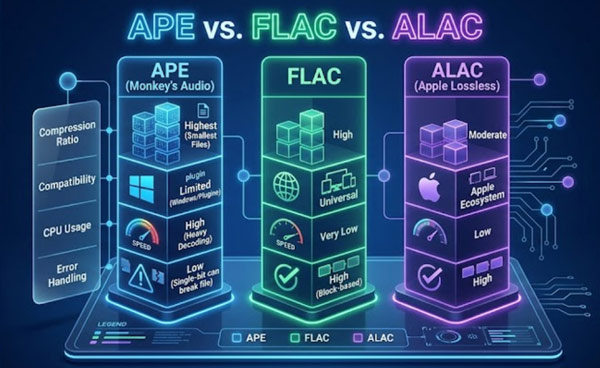
| Feature | APE (Monkey's Audio) | FLAC | ALAC (Apple Lossless) |
|---|---|---|---|
| Compression Ratio | Highest (Smallest Files) | High | Moderate |
| Compatibility | Limited (Windows/Plugins) | Universal | Apple Ecosystem |
| CPU Usage | High (Heavy Decoding) | Very Low | Low |
| Error Handling | Low (Single bit can break file) | High (Block-based) | High |
Because APE is highly compressed, native media players on Windows and Mac typically cannot open it. A simple cross-platform solution is VLC Media Player, which natively supports decoding APE files without installing extra codecs.
1. Open VLC Media Player. Drag and drop your APE files directly into the player window. Or, you can click Media at the top-left bar, select Open File... (or press Ctrl+O) to find and open the APE audio track.
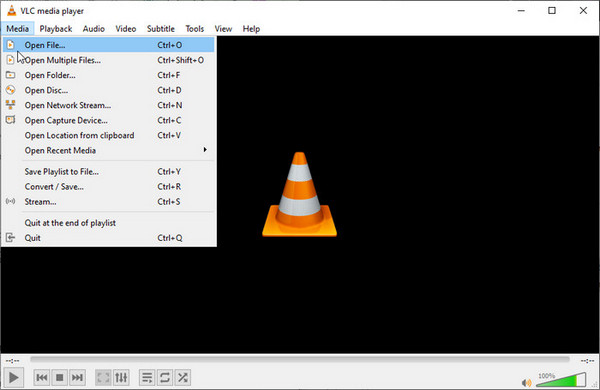
2. If the file includes a .cue sheet, open the .cue file directly to load the tracks.
Keep the .cue file and the .ape file in the same folder with the same filenames, and VLC will automatically load the complete track list!
If you have downloaded or ripped an album in APE format, you may have encountered a common situation: instead of individual track files, you get one large .ape file and a small .cue text file. CUE files typically contain the start and end positions for each track, as well as the corresponding metadata for each segment.
Without a dedicated media player or a conversion tool capable of reading CUE files, it is nearly impossible to play an individual track from the album.
The solution: converting APE for the modern world
Regarding the APE gap mentioned above, you need a tool capable of handling lossless audio data.
Why we recommend AnyMP4 Video Converter Ultimate:
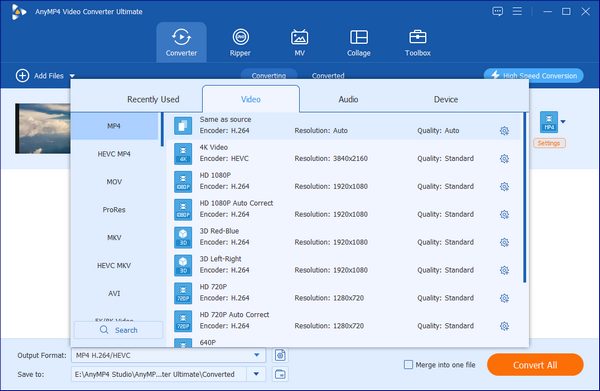
As a content strategist, I have tested dozens of tools, but AnyMP4 Video Converter Ultimate stands out for APE management for three reasons:
Secure Download
Secure Download
Does APE sound better than FLAC?
No, they sound identical. Both are bit-perfect lossless formats that preserve 100% of the original audio quality.
Can I open APE files on a Mac?
Yes, but not natively. macOS QuickTime and Apple Music do not support .ape, so you will need third-party media players like VLC, AnyMP4, etc.
Why is my APE file corrupt?
It usually stems from incomplete downloads or outdated decoders.
The APE format remains a powerhouse for those who value every kilobyte of storage and every note of music. However, in 2026, convenience is king. You should not have to choose between high-fidelity sound and the ability to listen on your favorite headphones.
Ready to unlock your music?
Do not let your high-res audio sit trapped in an incompatible format. Use a professional-grade solution like AnyMP4 Video Converter Ultimate to preserve your quality while gaining total device freedom.
Secure Download
Secure Download
 Updated by Alice Thorne to Glossary
More readings
 What Is An MKV File and How to Play It without Quality Loss
Do you have a video in MKV file and want to learn more information about it? You are at the right place since this concrete guide will tell you everything.
 What is M4A | A Comprehensive Review of MPEG-4 Audio File
This informative post will focus on what M4A is. Besides discussing its aspects, we will also present viable tools for playing and converting these files.
 What Is FLV? Defining the Flash Video and How to Access it
This informative post will focus on what FLV is. Additionally, we will present tools for playing and converting these files. Check the answers you need here!
 What Is AAC and Why It Matters in Audio Technology
This post will highlight what AAC is. Discover the origins, advantages, disadvantages, and versatile applications of the Advanced Audio Coding files.
 Add your comments to join the discussion here