
Summary:
MPEG-4 and MP4 are not the same as you think. MP4 is a container, while MPEG-4 is the content inside that container. Today, MPEG-4 is still being used in legacy systems, but MP4 remains the universal standard in everyday use due to its superior support for advanced codecs.
MPEG-4 and MP4 are two names that sound almost identical, and many video files and export settings use them interchangeably. However, MPEG-4 and MP4 are not technically the same thing. MPEG-4 refers to a multimedia standard, while MP4 is a container format. This distinction matters when a video fails to play, leaving you unsure whether the problem is the file format or the codec. In this post, we will compare MPEG-4 vs MP4 to help you better understand the difference between the codec and the container. We will also cover their technical specification and answer why most users confuse the two.

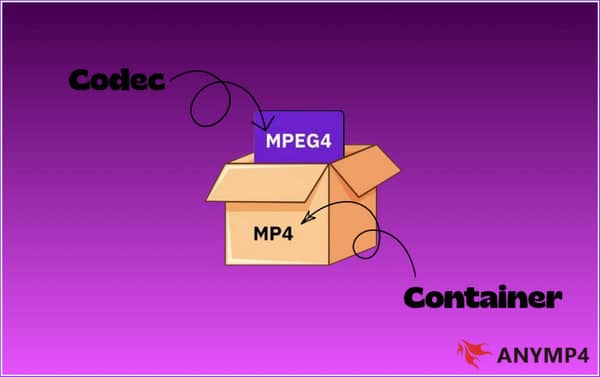
If you're unfamiliar with video format terminology, you might think that MPEG-4 is the same as MP4. But the terms MP4 and MPEG-4 do not mean the same thing. Think of MP4 as a container box and MPEG-4 as the item inside that box. MPEG-4 is an ISO/IEC standard created by the Moving Picture Experts Group (MPEG). Some important MPEG-4 parts include MPEG-4 Part 2, MPEG-4 Part 10, and MPEG-4 Part 14. MPEG-4 Part 2 is a video coding standard associated with older implementations. MPEG-4 Part 10 defines AVC, better known as H.264 codec, while MPEG-4 Part 14 defines the MP4 container format.
Important Note: Remember, a container can hold one or more encoded streams. If you’re still confused about what to use, MP4 or MPEG-4, you should use MP4. MP4 is the actual file format, while MPEG-4 is just the underlying compression standard.
| MPEG-4 (MPEG-4 Part 2) | VS | MP4 (MPEG-4 Part 10) |
| Video compression standards | File Type | Digital multimedia container |
| Lower | Compression | Higher |
| Old internet archives or legacy hardware | Usage | Online streaming, smartphones, cameras, and social media |
| H.263 | Video Codec | H.264/AVC, H.265/HEVC, AV1, MPEG-4 Part 2, and MPEG-2 and MPEG-1 |
| AAC and MP3 | Audio Codec | AAC, MP3, Apple Lossless (ALAC) & FLAC, Opus, etc. |
When comparing MPEG-4 vs MP4, specifically MPEG-4 Part 2 with H.264/AVC inside an MP4 container, H.264 provides better compression efficiency. Meanwhile, MPEG-4 Part 2 is an older video codec with less efficient compression.
MP4 has the advantage in compatibility. However, the codec inside the container matters. MP4 plays perfectly with Android smartphones and smart TVs, especially when encoded with H.264/AAC. QuickTime also support MP4, but ProRes may use different containers. In contrast, MPEG-4 is limited to VCDs, DVDs, MPEG players, and broadcasting.
MP4 allows for structured metadata for titles, dates, chapters and track details. This makes MP4 a convenient format for organizing and managing video libraries. But metadata doesn’t directly boost your search engine rankings.
The confusion of MP4 vs MPEG-4 because of the evolution of digital video technology. Early digital cameras and devices promoted MPEG-4 as the video compression technology while storing recordings in an MP4 container. MPEG-4 also appeared in legacy software when describing the video codec. With the rise of MP4 for smartphones, websites, and video sharing, people began using MPEG-4 and MP4 interchangeably.
AnyMP4 Video Converter Ultimate is a safe and secure video-to-video conversion software. It uses Lossless technology to achieve minimal to zero quality loss conversion. It can remux hundreds of MPEG-4 Part 2 videos to an MP4 (H.264/H.265) container simultaneously. Also, it uses the most advanced hardware-accelerating media processing to achieve 120× speed. Better yet, all video data is processed offline, eliminating the risk of data leaks and server caching.
1. Download the best MPEG-4 to MP4 converter for Mac/Windows and complete the installation. After setup, the software will open to the Converter tab.
Secure Download
Secure Download
Click +Add Files to import the MPEG-4 source from your computer. You can use the Add Folder option to batch-load multiple files from a single folder.
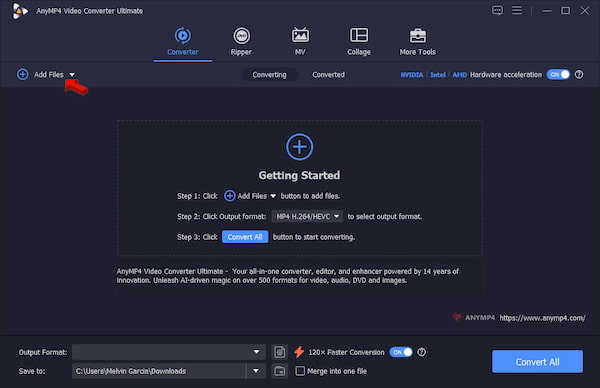
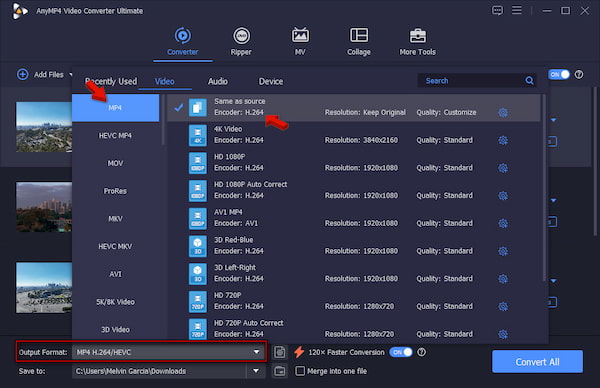
2. Go to the Output Format picker and select MP4 under the Video category. Set Same as Source as your quality preset to keep the original quality of your source file.
3. Go back to the main interface and turn on Hardware Acceleration to speed up the conversion. Set the output destination, then click Convert All to convert MPEG-4 to MP4 without quality loss.
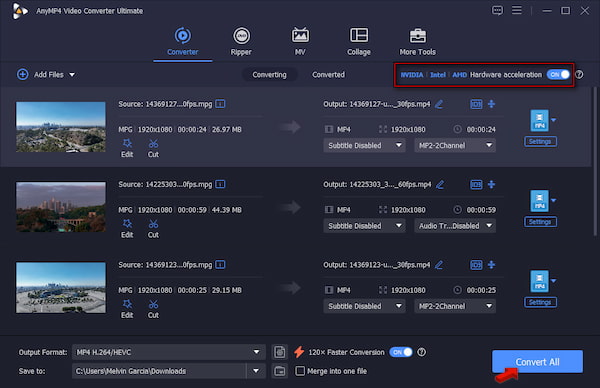
In our test, we use 50 MPEG-4 Part 2 videos from old camcorders, totaling 2.2 GB. It took only 2 minutes and 7 seconds for the MPEG-to-MP4 converter to complete the batch conversion. We QA-checked all the converted files and found no quality loss.
Is MP4 better quality than MPEG-4?
Neither MP4 nor MPEG-4 offers better quality. MP4 is a container format, while MPEG-4 is a codec. The quality depends on the video encoding you use.
Can I rename a .mpeg4 file extension to .mp4?
Yes, you can rename .mpeg4 file extension to .mp4 because they refer to the same video format family. However, changing the extension name only updates how your system labels and handles the files.
Why won't my MPEG-4 video play on a modern Smart TV?
MPEG-4 videos don’t play on Smart TVs because they might not support the internal audio or video format hidden inside the file. If the TV does not recognize the compression tool used, the video will fail to play.
What is the best codec to use inside an MP4 container in 2026?
H.264/AVC is the best codec to use in MP4 container because of its universal compatibility. You can also opt for AV1 for maximum compression efficiency on modern web platforms.
Is MPEG-4 Part 14 the same as MP4?
MP4 and MPEG-4 Part 14 are the same thing, but do not confuse them with general MPEG-4. MPEG-4 is a part of a standard used for encoding and compressing data. Meanwhile, MP4 is the file wrapper/container that stores the compressed data. You may also want to check the differences between MOV vs M4V vs MP4.
The simplest way to remember the difference between MPEG-4 vs MP4 is this: MPEG-4 is a multimedia standard, while MP4 is a container format. MPEG-4 Part 14 defines the MP4 container, but MP4 can hold video encoded using different codecs, including H.264 and HEVC. If an older MPEG-4 video is causing compatibility problems, use AnyMP4 Video Converter Ultimate to convert it to a modern MP4 configuration.
Why Trust Us: Our technical team spent 48 hours testing 50+ video formats on Windows 10 to verify codec, container, compatibility, and conversion considerations discussed in this guide.
Disclaimer: MPEG, MPEG-4, MP4, H.264, H.265, and related trademarks and standards are associated with their respective organizations and owners. Product features and hardware acceleration capabilities may vary by version, operating system, hardware, and input media.
 Updated by Alice Thorne to Glossary
More readings
 The Best MKV to MPEG Converter to Transcode MKV to MPEG Files
When you want to convert MKV to MPEG for DVDs, you can learn more about the most efficient method to transcode the MKV files with ease from the article.
 2 Ways to Convert MPG/MPEG to WMV on Windows/Mac/Online (Reversely)
Read and get 2 easy ways to convert MPG to WMV or WMV to MPG on your Windows and Mac computer. You can get both online and desktop MPG converters in this post.
 The Advantages and Disadvantages about AVCHD and MP4
Do you know AVCHD and MP4 these two formats? The article will introduce the difference between them. Keep reading to understand more details.
 MKV vs MP4 – The Difference Between MKV and MP4
The file formats MP4 and MKV are widely used. Do you know the difference between them? The following article will compare MP4 and MKV about their details.
 Add your comments to join the discussion here