
Summary
MP4 is a modern format used for online streaming and compatible with most devices. Meanwhile, MPEG files with .mpg or .mpeg extensions are older formats that still being used on older hardware, DVDs, and VCDs. However, the file extension alone does not determine quality or compatibility. What matters most is the codec, container, bitrate, resolution, and playback device.
If you have an old .mpg video that refuses to play on a modern device, you may wonder which format is better: MPEG or MP4. This MPEG vs. MP4 comparison can be confusing because the two terms describe different aspects of video technology. Understanding the difference between MPEG and MP4 helps you choose the right format for playback, sharing, and storage. This video format comparison explains compression, quality, compatibility, and conversion, including how to convert MPEG to MP4 without unnecessary loss of quality.

MPEG is a family of compression standards created to make large files small to store media streams. MPEG videos appear with file extensions (.mpg, .mpeg, .mp4). MPEG-1 is associated with VCDs, while MPEG-2 is the standard for DVDs, digital TV, and broadcasting.
MP4 is a container format standardized as MPEG-4 Part 14. The difference between MPEG and MP4 is that MP4 can hold different types of data. It can contain a video stream, an audio track, subtitles, metadata, and other information.
No, MPEG-4 and MP4 are not the same. This is the common source of confusion in video terminology. MPEG can refer to the developer of the multimedia standard, the Moving Picture Experts Group, and to the files associated with MPEG video. MP4, on the other hand, is a container format standardized as MPEG-4 Part 14. MPEG-4 includes multiple standards and technologies, while MP4 defines how multimedia content can be packaged into a standardized container. So, MPEG-4 refers to a family of standards, while MP4 refers to a container format.
If you need to convert your MPEG-4 to MP4, use a dedicated MPEG to MP4 converter to ensure error-free playback after conversion.
The MP4 and MPEG difference becomes clearer when you compare how each handles compression, quality, and playback compatibility. However, it is important to remember that MPEG can refer to different standards, while MP4 is a container format.
| MPEG | VS | MP4 |
| Coding standards and compression methods | Type | Container |
| .mpg, .mpeg, .mp4 | File Extension | .mp4 |
| VCDs, DVDs, digital TVs, and broadcasting | Primary Use | Online streaming, sharing, and mobile devices |
| H.261, MPEG-1, MPEG-2, and MPEG-4 | Video Codecs | H.264/AVC and H.265/HEVC |
MP4 has the advantage in compression efficiency, but the container itself is not responsible for that advantage. The key factor is the codec used inside it. Older MPEG-1 and MPEG-2 video can require high bitrates to maintain good quality. By contrast, MP4 contains more efficient codecs such as H.264/AVC or H.265/HEVC, allowing comparable quality at lower bitrates.
There is no difference between MPEG and MP4, as neither automatically produces better image quality. A high-quality MPEG-2 source can look better than a heavily compressed MP4. Meanwhile, a properly encoded H.264 or H.265 MP4 can provide excellent quality at a smaller file size.
When comparing formats in terms of device compatibility, MP4 wins because of its cross-platform compatibility. This format is fully supported on Windows, Mac, iPhones, and Android devices. However, MPEG still fits on VCDs, DVDs, digital TVs, and broadcasting.
AnyMP4 Video Converter Ultimate is a highly secure video-to-video conversion software. It processes all conversions locally, ensuring zero data leaks and protecting private files. It uses advanced algorithms to ensure that converting an old MPEG file to a modern MP4 does not cause pixelation or quality degradation. With it, you can batch convert hundreds of files at 120× speed without lag or crashes.
Here’s how to convert MPEG to MP4 without losing quality:
1. Download AnyMP4 Video Converter Ultimate and complete the installation. After setup, the software will open to the Converter tab.
Secure Download
Secure Download
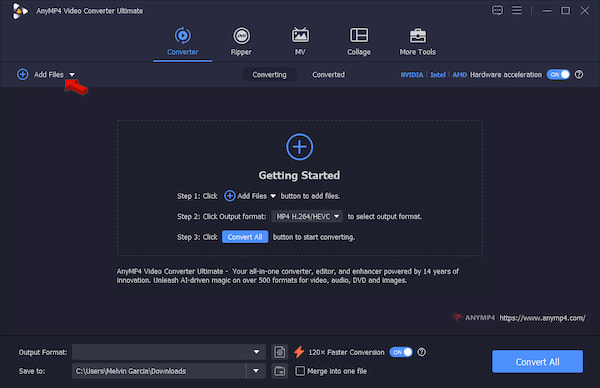
Click +Add Files to load the MPEG source from your computer. If your files are organized into a single folder, use the Add Folder option instead.
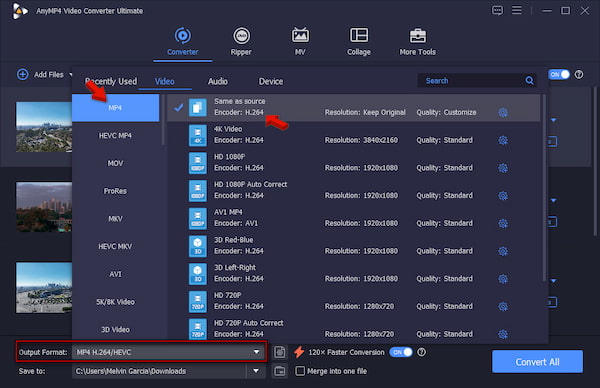
2. Click the Output Format picker, go to the Video category, and select MP4. Select Same as Source as your quality preset to keep the original quality of the source file.
3. Back to the main interface and toggle on Hardware Acceleration to speed up the conversion. Set the output folder, then click Convert All to convert MPEG to MP4 in batches.
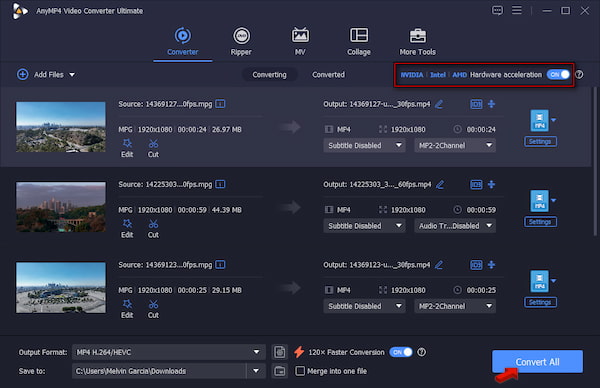
Before the conversion, we used an MPEG player to QA-check all 50 MPEG sources. After testing all 50 source files (1.3 GB total), we batch-converted them using AnyMP4 Video Converter Ultimate. It took only 2 minutes and 24 seconds to complete the conversion.
Does converting a legacy MPEG file to MP4 automatically improve the video quality?
No, it does not automatically improve its video quality because there is no new data. A video file only holds the data it was recorded with. Converting it cannot bring back lost details.
Why does my computer struggle to play older .mpg files but handles 4K MP4s effortlessly?
Computers struggle with older .mpg because they lack hardware acceleration for older video codecs. This forces your processor to decode them slowly using software.
Are there privacy risks involved when using online converters to change video formats?
Yes, using online video converters involves real privacy and security risks. When you upload a video, it stays on a remote server you do not control. Even if a site claims it deletes files after 24 hours, you cannot verify it.
Can smart TVs and modern streaming devices natively read standard MPEG-2 files?
Yes, most smart TVs and modern streaming devices can natively read and decode standard MPEG-2 files. They can also stream through built-in hardware or software decoders.
The MPEG vs MP4 comparison makes a lot more sense when you break down the terminology. MPEG is a family of standards that covers older MPEG-1 and MPEG-2 video files. Meanwhile, MP4 is a more modern container, standardized as MPEG-4 Part 14. When moving personal videos to another format, you need to consider privacy and security. AnyMP4 Video Converter Ultimate runs on your local machine and features hardware-accelerated conversion.
 Posted by Alice Thorne to Glossary
More readings
 The Best MKV to MPEG Converter to Transcode MKV to MPEG Files
When you want to convert MKV to MPEG for DVDs, you can learn more about the most efficient method to transcode the MKV files with ease from the article.
 4 Best Methods to Convert MP4 to MPEG in 2026
Want to convert MP4 to MPEG for DVD burning or legacy equipment? Here are the 4 best methods for high-speed, high-quality conversion.
 Best 5 AVI to MP4 Converter 2026 Without Quality Loss
Looking for the best AVI to MP4 converter? Check this review of AnyMP4, Movavi, VLC, etc. Compare speed, quality, and ease of use to find your perfect tool now.
 Convert MP4 to MOV (Lossless & Fast) - 4 Best Ways [2026]
How to convert MP4 to MOV without quality loss? Follow our guide to convert formats in seconds with desktop or free online tools. Secure, fast, and 4K included.

