
At A Glance:
Are you struggling to play downloaded M4B audiobooks on your Android device, or are you wondering why your MP3s don’t save your listening progress? These factors all come down to the difference between M4B and MP3, which can be solved by answering one thing: what are you trying to listen to? In this article, we will provide a comprehensive guide to MP3 and M4B files, including their key features, main uses, and a detailed comparison of the two formats on key points.
MP3 audio files were built to become the universal standard from modern smartphones to classic car stereos. Since its development, it has long been considered the standard audio format. This was made possible by its superb compression rate and sufficient audio quality.
MP3s are best used if you prioritise compatibility. It is considered the universal standard, and it can be played on most music players. Due to its versatility, MP3 is designed to maximise digital storage space, resulting in highly compressed, small files. However, this comes at the cost of the program’s lower-quality audio.
Although its compatibility is not as broad or as versatile as MP3, M4B may be considered a specialised audio format. It is designed as an audiobook format primarily developed for the Apple Books app. As such, it can support advanced metadata such as chapters and bookmarks. It may be inferior to MP3 in terms of compatibility, but it is best used for modern audiobook consumption.
Unlike the previous format, M4B is more like a specialized audio file. It was originally designed as the audio file used for audiobooks released in the Apple Books app. As such, bookmarks can be added to the audio file, and chapter data is also embedded in it. You can go to a chapter you want to start listening to or leave bookmarks where you stopped listening. M4B may be limited in its uses, but it is good at what it specialises in.
When it comes to audio quality and file size, MP3 and M4B files differ significantly. At the same bitrate, M4B will have greater audio detail and produce smaller files than the older MP3 format. This is where the difference in development lies: M4B is superior to MP3 in terms of storage space and overall listening experience.
M4B was specifically designed as an audiobook format. It supports chapter markers and leaving bookmarks in your audio file. On the other hand, MP3 has only a single indivisible audio stream, making it harder to resume playback unless you use a good media player. Simply put, M4B functions as a physical book in digital audio format. The presence of chapter markers is the major difference between M4B and MP3 for audiobooks.
Although M4B offers modern advantages over MP3 in terms of specialized features and quality, MP3’s unmatched compatibility means it’s playable on almost everything. From a 20-year-old MP3 to smart home devices, the MP3 will play without issue. This is the cost of M4B’s heavy reliance on the Apple ecosystem, which offers poor compatibility with non-Apple devices, even on popular platforms such as Android and Windows.
Besides audio quality, metadata and DRM protection are factors to consider when choosing between MP3 and M4B. On one hand, MP3 uses ID3 tags (limited to artist, album, etc.), while M4B supports richer metadata (even embedded images). When it comes to Digital Rights Management (DRM) presence, many store-bought M4Bs (such as iTunes/Audible derivatives) come with DRM, whereas MP3s are almost entirely DRM-free.
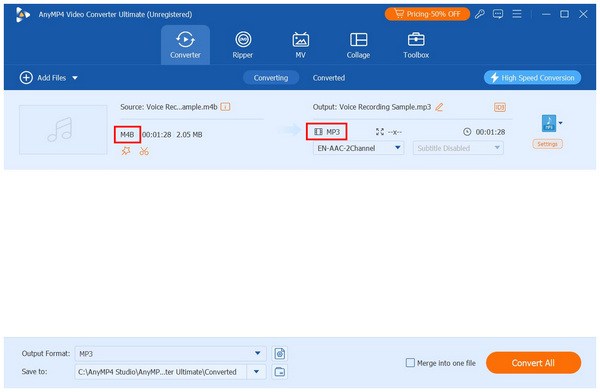
If you’re frustrated by “Format Not Supported” errors when trying to play an M4B audiobook on your car stereo, or if you want to compress bulky MP3 files into a single, manageable audiobook format, you need a robust converter. This is where AnyMP4 Video Converter Ultimate steps in as your digital lifesaver.
Forget clunky online converters that put your privacy at risk or ruin your audio quality. AnyMP4 is a desktop powerhouse built for efficiency. It solves all your audio format headaches through efficient processing, bulk conversions, lossless output quality, and customizable output specs.
To start, AnyMP4 Video Converter Ultimate is GPU-accelerated, making it 120x faster than standard software. This is highly beneficial for handling huge M4B audio files if you wish to convert them to MP3. This highly efficient processing speed also works hand in hand with its bulk conversion support, enabling the tool to convert entire libraries and folders in one go.
If you are concerned with the voice clarity of your converted files, fear not, since AnyMP4 offers a lossless output format. This will enable your spoken-word audio to be crystal-clear and crisp, free from unwanted audio artifacts. For the audiophiles, you can dive deep and customize the bit rate, sample rate, and audio channels, ensuring your newly converted file sounds exactly how you want it on your specific device.
To learn more about the best audio format converted in the market, make sure to download AnyMP4 Video Converter Ultimate for a first experience of what an efficient format conversion feels like.
Secure Download
Secure Download
Can I play M4B files natively on an Android device?
No, you cannot. Android does not natively support M4B files. You need to use third-party music players.
Does the MP3 format support audiobook chapters or bookmarking?
No, it does not. An MP3 file has only a single audio stream. To support chapters and bookmarks, use the M4B format.
Which format offers better audio quality: M4B or MP3?
M4B has superior audio quality. It uses a modern codec and compression options and is developed for the Apple ecosystem. Meanwhile, MP3 has solid audio, but it is far from the best. If you are looking for lossless formats, good alternatives to MP3 include FLAC and WAV.
How can I convert a large M4B audiobook to MP3 without losing audio quality?
You need a reliable format converter. A good option is AnyMP4 Video Converter Ultimate. It supports lossless conversion, even for MP3 files.
Is M4B the same as M4A?
Yes, they are nearly identical. Both are Apple-developed formats, use AAC codec, and are compressed in MPEG-4. They differ only in how they are used: M4B is for audiobooks, and M4A is for music.
With the difference between M4B and MP3 now discussed, all you need to do is choose M4B for audiobooks and MP3 for music or universal device compatibility. Moreover, the walled gardens of Apple’s ecosystem made M4Bs incompatible with platforms outside its exclusive ecosystem. Despite these differences, you don’t have to limit yourself to how you listen to your favorite content. You can easily fix M4B’s limitations using AnyMP4 Video Converter Ultimate to convert them to MP3 or any format of your choice. Download the software using the link below.
Secure Download
Secure Download
 Updated by Alice Thorne to Glossary
More readings
 5 Best MOV to MP3 Converters (2026): Pro Quality & Speed Tested
Extract 320kbps MP3 from MOV files with our top 5 tested tools. Features detailed reviews, batch guides, and expert tips for lossless audio extraction.
 MTS to MP3 – How to Extract the MP3 Audio from AVCHD MTS Easily
When you need to extract some audio files from MTS, you can learn from the 3 most efficient methods to convert MTS to MP3 with ease from the article.
 Everything You Need to Know about MTS and M2TS in 2026
Both MTS and M2TS are file extensions for AVCHD video. This guide will show you the differences between them and how to easily play them on your computer.
 AVI vs MP4: 9 Key Differences + Which Is Better (2026)
AVI vs MP4: Compare file size, quality, codec support, and device compatibility. Discover which format is best for YouTube, video editing, and archiving.
 Add your comments to join the discussion here