
Quick Answer:
The main difference between M4A and MP4 is that M4A is an exclusively audio format, while MP4 is a multimedia container that can hold video, audio, subtitles, and images. For pure music listening on Apple devices, M4A offers exceptional quality. For sharing video content or universal playback across all devices, MP4 is the absolute standard.
When making podcast videos, have you ever encountered M4A music files not playing on some devices, or been confused about whether MP4 is a video or audio format? Knowing the difference between M4A and MP4 can save you from trouble. The key to all this is to choose between professional audio quality and universal video compatibility. Then, let's uncover the mysteries of these formats so you can optimize your multimedia workflow.
M4A (MPEG-4 Audio) is a dedicated container extension based on the ISO/IEC 14496-14 standard, which Apple popularized for high-fidelity digital audio. It usually includes lossy AAC (Advanced Audio Coding) for excellent compression efficiency, or ALAC (Apple Lossless Audio Codec) for audio reproduction with perfect bit-for-bit and master-level sound quality.
Unlike M4A, MP4 (MPEG-4 Part 14) is a multimedia container format rather than a codec. You can think of it as a digital box designed to synchronize multiple data streams, including high-definition video (H.264/HEVC), multi-channel audio tracks, subtitles, and metadata, into a single, unified file structure.
| M4A (.m4a) | VS | MP4 (.mp4) |
| Audio Only | Content Type | Video, Audio, Subtitles, & Metadata |
| AAC, ALAC (Lossless) | Common Codecs | AAC, MP3 (Audio) / H.264, HEVC (Video) |
| lightweight | File Size | Large (include video stream data) |
| Apple, legacy platforms | Compatibility | Universal (across all devices) |
| Podcasts, high-res music archiving, voice notes | Best Used For | YouTube uploads, movies, social media sharing |
A common myth is that M4A natively delivers superior sound fidelity. In reality, if both use the standard AAC codec at identical bitrates, their quality is identical. However, M4A's true edge is its exclusive support for ALAC (Apple Lossless Audio Codec). For audiophiles seeking true studio-grade lossless audio, M4A is the superior choice over the standard compressed MP4 format.
The fundamental structural difference impacts your storage footprint. An MP4 functions as a multimedia container that supports multiple video tracks. Conversely, M4A strips away all visual elements to deliver a pure audio stream. If you only need the audio—like a lecture or background score—extracting audio from video to M4A will significantly reduce storage space, making files much easier to email or sync via cloud storage.
M4A format offers excellent native integration within the Apple ecosystem (Mac, iPhone, iPad). However, playback errors may occasionally occur when playing M4A files on the default Android player or older Windows computers. In contrast, the MP4 format performs excellently in this regard: as a universal media format, MP4 ensures broad compatibility across Windows, Android, smart TVs, and social media platforms such as YouTube and TikTok.
• You should choose M4A for:
Recording high-fidelity podcasts, building your archive of lossless music tracks, capturing voice memos, or conducting specialized audio editing and post-production inside professional suites like Final Cut Pro or Logic Pro.
• You should choose MP4 for:
Optimizing files for uploading to YouTube, sharing engaging music clips with covert art on social media, transferring media across different operating systems, or when sending a file to someone whose device specifications are entirely unknown.
Editorial Disclaimer: The tools recommended below have been rigorously tested and verified by our technical team. We ensure they pass strict malware security scans, operate without data privacy vulnerabilities, and maintain flawless 1:1 conversion fidelity during format processing.
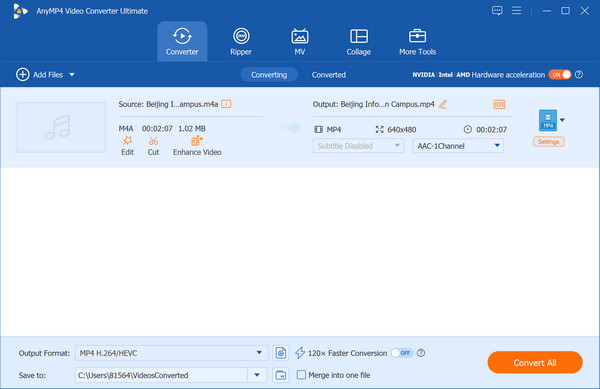
When it comes to format conversion, the biggest risks are losing audio fidelity or encountering out-of-sync tracks. For both beginners and professionals, we highly recommend AnyMP4 Video Converter Ultimate as the go-to desktop solution.
Secure Download
Secure Download
Why it stands out (Features to User Benefits):
Is M4A better audio quality than MP4?
The short answer is no, M4A does not inherently have better audio quality than MP4. In fact, when it comes to the actual audio data, they can be identical.
Can I simply rename an .m4a file extension to .mp4?
Yes, you can technically rename a .m4a file to .mp4 by simply changing the extension at the end of the filename, and it will often work.
Why won't my M4A file play on my Android device?
Android natively supports the standard M4A container, so a playback failure usually boils down to a few specific technical friction points.
How do I extract an M4A audio track from an MP4 video?
M4A and MP4 share the same container family, so you do not need to convert or re-encode the audio. You just need to extract (or demux) the audio stream out of the video container.
Which format should I choose for uploading to YouTube?
For the best results, you can upload your videos to YouTube in MP4 format with the H.264 video codec and AAC-LC audio codec.
The choice between M4A vs. MP4 depends on your project goals: choose M4A if you want to save disk space while preserving high-fidelity audio, but if you need to embed video or are looking for perfect cross-platform compatibility, choose MP4. If you found this guide helpful, feel free to share it with your fellow creators. Leave a comment below if you have any questions about these two formats!
 Updated by Alice Thorne to Glossary
More readings
 How to Convert M4A to MP3 in 2026 (High Quality & Batch)
Learn 5 fast ways to convert M4A to MP3 on Windows/Mac and Online. Video conversion with zero quality loss and custom bitrate (up to 320kbps).
 Simplest Solution | Convert AVI to M4A Online & Offline
How to convert video to audio? Sometimes you may need to convert AVI files to M4A. Don’t worry. We will tell you the simplest solution to convert AVI to M4A.
 5 Ways to Convert MP4 to OGG (2026 Tested: High Quality)
Looking for a fast way to convert MP4 to OGG? Learn how to extract high-quality OGG audio from your MP4 videos using the best tools without quality loss.
 Comparisons of MOV vs MP4 and M4V vs MP4
MOV, M4V, or MP4, which file format you should choose? Here you will learn about what is MOV/M4V/MP4, and the difference between MOV and MP4, and M4V vs MP4.
 Add your comments to join the discussion here