
Quick Summary:
AIFF is ideal for professional Mac-based audio production due to its uncompressed studio-quality sound. Meanwhile, FLAC is better suited for music collectors who want efficient storage without losing fidelity. Both formats deliver identical lossless audio quality. With tools like AnyMP4 Video Converter Ultimate, you can easily convert, manage, and optimize large audio libraries for different devices and platforms.
You've finally upgraded your headphones, your DAC is glowing, and your ears are ready for high-fidelity bliss. But then comes the wall: Should you rip your library to AIFF or FLAC? Should you build your library in AIFF or FLAC? One promises uncompressed purity, while the other delivers lossless compression with smarter storage efficiency. In the AIFF vs FLAC debate, we strip away the marketing jargon to reveal which format actually deserves a spot on your hard drive. Are you truly hearing a difference, or are you simply choosing between massive and optimized files? In 2026, lossless audio is more important than ever as listeners demand studio-grade fidelity across devices without sacrificing space. This guide explores AIFF and FLAC in detail. We will cover technical specifications, real-world device and software compatibility, and practical conversion workflows. By the end, you'll know which format truly deserves space in your digital music collection.
AIFF, or Audio Interchange File Format, is a high-quality audio format developed by Apple based on the Interchange File Format (IFF). It stores audio in uncompressed LPCM, preserving every detail of the original recording without sacrificing quality. This format is the studio standard among macOS users and Logic Pro professionals. Some of which are music production, recording, editing, and mastering.
FLAC, short for Free Lossless Audio Codec, is an open-source audio format created by the Xiph.Org Foundation. It uses lossless compression to reduce file size while preserving the original audio quality. It works similarly to a ZIP archive for music, reducing storage requirements without sacrificing sound quality.
Why are FLAC files so big? Discover the surprising reason behind their massive size and what makes them different from regular audio formats.
| Feature | AIFF | FLAC |
|---|---|---|
| Bit Depth | Up to 32-bit | Up to 32-bit |
| Sample Rates | Up to 192 kHz | Up to 192 kHz or higher |
| Compression Ratio | 1:1 no reduction in file size | 2:1 compression ratio |
| Metadata Support | ID3v2 tags and XMP | Vorbis Comments |
When people compare FLAC vs AIFF, they think AIFF sounds better because it is not compressed. But that is not true. Both formats can sound exactly the same because FLAC is lossless, which means it does not remove any audio data.
The biggest factor in the AIFF vs FLAC file size comparison is storage efficiency. AIFF stores raw, uncompressed audio, which results in larger files.
In contrast, FLAC reduces file size by around 50% without losing any audio information. This makes FLAC far more practical for smartphones, portable players, and cloud backups.
Metadata management is another major point in the AIFF vs FLAC comparison. FLAC uses Vorbis Comments, which support extensive tagging options. It includes album art, lyrics, composer credits, genres, and custom library fields.
On the other hand, AIFF supports metadata through chunk-based structures. These are useful in professional production environments for storing engineering and session-related information.
When deciding which audio format is better, AIFF or FLAC, compatibility is an important factor. Apple apps support AIFF, including Music app, iTunes, and Logic Pro. On the other hand, FLAC is more widely used on Android, Windows, hi-fi players, and media servers. Professional DJ systems such as Pioneer CDJs also favor AIFF because uncompressed files can reduce loading delays during live performances.
Choosing between the AIFF format vs FLAC is crucial when transitioning from a Mac-based studio to a Windows-based listening room. Others convert large AIFF collections into FLAC to save 1TB of storage space without sacrificing audio quality.
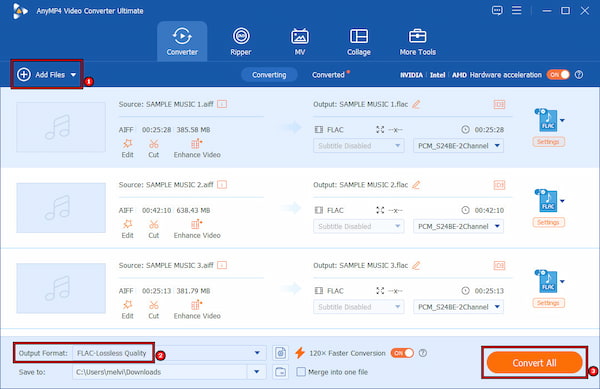
AnyMP4 Video Converter Ultimate is an all-around media conversion software compatible with Windows 11/10/8 and macOS 10.12-15. It can convert AIFF to FLAC or vice versa while preserving original audio quality. It supports lossless conversion, ensuring no audio data is lost during processing. It also features hardware acceleration technology capable of delivering up to 120× faster conversion speeds. This feature makes the batch conversion of entire music libraries far more efficient. Beyond format conversion, you can also customize output settings, edit metadata information, and manage large audio collections.
Secure Download
Secure Download
What to Expect with AnyMP4 Video Converter Ultimate:
Does converting FLAC back to AIFF regain quality?
No, converting FLAC back to AIFF does not regain quality because FLAC is already a lossless format. No audio data is lost during compression, so that the AIFF output will sound identical to the original FLAC source.
Will AIFF work on my Android phone?
AIFF is not supported by most Android phones by default. It may still work with certain music apps, but it is not always reliable. AIFF is not ideal for mobile use because they are large and support is not consistent.
Is WAV better than AIFF?
WAV and AIFF have the same sound quality because they are uncompressed audio formats. The difference is mostly about compatibility. AIFF is more commonly used on Apple devices, while WAV is more widely supported on Windows and many other audio systems.
Why does my car stereo see AIFF but not FLAC?
It is because many built-in car systems only support older, uncompressed formats. AIFF is easier to decode, so it works more reliably without extra software support. FLAC requires built-in decoding, which most car stereos do not support.
When choosing between AIFF vs FLAC it really depends on what you need. If you use a Mac and work in music production, AIFF is a good choice. But if you want to keep a large music library for the long run, FLAC is usually better.
Don’t let file limits affect how you enjoy your music. Whether you are saving songs for long-term use or preparing music for a set, choose the format that best fits your needs without sacrificing quality. If you want more control over your audio files and easy conversion, you can use AnyMP4 Video Converter Ultimate.
Secure Download
Secure Download
 Updated by Alice Thorne to Glossary
More readings
 FLAC Vs. MP3 Vs. WAV: What Are Differences
Discover the major differences among FLAC, WAV, and MP3, and everything in between to know their pros and cons and what they should be used for.
 H.265 vs. H.264: A Simple Guide to Help You Pick the Right
Confused by H.265 vs. H.264? Read the post to learn the differences between these two video codecs and which one to pick for your project.
 M4A Vs. MP3: Which Audio File Format Reigns Supreme
M4A and MP3 both serve as audio file formats. This informative post will provide a comprehensive comparison between M4A Vs. MP3. Check them out here!
 The Advantages and Disadvantages about AVCHD and MP4
Do you know AVCHD and MP4 these two formats? The article will introduce the difference between them. Keep reading to understand more details.
 Add your comments to join the discussion here