
Travel vlogs are a popular theme on YouTube and other social media platforms. Sometimes words and photos might not be enough to capture the beauty of a landscape fully. By filming and creating travel vlogs, the real travel experience can be better recorded. To show the appeal of the video and attract the audience to watch it, this article will guide you through the three phases of making a travel vlog: planning and pre-production, the recording process, and post-production and publishing, so as to help you create a popular travel vlog. If this is what you are looking for, then keep reading.
To create a standout travel vlog, you first need to have a vlogger's mindset—transitioning from a tourist with a camera to a storyteller with a plan. Then, laying a solid foundation in phase 1 is crucial to avoid ending up with a pile of footage that can't be edited.
Before shooting, you should first determine your subject matter and clearly define your niche and style. The vlog styles of different content are significantly different, and focusing on specific fields will help algorithms find your target audience more quickly and accurately. You can read articles about vlog ideas to gain more inspiration.
A video blogger needs three basic and reliable pieces of equipment to deal with videos: the camera, audio gear, and stabilization setup.
• Camera
When choosing a travel vlogging camera, the best option depends on whether you prioritize ultra-smooth motion, professional image quality, or rugged durability.
For smooth motion & portability:
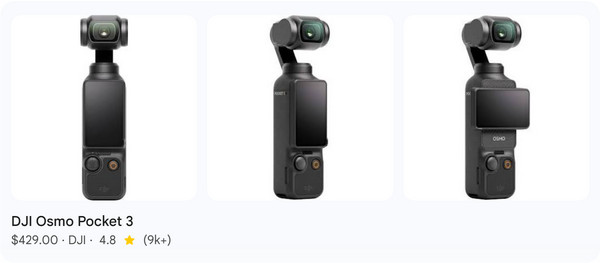
For smooth motion and portability, consider the DJI Osmo Pocket 3, widely regarded as the top choice for travel vlogging. It features a built-in 3-axis mechanical gimbal that delivers cinematic stabilization for steady walking shots.
For professional image quality:
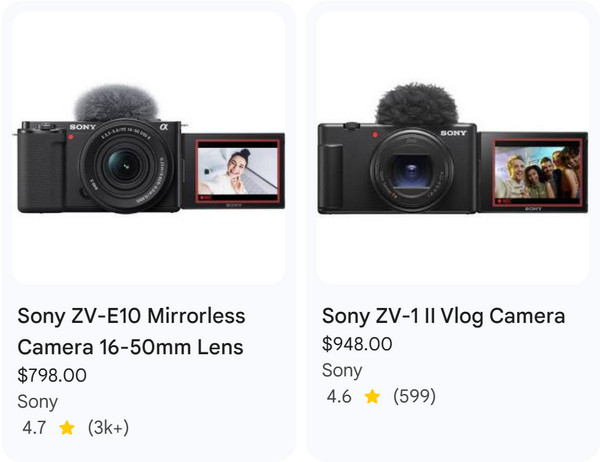
For more professional image quality or those who want to use different lenses for both photography and videography, both the Sony ZV-E10 and Sony ZV-1 II are excellent choices.
For rugged durability in adventures:
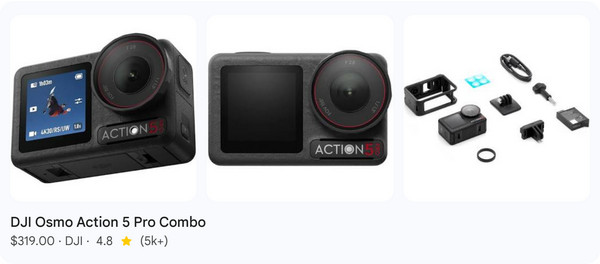
For travelers who are hiking, swimming, or skiing, the DJI Osmo Action 5 Pro is the most durable choice: freeze-proof, highly impact-resistant, and with class-leading battery life.
• Audio
If the picture quality taken by your camera is not high, it is strongly recommended that you add a dedicated wireless microphone to ensure that your voice is clearly audible in wind noise and urban traffic.
In the second phase of making the travel vlog, to establish E-E-A-T (Experience, Expertise, Authoritativeness, and Trustworthiness), you need to move beyond just filming what you see and start filming how it feels.
Professional travel vlogs aren't just one long shot. They are built using three types of footage:
Tip: Always record B-roll for at least 5–10 seconds per shot to give yourself room in the edit.
Audio is the unsung hero of travel vlogs. Viewers may forgive blurry footage, but if the audio is also noisy and low-quality, they will usually turn off the video instantly.
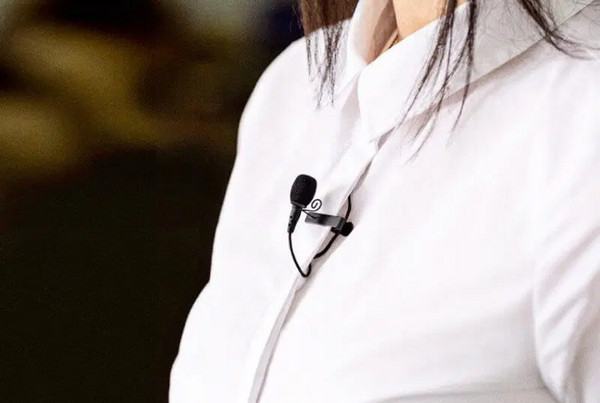
So, to get professional sound, you need a microphone that isolates your voice from surrounding noise. And it is best to choose a clip-on design for quick and easy use.
Phase 3 of creating a travel vlog is transforming your raw footage into polished, searchable videos. Most social media platforms, such as YouTube, prioritize how long people watch, likes, and comments. Therefore, the post-production of your travel vlog is also important.
Whether you are a professional or an average person, you will need a video editor to make your travel vlogs after the trip. AnyMP4 Video Converter Ultimate is the best travel vlog editor. Once you collect all the photos, videos, and other files during the travel, you can easily combine them into an excellent travel vlog with AnyMP4. It allows you to make a fantastic video vlog with photos, video, audio, and other elements.
1. Download and install it on your Windows/Mac computer. After installation, it will launch automatically.
Secure Download
Secure Download
2. Go to the MV tab and click the Add button to import your travel photos and video clips into the program.
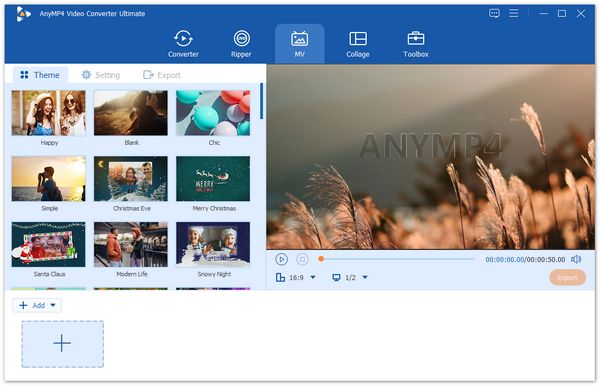
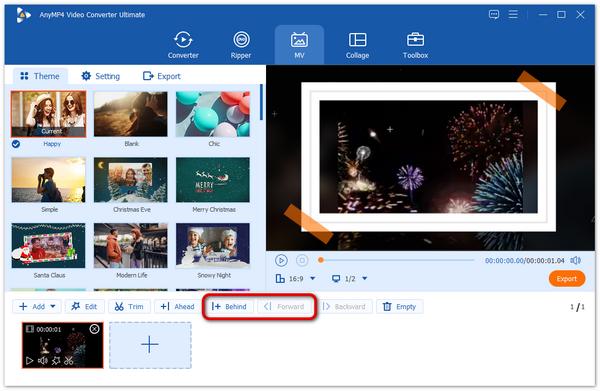
After uploading your files, you can click the Behind or Forward button or directly drag or drop to rearrange the order of the videos and photos.
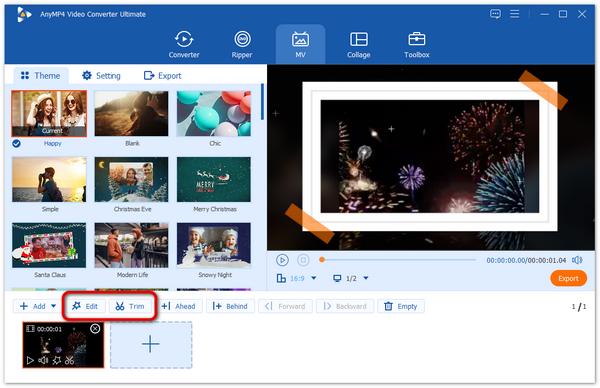
If you need to trim or edit your video clips, select the video you want to trim and click the Trim or Edit button to make adjustments.
3. Then, you can go to the Theme section to choose a theme for your travel vlog.
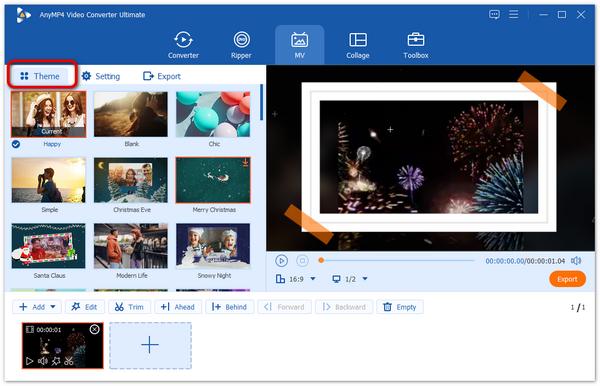
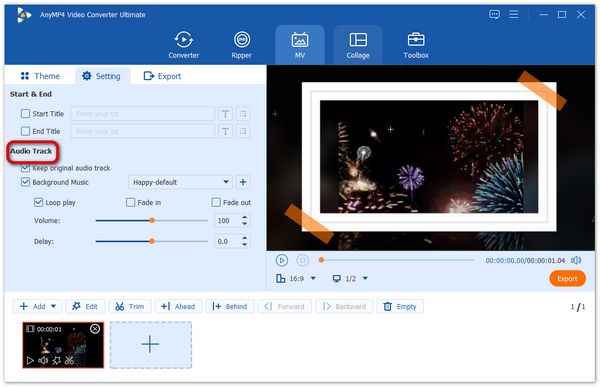
Besides, you can head to the Setting section > Audio Track to add the default music of the theme, or add new background music.
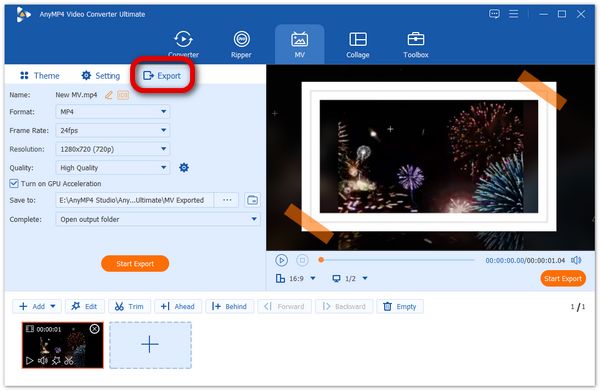
Go to the Export section. Here you can configure the output format, resolution, quality, and other settings for your video file. Finally, click Start Export to produce your travel vlog.
Pacing is the heartbeat of your vlog. If it is too slow, people click away; if it's too fast, they get overwhelmed. Therefore, you should choose appropriate background music and adjust the editing rhythm according to the music beat.
To get your travel vlog discovered on YouTube and other platforms, you need to 'package' the video so the algorithm knows which users to show it to.
1. Titles: Place primary keywords at the beginning of the title and keep the title length under 60 characters to avoid being truncated.
2. Thumbnails: Use the image with high-contrast colors and avoid clutter caused by excessive text on it.
3. Tags & Descriptions: Summarize the video content using primary keywords and tags (both broad and niche).
How long should a travel vlog be?
The length of a travel vlog depends entirely on where you're posting it and how much story you have to tell. The industry standard length for YouTube (long-form videos) is typically 8–12 minutes, and short-form videos made for platforms (TikTok, Reels, Shorts) are usually under 60 seconds.
How do travel vloggers make money?
Successful creators actually run diversified media companies with five primary revenue streams: brand sponsorships & partnerships, affiliate marketing, ad revenue, sales of digital & physical products, and certain specialized services.
What are the essential travel vlog editing tips?
To keep viewers from clicking away, you need to prioritize pacing and storytelling over fancy effects. The right video editing software is also important.
The travel vlog is a popular way to share your travels and experience to your friends, family, and other audiences on social media. This article introduces the points that should be paid attention to in making a travel vlog in three stages: preparation, production, and post-production, offering a comprehensive tutorial for beginners. If you want to make a travel vlog for your journey, you can get everything you need to know about it in the article. Feel free to leave a message in the comment section if you have any other questions.
 Updated by Mark Cristobal to Edit Video
More readings
 This article will show you how to make a good tutorial video by recording with your computer with ease. You can get useful information here.
 An Easy Way to Make a Reaction Video – Tutorial for Beginners
Reaction videos are fun to watch. If you want to make your first reaction video for YouTube, TikTok, etc., here're the easy steps to create a reaction video.
 3 Methods to Make Time-Lapse Videos with Stunning Effects
When you need to share some stunning videos with TikTok or Facebook, here are 3 methods to make time-lapse videos.
 How to Make a Music Video [Beginners Guide]
Have many video clips and pictures saved on your computer or mobile phone? Why not turn them worthwhile by making a music video. Find out how here!
 Add your comments to join the discussion here