HLS Stream Recorder Review 2026: Free Extension vs Desktop
Quick Answer:
- Yes. A free HLS Stream Recorder still saves most unprotected streams. Stream Recorder - HLS & m3u8 Video Downloader 2.2.9 reads the .m3u8 playlist. It writes one MP4 without re-encoding. About 1,000,000 users and 4.3 stars sit behind that claim. Three limits decide your job. It cannot open a DRM stream. It has no scheduler, and it writes MP4 only.
- Best for: One unprotected clip from a free stream.
- Cannot do: Paid platforms, timed recordings, 4K capture.
- Fallback: A desktop recorder for long, scheduled or protected jobs.
When the stream plays, the Save video button does nothing. Then, you right-click the player, only to find a greyed-out menu. So you try a generic video downloader, but end up with a useless 40 KB text file, a master playlist containing hundreds of tiny video chunks instead of a single movie. If you've ever met such a situation, you already know that ordinary downloaders constantly trip on modern video delivery.
This comprehensive Stream Recorder - HLS & m3u8 Video Downloader review answers such a question: Can a free browser extension actually save these protected streams?
To find out, we put the tool to the test and give a reliable review test result. Keep reading to get the answer.
How We Tested Stream Recorder - HLS & m3u8 Video Downloader
We installed Stream Recorder - HLS & m3u8 Video Downloader 2.2.9 in Chrome and Edge. We opened two public HLS test streams and pressed play. Then we opened the toolbar panel and wrote down what it listed.
We switched to Capture mode and recorded both streams again. That gave us both routes on one source.
Reading took longer than testing. We went through the terms page and about 2,800 public ratings. The complaints repeat, so the pattern was easy to spot.
One limit up front. We have no capture card and no bitrate meter. So we quote no frame rates of our own. Every quality claim below comes from the listing or from the player itself.
We scored five things. They are first-save speed, HLS coverage, DRM limits, output choices and beginner access. Each score appears in the verdict. Ignore the ones that do not matter to you.
What Is an HLS Stream Recorder, and Why Does Save Video Fail?
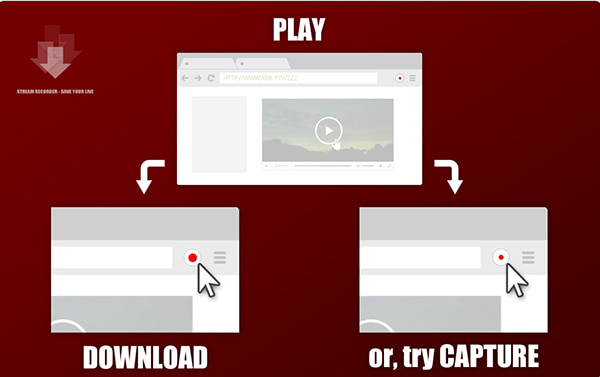
HLS means HTTP Live Streaming. Apple built it for the iPhone in 2009. Most live TV, sports and webinar platforms still use it.
An HLS stream is not one file. It is a text playlist with an .m3u8 extension. That playlist points to hundreds of tiny .ts segments. Each one runs a few seconds. Your player fetches them in order and plays them as one video. Our M3U8 explainer covers the format in more depth.
A normal downloader looks for one video file. It finds a playlist instead. So it saves the text, or nothing at all. That is the 40 KB file in your Downloads folder.
A recorder handles this in one of two ways. It reads the playlist and downloads every segment. Or it records the playback on screen.
The first route keeps what the stream sent. The second rebuilds it from pixels. That gap drives every verdict below.
Stream Recorder - HLS & m3u8 Downloader: Specs, Version 2.2.9 and the ~1M-User Reality Check
| Publisher |
loadmonkey |
| Website |
hlsloader.com |
| Version |
2.2.9, updated August 2025 |
| Users |
about 1,000,000 |
| Rating |
4.3 from about 2,800 ratings |
| Price |
free |
| Platforms |
Chrome and Edge |
| Output |
MP4, no re-encoding |
These numbers tell a much bigger story than the 4.3-star rating. Build 2.2.9 hasn't seen an update since August 2025, yet it's still alive on hlsloader.com, a solid sign the developer didn't abandon ship when Chrome tightened its extension rules. Sifting through its ~2,800 user reviews didn't take long, and the complaints follow a very predictable pattern. To their credit, the developers are surprisingly upfront about its limits: their terms page openly warns that the tool won't work on every site (even if they don't name names). It's rare to see that level of honesty on a product page, and our hands-on testing confirmed every bit of it.
This stream recorder HLS M3U8 downloader review starts with numbers on purpose. They set the expectation. A free tool with a million users works most days. Not every day.
Stream Recorder - HLS & m3u8 Video Downloader: Normal Mode vs Capture Mode
The extension runs inside the tab. It has no desktop app, no background service and no account. Two modes do all the work.
Normal mode reads the page's own stream requests. Capture mode records what you see and hear. We cover that split next.
Normal mode
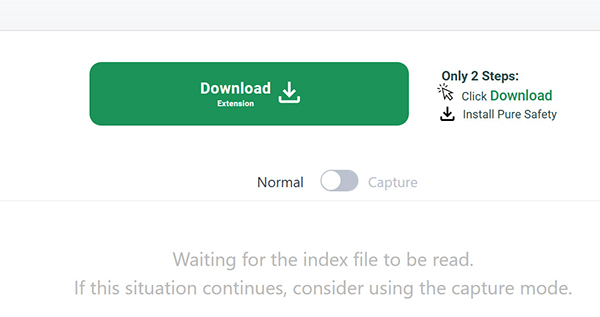
Normal mode is the fast path. The extension spots the playlist, downloads the segments and joins them. Output keeps the source bitrate and resolution.
That is how you record HLS stream without re-encoding. The file matches the source, frame for frame.
Capture mode
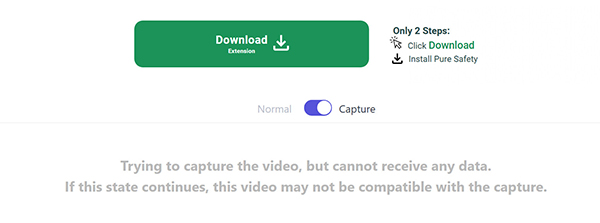
Capture mode is another alternative to save M3U8 files. It records the video clips in real time while the extension is playing the stream inside your tab. This means hidden scripts or dynamic security tokens won't stand in your way anymore. But the limitation is obvious. If you have a 90-minute M3U8 file, you will wait 90 minutes to record the full video while keeping the browser tab open.
Our rule is simple. Try the button first. If it stays grey, switch to Capture and start again.
For more Chrome recorders to save video or music, check it here.
Capture mode has a cost. If your laptop drops a frame, the file keeps the drop. Normal mode never has that problem. Most people end up in Capture anyway. It is the simple way to record online live stream on PC. People also search how to record M3U8 live stream. The answer: play it once and record it once.
Why Does It Fail on DRM Streams?
Three failures cover most complaints. Only one is the extension's fault.
Encrypted streams. Netflix, Disney+ and most paywalled live TV use Widevine or AES-128. Each segment is locked with a key the browser holds. No extension can read it. This is by design, and no setting changes it.
So, can you record DRM protected HLS stream? No. Not with an extension and not with a downloader. A desktop recorder can capture what plays on screen. It never decrypts anything.
A grey button. The tab has no readable HLS request. The stream may load late, or sit inside a cross-origin frame. Refresh, press play, then try again.
Pixelated or split output. Long streams love to break apart before they finish. You might end up with sound in one file and picture in another. Some users even saw extra files they never asked for. One person said it stops every 11 minutes. Quick clips work fine. The app just hates long streams.
Here is the stream recorder extension not working fix, in order. Refresh the tab. Press play. Force Capture mode. If all three fail, read Part 5.
| Symptom |
Cause |
Fix |
| Grey button |
No HLS request found |
Refresh and press play |
| Empty file |
Segments blocked |
Switch to Capture |
| Split audio and video |
Separate tracks |
Merge or capture |
| Pixelated frames |
Dropped frames |
Capture with less load |
| Stops every few minutes |
Long stream |
Restart or go desktop |
When the Extension Fails: Try the Alternatives
If you tried every fix, nothing worked, and the button is still grey, or the video came out blank, here is what to do next.
VLC Media Player. Just paste the .m3u8 web link right into VLC under Open Network Stream. VLC finds all the video pieces that your browser hid away. Then, you hit record as the video plays. You do have to let the whole clip run, and VLC saves it as a fresh file. We keep VLC on our PC just for this job. It has saved way more videos for us than any browser tool. Take a look at our M3U8 player guide to see the exact buttons to click.
yt-dlp with FFmpeg. One command grabs the whole stream. It handles live feeds, retries and batch jobs. It needs a terminal and a working FFmpeg install. If you record online live stream on PC every week, the setup pays for itself.
A desktop recorder. AnyMP4 Screen Recorder is the only solution to scheduled capture the M3U8 file. It is also the only method for annotations by adding drawing, shape, whiteboard, shapes, etc. Need a webcam overlay or 4K at 60 FPS? Same answer. It records the screen, so a DRM stream becomes pixels.
The trade is honest. VLC and yt-dlp are free and ugly. A desktop recorder costs money and works every time.
|
Reads M3U8 |
DRM streams |
Re-encodes |
Live stream |
Scheduler |
Annotation |
Output |
Price |
Skill level |
Best for |
| Stream Recorder |
Yes, two modes |
|
|
Capture only |
|
|
MP4 |
Free |
Beginner |
One-off browser stream grabs |
| HLS Downloader |
|
|
Download only |
Limited |
|
|
MP4, TS |
Free |
Beginner |
Simple m3u8 downloads |
| yt-dlp + FFmpeg |
|
|
Optional |
|
Scripts |
|
Anything |
Free |
Advanced |
Weekly batch archiving |
| VLC Media Player |
(Network Stream) |
|
(Transcode) |
|
|
|
MP4, TS, MKV |
Free |
Intermediate |
One file, no terminal fallback |
| AnyMP4 Screen Recorder |
Records playback |
Records what plays |
|
|
|
|
MP4, MOV, AVI, MKV |
$12.45 for month license |
Beginner |
Scheduled or annotated recording |
Our pick depends on the job, not on the score. This table also settles most HLS downloader vs recorder arguments. Three of the four record HLS stream without re-encoding. The desktop app is the exception.
A downloader grabs the actual video file. A recorder just films whatever plays on your screen. The downloader keeps the full picture quality, but it needs an open link to work. If a video uses DRM locks or the link expires, the downloader fails. A recorder is different. If you can watch it on your monitor, you can save it. It takes a fresh picture of every single frame as it plays.
That is the real split between a downloader and a recorder. The website picks the tool for you, not the software.
How to Record an HLS Stream in 5 Steps
These steps cover how to record HLS stream on a plain page. No token, no DRM. If you searched for record M3U8 stream, this is the short route.
1. Install the Extension
Open your Chrome Web Store and search for Stream Recorder - HLS & m3u8 Video Downloader. Click Add to Chrome. Pin the icon to the toolbar.
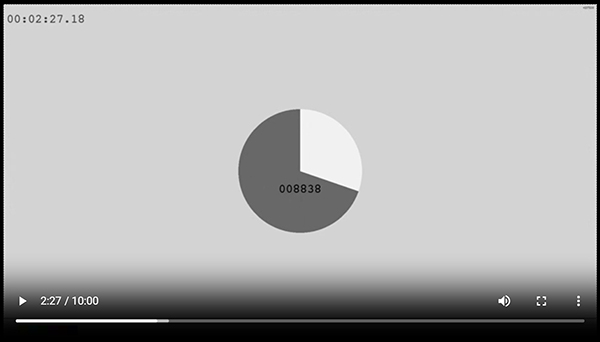
2. Open the Stream and Press Play
The panel stays empty until playback starts. We sat on a paused page for two minutes before working that out.
3. Click the Toolbar Icon
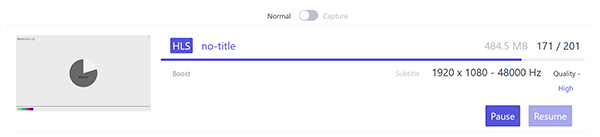
Click the icon of Stream Recorder - HLS & m3u8 Video Downloader at your browser chrome extension to enable it. Click the A number appears on the icon. One means one stream. Four or five means the page runs ads or previews that also use HLS.
Note
Pick the entry with the highest resolution. The first row is often a 240p preview.
4. Pick the Largest Stream and Hit Save
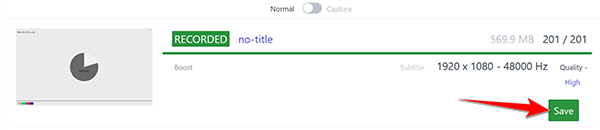
The Save button should turn green once the scanning analysis process is done, and you just need to click the button to start getting the M3U8 playlist into a separate video files. If it stays grey, the playlist sits behind a script. Jump to Capture mode to record the M3U8 file.
Note
Do not close the tab, otherwise the downloading process will be stopped. In our tes, we lost a 40 minute file that way. Keep it in the foreground until the counter stops.
5. Find the MP4 in Downloads Locally
Once the save process is complete, you can find the separate video files that retain the source name and include a date stamp.
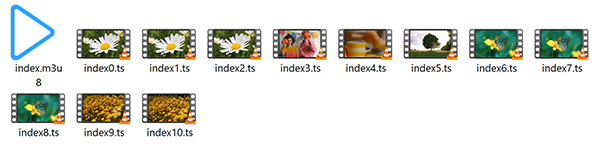
The same 5 steps record M3U8 on Windows 11. That also covers how to record HLS stream on a normal site. No terminal and no account.
One warning. Do not start a second download in the same tab. The extension loses the first playlist and starts over.
If the file plays but the sound is gone, the stream used two tracks. Merge them. Or record the playback instead.
Stream Recorder - HLS & m3u8 Video Downloader: Pros and Cons
Pros
- Free for every feature on the list. No account and no watermark.
- Remux keeps the source quality intact, because nothing is re-encoded.
- One click on plain sites, with no settings to learn.
- Two modes cover players that hide the playlist behind a script.
- About 1,000,000 users and 4.3 stars.
Cons
- Browser only, on Chrome and Edge.
- No DRM support, and no way around it.
- No scheduler and no annotation tools.
- MP4 output only, with no format choice.
- Long streams can stop and need a restart.
Who should use it: Casual viewers and archivists. Anyone who needs one clip from a free stream. For that job it is the best HLS recorder for PC. It does that job well.
Who should skip it: Broadcast teams, teachers who record weekly, and anyone capturing a paid platform. They need a timer, a pen and a file that takes two hours.
FAQs of Stream Recorder - HLS & m3u8 Video Downloader
What is an HLS stream recorder?
An HLS stream recorder saves video sent as HLS. It reads the .m3u8 playlist or captures the playback, then it convert M3U8 to MP4.
How do you record an M3U8 stream on PC?
Install the extension, play the video and click the toolbar icon. Pick the largest row and hit Download. The file lands in your Downloads folder. That is how to record M3U8 stream on PC without a terminal.
Can you record a DRM protected HLS stream?
No. Each segment is encrypted with a key the browser holds. An extension never sees that key, and no setting changes it. People keep asking can you record DRM protected HLS stream. A newer build will not help. A desktop recorder can film the screen instead.
Can you record M3U8 on Windows 11?
Yes. Run Chrome or Edge on Windows 11 and follow the six steps above. Edge needs the same site access toggle before the icon shows a stream.
Why does the extension show no stream?
Usually, this happens for two simple reasons. First, the video is not playing yet. When a video is paused, the tool sees nothing to grab. Second, the video sits inside a hidden frame that the tool cannot read. To fix this, start the video and refresh your web page. If the tool icon is still blank, switch over to Capture mode.
Conclusion
Stream Recorder - HLS & m3u8 Video Downloader works to save M3U8 file, but it has clear limits. It is great if you just want to grab a basic video with one click. It keeps the full picture quality and skips messy re-encoding. Still, that is about all it can do.
A desktop recorder is a much better pick for bigger jobs. You will need one for paid platforms, timed captures, or live streams that run over two hours. AnyMP4 Screen Recorder handles all of that smoothly at crisp 4K and 60 FPS. It also gives you handy on-screen drawing tools and leaves zero watermarks on your files. Grab the free download to save your stream as video or audio without the hassle.




 Add your comments to join the discussion here