
Quick Summary:
XviD is a legacy, open-source video codec based on the 2001 MPEG-4 Part 2 standard; H.264 is the universal modern standard based on the advanced MPEG-4 Part 10 specification. Changing a (XviD) file extension to MP4 manually will corrupt playback. To modernize legacy files, use a tool like AnyMP4 Video Converter Ultimate to transcode them to H.264 safely.
If you found an old hard drive from 2008, it is likely filled with legacy AVI files running XviD. But if you want to upload to YouTube, H.264 is the king. In the battle of Old School Efficiency versus Modern Mastery, does the veteran XviD still have a place in your workflow, or is it time to hit delete on the past? This XviD vs. H.264 comparison will explore their differences from various aspects, such as quality, file size, and device compatibility. We will also show you exactly how to convert your aging video files into formats that play smoothly. Then, let's get started!

| Use Case | Recommended Codec | Why |
|---|---|---|
| Streaming to Web | H.264 | Native browser support. |
| Old DVD Player (USB) | XviD | Only formats that many older chips recognize. |
| Smartphone Playback | H.264 | Battery efficiency (hardware decoding). |
| Retro Gaming Mods | XviD | Low memory footprint for older CPUs. |
For nearly a decade, XviD has been the king of the internet file-sharing ecosystem, and its great success is mainly due to two advantages:
Honest caveat: In the early days, DivX and XviD were widely used to encode many older video files. So, nowadays, people need professional DivX players to watch them.
H.264 introduced highly sophisticated algorithms that changed everything. And it represents a massive generational leap, designated as MPEG-4 Part 10.
By the late 2000s, H.264 achieved a complete victory, which was mainly due to two decisive factors:
Actionable Tip: If you are archiving video for the next 20 years, choose H.264. While XviD decoders exist, H.264 is baked into the silicon of almost every chip on the planet.
Compared to H.264, XviD relies more on older compression logic, whereas H.264 uses advanced prediction algorithms designed specifically for modern high-definition streaming and XviD playback.
A detailed comparison of other aspects is as follows.
| XviD (MPEG-4 Part 2) | VS | H.264 (MPEG-4 Part 10) |
| Requires high bitrates (e.g., 2000+ Kbps for SD) to prevent heavy distortion. | Bitrate | Retains excellent clarity at roughly half the target bitrate of XviD. |
| Legacy hardware like 2000s-era DVD players, old car stereos, and retro consoles (PS2/PSP). | Compatibility | Modern platforms are available on all modern web browsers, smartphones, Smart TVs, and streaming boxes. |
| Low (Requires high bitrates for decent quality). | Compression Efficiency | High (Cuts file sizes roughly in half vs. XviD). |
| Prone to macroblocking and pixelation. | Video Quality | Smooth gradients, detail retention via deblocking filters. |
| Extremely fast on legacy/weak CPUs. | Encoding Speed | Lightning-fast on modern hardware using dedicated GPU encoding. |
| Only supports standard definition (480p) and cannot play modern HD videos. | Resolution Support | Native support for 720p, Full HD (1080p), and 4K UHD resolutions. |
At the same bitrate, H.264 retains roughly 40-50% more detail than XviD.
XviD struggles with 'blocking' in dark scenes; H.264 uses deblocking filters to keep things smooth.
XviD (Legacy hardware):
XviD is compatible with hardware manufactured between 2002 and 2010, such as vintage car head units, 2005-era DVD players, and legacy game consoles (PS2/PSP).
H.264 (Modern platforms):
H.264 is compatible with modern platforms such as YouTube, Twitch, and Netflix. While modern web-based video ecosystems completely ignore XviD, streaming XviD files over the web requires real-time server conversion, which is extremely inefficient.
H.264 is roughly twice as efficient as XviD, which means it can achieve the same visual presentation at roughly half the bitrate.
The video quality of H.264 is undoubtedly superior to that of XviD. XviD is highly prone to blocking in dark scenes, whereas H.264 uses a deblocking filter to avoid this issue and preserve video quality.
It depends on your system hardware.
On older processors lacking modern graphics capabilities, XviD encodes extremely quickly. On any modern computer, however, H.264 is significantly faster than XviD.
XviD is designed specifically for standard-definition (SD) video, with an optimal resolution of 480p. H.264, on the other hand, natively supports high-definition (1080p Full HD) and 4K Ultra HD resolutions.
Actionable Tip: Use a tool like Handbrake or FFmpeg to batch-convert old XviD libraries to H.264 (MP4) if you want to stream them to your modern Smart TV or Plex server without constant 'transcoding' lag.
AnyMP4 Video Converter Ultimate is a powerful and reliable desktop software designed to handle video conversions. Available for Windows 11/10/8 and macOS (10.12 to 15), this software easily handles the processing of older compression standards. It uses advanced hardware acceleration to speed up processing times and lets you convert XviD files into highly compatible formats such as H.264 MP4, MKV, MOV, or standard AVI. Beyond conversion, it features built-in editing tools to crop, rotate, apply filters, manage subtitles, and an integrated Media Metadata Editor to edit file details.
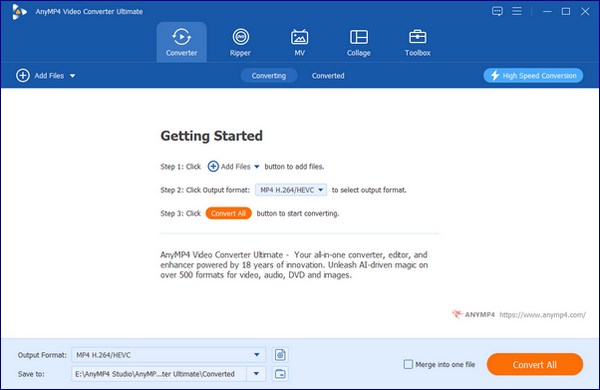
1. Download and install AnyMP4 Video Converter Ultimate. Once completed, it will launch automatically.
Secure Download
Secure Download
Click Add Files in the upper-left corner or drag and drop to load your XviD files into the program.
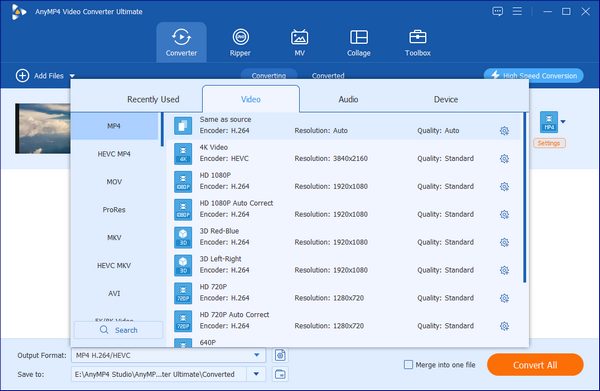
2. Click the Output Format option, go to the Video tab, and choose MP4 (which utilizes the H.264 encoder by default).
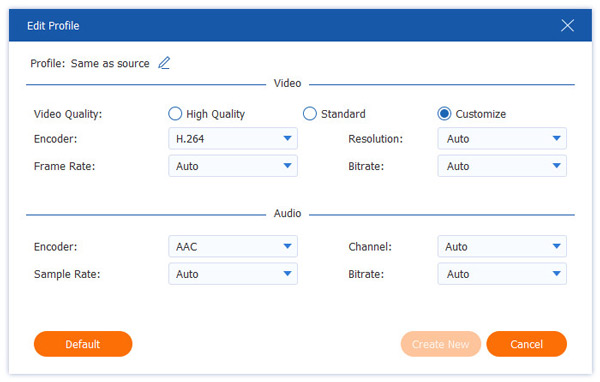
3. Click the gear-shaped Output Format Settings button to customize parameters such as quality, frame rate, resolution, bitrate, etc. If your old XviD video needs adjustments, use the built-in editing tools to rotate, crop, modify effects/filters, and more.
Set the destination folder for your converted file, and click Convert All to begin the conversion.
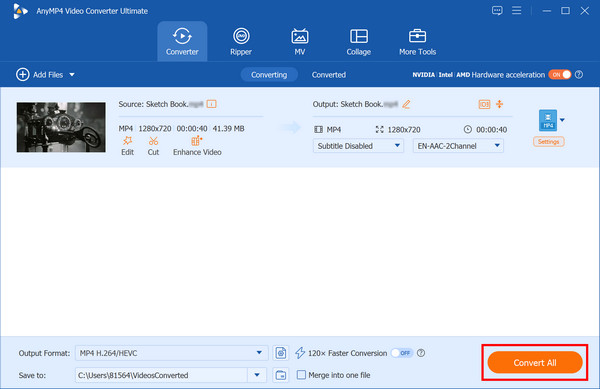
With a professional video conversion tool like AnyMP4 Video Converter Ultimate, converting outdated 2000s format XviD to the more widely compatible H.264 format is safe and fast.
Can I just rename a .AVI (XviD) file to .MP4?
The short answer is no. While it might change the icon on your desktop, it does not change the file's internal structure.
Is XviD dead in 2026?
XviD is objectively obsolete. However, in the field of data preservation, a codec never truly 'dies' as long as the files exist.
Does H.264 support 4K?
Yes, H.264 (AVC) does support 4K resolution, but it is rarely used for this purpose because it is incredibly inefficient at handling it.
The verdict of the XviD vs. H.264 is clear: H.264 is the undisputed champion of the modern era. Not only does it offer better video quality and smaller file sizes, but it also boasts excellent compatibility. XviD remains a fascinating chapter in the history of the internet: a tool that democratized video sharing. However, in the age of HD streaming and mobile-first, it has become a relic of a lower-bitrate era.
Secure Download
Secure Download
 Updated by Alice Thorne to Glossary
More readings
 The Advantages and Disadvantages about AVCHD and MP4
Do you know AVCHD and MP4 these two formats? The article will introduce the difference between them. Keep reading to understand more details.
 H.265 vs. H.264: A Simple Guide to Help You Pick the Right
Confused by H.265 vs. H.264? Read the post to learn the differences between these two video codecs and which one to pick for your project.
 M4A Vs. MP3: Which Audio File Format Reigns Supreme
M4A and MP3 both serve as audio file formats. This informative post will provide a comprehensive comparison between M4A Vs. MP3. Check them out here!
 Everything You Need to Know about MTS and M2TS in 2026
Both MTS and M2TS are file extensions for AVCHD video. This guide will show you the differences between them and how to easily play them on your computer.
 Add your comments to join the discussion here