
Quick Summary:
DAT files are generic data containers used for videos, emails, or system data, depending on the program that created them. Understanding what a DAT file is helps you identify and open them correctly. For easy conversion and playback, AnyMP4 Video Converter Ultimate allows quick transformation into widely supported formats like MP4.
You have probably seen the DAT extension on a video file, an email attachment, or even on system and application files. However, many users struggle to open it because they are unfamiliar with the format. If you are not knowledgeable about file types, DAT files can be confusing since they may contain different kinds of data depending on the program that created them. That is why we created this post to help you better understand the format. In this guide, we will explain what a DAT file is and how to identify the type of data it contains. We will also show you how to open or convert it properly. We aim to make handling DAT files easier and less confusing for all users.

What is a .dat file? A DAT file extension is a generic data file used by programs to store information in different formats. Since it is not tied to a single application, the content inside can vary depending on the software that created it. It is a container for data, not a specific media or document format. Many DAT files require the original app to open and interpret them correctly.
Video DATs
Video DATs are commonly associated with VCDs (Video Compact Discs). These files store video, audio, and playback information in a single container. You can find them inside the MPEGAV folder of a VCD. To play this older format on a computer, you can use a DAT player or any standard media player that supports MPEG-1 videos.
Email DATs
Email .dat files usually appear as Winmail.dat attachments in emails sent from Microsoft Outlook. These files contain formatting data, embedded attachments, and message details encoded in Microsoft's proprietary TNEF format. Recipients using non-Outlook clients will need specialized tools or third-party apps to extract the original content hidden within.
System/Application DATs
Many software programs create DAT files to store configuration settings, cached information, or application data. These files help programs remember preferences and operate correctly in the background. System DATs are usually not intended for manual editing, as changes may cause software errors or corruption.
A hex editor is one of the most reliable tools for identifying unknown DAT files. It lets you inspect the raw binary or text data stored inside the file. By viewing file headers, signatures, or readable strings, you can determine whether the DAT contains video, email data, or program information.
Sometimes the easiest way to identify a DAT file is to examine its source. A DAT file attached to an Outlook email is likely a Winmail.dat file, while one stored in a VCD folder is likely video data. Checking the file location, associated program, file size, and creation date can provide useful hints.
Video DAT files are closely associated with the era of Video CDs (VCDs). Although they carry a .dat extension, these files are actually MPEG-1 video streams stored in disguise. That is why many modern media players can still recognize and play them without additional codecs.
VLC Media Player is one of the best tools for opening video DAT files because it natively supports MPEG-1 streams. It also works across Windows and macOS, making it a convenient choice for older VCD content. In addition, it can help verify whether a DAT file truly contains playable video data before attempting conversion.
AnyMP4 Video Converter Ultimate is a versatile media conversion software available on Windows 8-11 and Mac OS X 10.12-15. It can open DAT audio files/video files and convert them to MP4, MOV, MKV, AVI, and 500+ other formats. You can also customize encoder settings, resolution, bitrate, and other output parameters for optimized results.
Beyond media conversion, it features built-in editing tools to crop, rotate, apply filters, and adjust subtitles or audio tracks. Best of all, AnyMP4 utilizes hardware acceleration technology to speed up the conversion process. A Media Metadata Editor is also available to modify file information for effortless post-conversion management.
Secure Download
Secure Download
Here's how to open a .dat file and convert it to a universal format:
1. After launching AnyMP4 Video Converter Ultimate, you will enter the Converter tab. Click + Add Files to load your DAT video files. If you want to process several files simultaneously, choose Add Folder instead to enable batch conversion and save time.
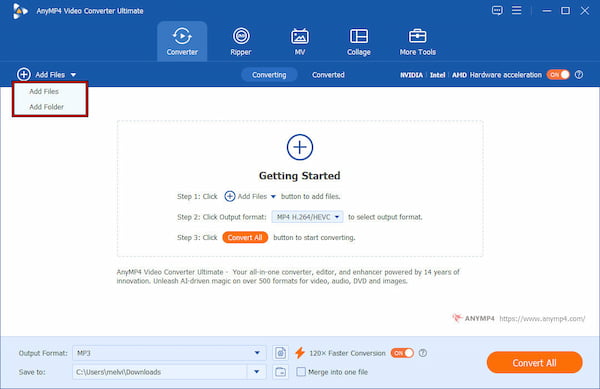
2. Open the Output Format selector and switch to the Video category. Select MP4 H.264/HEVC as the desired output format and choose a profile preset. If needed, use Custom Profile to adjust output parameters for optimized playback results.
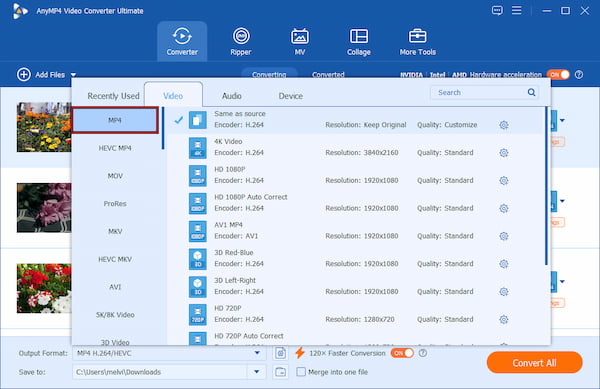
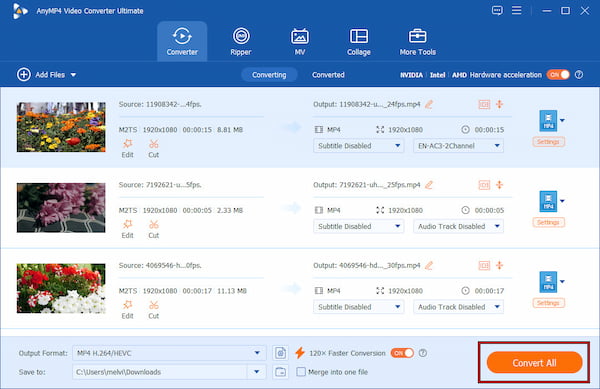
3. Use the Save To selector to specify the destination path for your converted file. Then, enable 120× Faster Conversion to improve processing speed and efficiency. After setting up everything, click Convert All to convert the DAT files to MP4 format.
If you are almost certain the DAT file contains video, try renaming the extension from .dat to .mpg. Since many DAT video files are actually MPEG-1 streams, modern media players may recognize and play them instantly without requiring conversion.
Winmail .dat files appear when Microsoft Outlook sends emails using Rich Text Format and TNEF encoding. Non-Outlook email clients cannot decode this format, causing attachments and formatting information to be bundled into a confusing file rather than displayed normally.
Winmail.dat readers and online decoders can extract hidden attachments such as PDFs, Word documents, and images from the DAT file. Offline tools offer better privacy, while online uploaders provide faster access without installation.
You can convert DAT to MP4 to make the file easier to play on modern devices and media players.
If you are the sender, change your Outlook message format to HTML or Plain Text. Doing this prevents Outlook from creating Winmail. dat attachments and ensure recipients can access your files normally across different email platforms.
Can I convert a DAT file to PDF?
Yes, but only if the DAT file contains document-related data or attachments. For example, winmail.dat files may include hidden PDFs that you can extract using a Winmail.dat reader. However, you cannot directly convert video or system DAT files to PDF because they contain fundamentally different data.
Why won't VLC play my DAT file?
VLC may fail to play a DAT file if it is corrupted, incomplete, or not a valid video file. Some DAT files store email, application, or system data instead of multimedia content. In other cases, the video codec inside the DAT file may be unsupported or damaged.
Is it safe to rename a .dat extension?
Renaming a video DAT file to .mpg can work because many VCD DAT files are actually MPEG-1 streams. However, changing the extension does not truly convert the file format. Renaming a DAT file to the wrong type can make it unusable or harder for software to recognize.
Understanding what a DAT file is becomes much easier once you know it can store different kinds of data. This includes videos, email attachments, and application information. Identifying the file type is the key to opening or converting it properly. If you need to convert video DAT files to modern formats, AnyMP4 Video Converter Ultimate offers a fast, reliable solution. Download it today to easily open, edit, and convert DAT files for smoother playback and compatibility across all your devices.
Secure Download
Secure Download
 Updated by Alice Thorne to Glossary
More readings
 What Is FLV? Defining the Flash Video and How to Access it
This informative post will focus on what FLV is. Additionally, we will present tools for playing and converting these files. Check the answers you need here!
 What is DTS? Everything You Need to Know About DTS is Here
In this guidepost, you will learn what DTS is and its impact on audio quality. Also, discover how to play and convert DTS files for a richer audio experience.
 What Is AAC and Why It Matters in Audio Technology
This post will highlight what AAC is. Discover the origins, advantages, disadvantages, and versatile applications of the Advanced Audio Coding files.
 MP3 Vs. MP4 | Uncover the Key Differences of These Formats
This post will focus on MP3 Vs. MP4 overview. Understand their distinct qualities and discover which one suits your audio and video preferences.
 Add your comments to join the discussion here