
Free Download100% Clear & Secure
Free Download100% Clear & Secure
Summary
To convert BDMV to MKV, you have two primary options: Handbrake for free, non-protected folders (requires encoding), or AnyMP4 Blu-ray Ripper for 1:1 lossless remuxing and decryption of protected BDMV. MKV is the preferred format as it preserves HDR10/Dolby Vision and multiple audio streams (TrueHD/DTS:X) from the original Blu-ray structure.
As we all know, BDMV, a format used to store high-quality audio and video content on Blu-ray discs, is less compatible and requires a specialized Blu-ray player to play. Well, for the purpose of managing and playing it more conveniently, there is another way, which is to convert it to a more compatible and popular digital format. MKV format is precisely the preferred format for many users when dealing with BDMV. This article will help you quickly complete the conversion between them with two BDMV to MKV converters. Keep reading to pick the most suitable tool!

Editor’s Note & Real-World Test
| Handbrake (Free) | VS | AnyMP4 Blu-ray Ripper |
| Casual Encoding | Best For | Lossless & Fast Ripping |
| Slow (CPU-heavy) | Conversion Speed | 30X Faster (Hardware Accel) |
| No (Compressed) | Lossless Quality | (1:1 MKV Lossless) |
| No (Fails on encrypted files) | Decryption | (AACS, BD+, latest DRM) |
| Basic | Editing Tools | Advanced (Trim, Filters, AI Enhancer) |
| Complex for beginners | User Interface | Intuitive & Modern |
The Verdict
If you are looking to convert BDMV to MKV without losing quality, the choice depends on your source file. Handbrake is excellent for non-protected home videos but lacks the decryption power for commercial Blu-rays. For cinephiles who demand a lossless 1:1 backup with all audio tracks (like DTS-HD MA) and fast hardware encoding, AnyMP4 Blu-ray Ripper is the most comprehensive tool that balances professional power with an easy-to-use interface.
Think of a BDMV (Blu-ray Disc Movie) folder not as a single video file, but as a "Russian nesting doll" of high-definition data. It is the complex directory structure found on Blu-ray discs, containing everything from the actual movie footage to interactive menus and audio streams.
If you open a BDMV folder, you’ll typically see a maze of sub-folders like STREAM, PLAYLIST, and CLIPINF. The actual movie is usually hidden inside the STREAM folder as a series of .m2ts files. While this structure is perfect for physical Blu-ray players, it’s a digital headache for modern media servers and mobile devices.
Converting your BDMV folders to MKV (Matroska Video) is the industry-standard move for home theater enthusiasts. Here is why MKV is the superior choice for your digital library:
HandBrake is an open-source digital video and Blu-ray converter for Windows, Mac, and Linux. It can convert video and Blu-ray in almost any format for free, including BDMV to MKV, of course. Let's see how to convert BDMV to MKV with HandBrake!
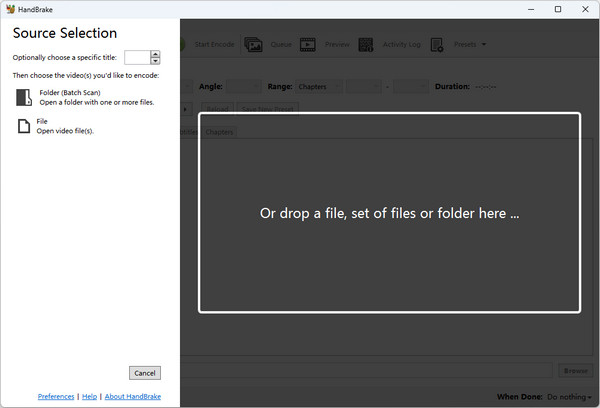
1. Download and open it on your computer. Then, click the Folder (Batch Scan) or File button in the opened interface to upload the BDMV files you want to convert. You can also drop a file, set of files, or folder into the box in the right area.
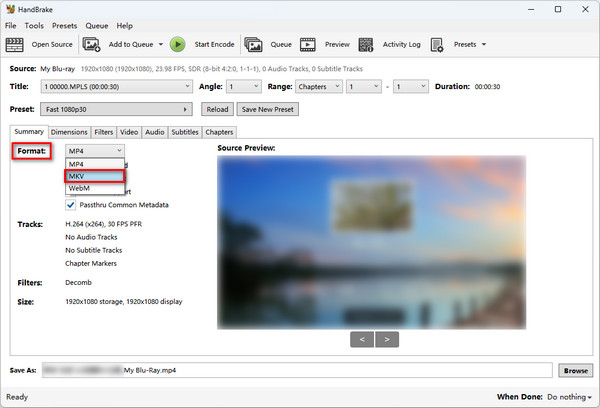
2. Click the Format option under the Summary tab to set the output format to MKV. Then, you can make other edits, such as size, filters, encoder, etc., according to your needs.
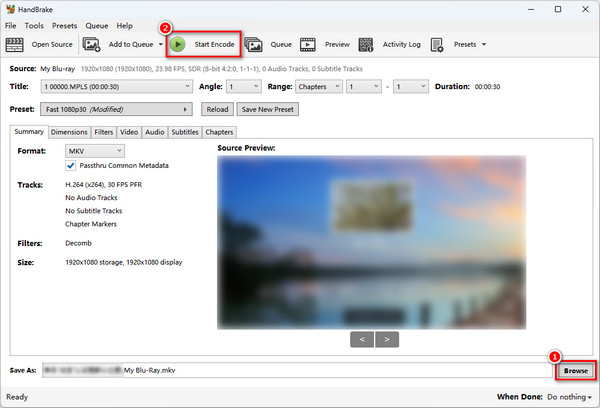
3. Click the Browse button in the lower right corner to select the location for the converted BDMV files, and then click the Start Encode button to convert BDMV to MKV for free!
HandBrake offers free and easy BDMV to MKV conversion, but its interface is a little outdated and has many advanced features, which may not be too friendly for beginners. Its Blu-ray to MKV conversion speed is a bit slow compared with other Blu-ray and DVD rippers in the market, which may take longer.
If your BDMV folder is from a commercial disc, Handbrake might show an error. You will need a ripper with decryption capabilities.
My Real-World Test:
The "Gotcha" Moments:
The Bottom Line: HandBrake is perfect if you have unprotected home videos and plenty of time to let your CPU run. However, if you are dealing with a retail Blu-ray library and want to maintain the original 40GB+ bitrate without waiting hours, you’ll likely find it frustrating.
If HandBrake feels too slow or complex, AnyMP4 Blu-ray Ripper is the professional-grade alternative designed specifically for Lossless Remuxing. Unlike standard converters that force re-encoding (which lowers bitrate and destroys detail), AnyMP4 can extract the original video and audio bitstreams directly from the BDMV structure.
For Plex and Kodi users, this is the "Holy Grail": it keeps the original 1:1 Blu-ray quality, supports 4K UHD HDR10/Dolby Vision, and most importantly, allows for Audio Passthrough. This means your high-end receiver will still detect DTS-HD Master Audio or Dolby TrueHD (Atmos) without any downmixing or compression.
Recommedations:
Secure Download
Secure Download
1. Load your BDMV Folder
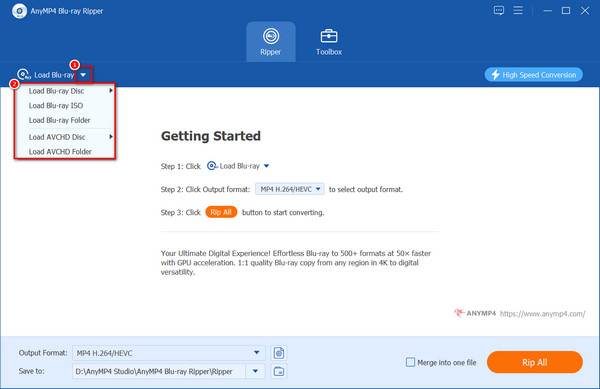
Launch AnyMP4 Blu-ray Ripper and click Load Blu-ray. Select Load Blu-ray Folder to import your entire BDMV directory. The software will automatically identify the main movie title for you.
2. Select "MKV Lossless" (The Remuxing Secret)
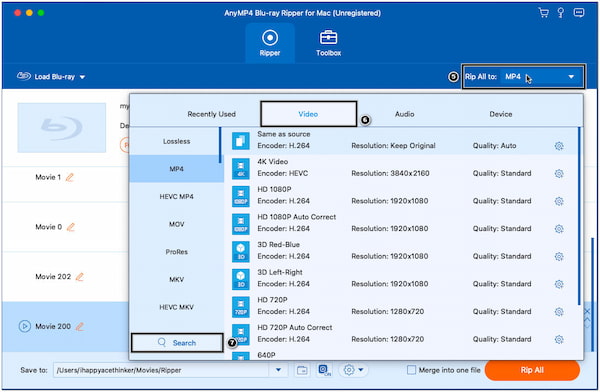
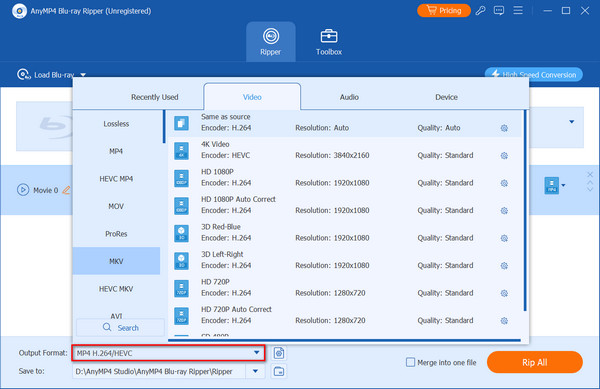
Click the Output Format dropdown. Under the Video tab, select MP4 Lossless.
Unlike other profiles, "MP4 Lossless" keeps the original Source Bitrate. It bypasses the transcoding engine, ensuring your output file is an exact digital clone of the Blu-ray.
If you just want a digital format for compatibility, you can select MP4, MOV, etc.
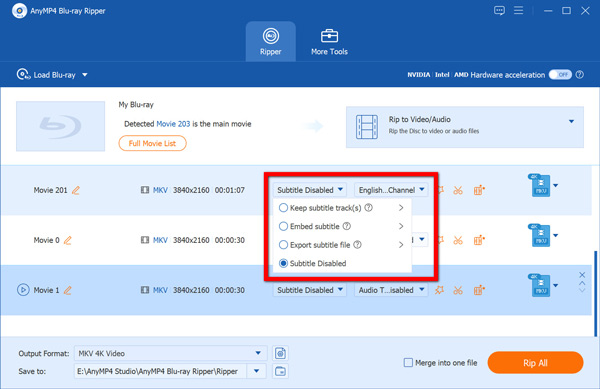
3. Configure Audio and Subtitle
To ensure your Atmos or DTS-HD tracks remain untouched:
4. Start High-Speed Ripping
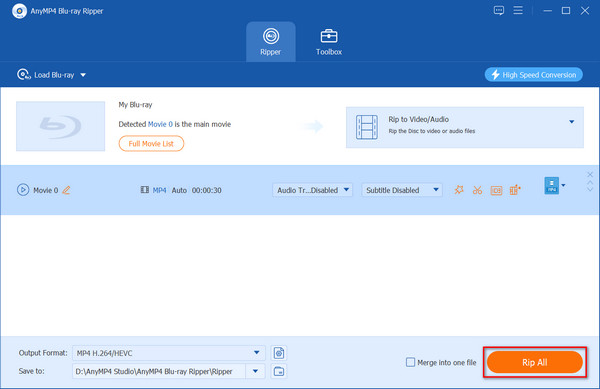
Choose your destination folder and click Rip All. Because the software is remuxing (copying data) rather than re-encoding, the process is incredibly fast, often taking less than 10-15 minutes for a full 50GB disc.
My Real-World Test:
The Bottom Line: If you are a cinephile who owns high-end home theater gear, don't waste time with tools that degrade your media. For a seamless "Remux" that preserves every bit of data while saving you hours of waiting, this is the most reliable workflow I’ve found in 2026.
Will I lose the 7.1 surround sound after converting BDMV to MKV?
Not if you use the "Lossless" or "Audio Passthrough" mode. AnyMP4 supports keeping original TrueHD and DTS-HD Master Audio.
Can I convert BDMV to MKV on Mac?
Yes, both Handbrake and AnyMP4 have macOS versions that support the latest Apple Silicon (M1/M2/M3) chips.
Is it legal to convert BDMV folders to MKV?
For personal backup of discs you own, it is generally considered fair use in many regions, but always check local copyright laws.
This article introduces the definitions of BDMV and MKV, the reasons why you should convert it, and provides two methods and their specific steps. AnyMP4 Blu-ray Ripper, a dedicated BDMV to MKV converter, can efficiently complete the conversion for you with the most straightforward operation, highest quality, and fastest speed so that you can enjoy the same high quality of the converted BDMV. Click the button to download it for free and try it out now! And you are welcome to share your experience with us in the comment section!
Secure Download
Secure Download
 Updated by Ted Klarso to Rip Blu-ray
More readings
 How to Rip Blu-ray Using HandBrake Effectively
If you have a large collection of Blu-ray discs, you may be wondering if HandBrake can rip your Blu-ray discs and convert them into digital files.
 5 Best Ways to Convert DVD to MKV in 2026 [Lossless & Fast]
Looking for the best way to convert DVD to MKV? Rip any protected DVD to MKV losslessly on Windows/Mac. Keep all audio tracks and subtitles at 30x faster speed.
 Best 3 Ways to Rip Blu-ray on Windows
This post shares how to rip Blu-rays to MKV, MP4, AVI, and more on Windows. After ripping Blu-ray movies, you can enjoy them on various devices.
 MKV Converter – Convert Video to/from MKV
This page lists the top 6 MKV converter online and desktop. You can convert to/from MKV from/to MP4, MOV, WMV, AVI, WMV, FLV, WebM, and more.
 Add your comments to join the discussion here