
Dedicated for DVD fans from every corner of the world, AnyMP4 DVD Ripper is capable of ripping all commercial DVD discs to any video format such as MP4, TS, AVI, WMV, VOB, ASF, FLV and any audio format such as MP3, AAC, AC3, FLAC, WAV, OGG and WMA. It also possesses stunning editing tools that can help you customize video effects according to your needs.
MPEG transport stream (TS) is a standard format for transmission and storage of audio, video, and data, and is used in broadcast systems such as DVB and ATSC.
Secure Download
Secure Download
AnyMP4 DVD Ripper can be downloaded from our product webpage or by clicking the "Free Trial" button. After successfully installing the software, you can open it and check out the interface.
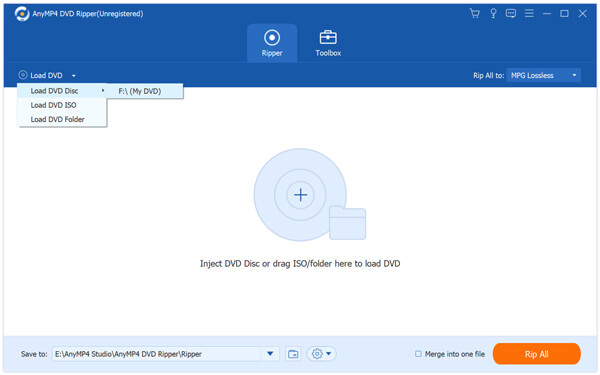
Click the "Load DVD" button to add your source DVD video. You can also select "Load DVD Folder" to add more than one DVD file to the software. By selecting several files and pushing the "Delete" button on your keyboard, you can also remove video files from the "File Name" list.
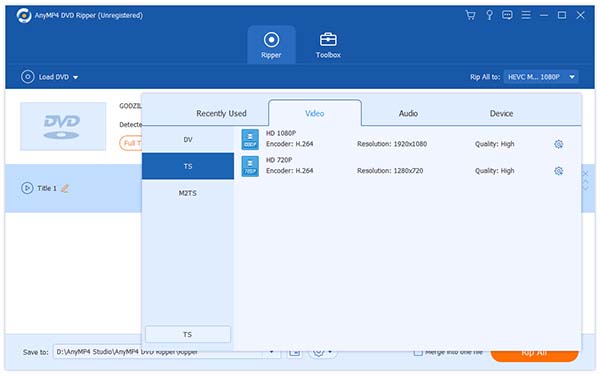
Click the "Profile" drop-down list to select TS profile. If you cannot find it, input it in the text area below and the software will automatically find it for you.
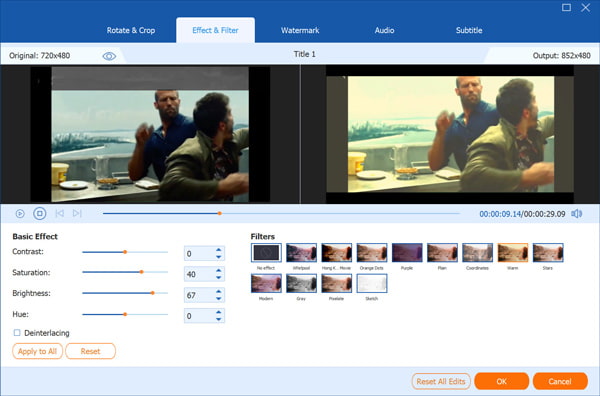
In order to get perfect video effect, you can conduct specific video effect customization by utilizing the versatile editing tools provided by AnyMP4 DVD Ripper. You are allowed to trim video for your preferred length by setting the exact start and end time, crop video frame to remove black edges, join several video clips together and add text/image watermark to personalize the video. You can also try adjusting Video Brightness, Saturation, Hue, Contrast and Volume.
You can even adjust output parameters for better enjoyment, such as Video Encoder, Resolution, Bitrate, Frame Rate, Aspect Ratio as well as audio parameters such as Encoder, Channels, Sample Rate and Audio Bitrate.
Some video files contain more than one audio track. You can choose your preferred audio track and add downloaded subtitle by clicking the "Audio Track" and "Subtitle" drop-down lists.
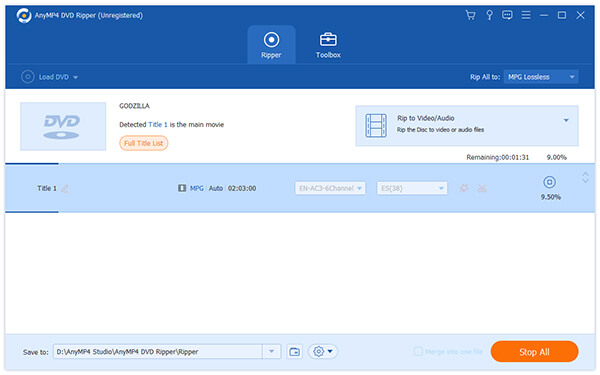
Click the "Rip All" button to begin ripping DVD to TS format.
When the progress bar reaches 100%, you can enjoy TS video with PS3 or Xbox 360.
 Updated by Joan Aimee to DVD
Related Articles
 Top 20 Free and Ultimate MP4 Player Software
This article will introduce you 20 MP4 Players and they can be used on windows or Mac.
 Can You Play DVD on Wii with The Easiest Way
Get easiest methods to serve Wii as DVD player, to play DVD on Wii in 2 methods.
 Fix the Issue in Windows Media Player Won't Play DVD
Top 5 windows media player alternatives to play dvd on Windows 8/10 with ease.
 10 Best Blu-ray DVD Player to Enjoy Movie With Ease
Compared the best Blu-ray DVD players. You can pick one to enjoy movie at home.
 Add your comments to join the discussion here
