
DVDs can be damaged over time, so it would be best to extract them immediately before you lose all the content saved on them. Converting DVDs to VOB can preserve the original DVD structure. It allows you to extract the video, audio, and subtitle streams and create backups of your collections that can be played on compatible devices or players. In this post, you will learn how to rip DVDs to VOB using various available software. So without any further discussion, learn more about the process below.

| Rip DVD to VOB Files | Platform | Price | Regular updates | Conversion speed | Batch conversion support | Supported inputs | Supported outputs | Overall Ratings |
|---|---|---|---|---|---|---|---|---|
| Windows, Mac | Starts at $49.95 | YES | 30× ultra-fast conversion speed | YES | DVDs, DVD Folders, and DVD ISO image files. | VOB, MP4, MKV, M4V, AVI, and 500+ more | 5 | |
| Windows | Free | Outdated | Slow | NO | DVD | ISO, VIDEO_TS Folder, and DVD-Video Disc | 3 | |
| Windows, Mac | Starts at $39.99 | Fair | Fair | YES | DVDs, DVD Folders, and DVD ISO image files. | MP4, MKV, AVI, MOV, WMV, etc. | 4 | |
| Windows | FREE | Outdated | Slow | NO | DVD | VOB, IFO, and BUP | 3 |
What is a VOB File on DVD? A VOB file is a multimedia container for storing audio, video, and other DVD data. VOB files are typically found in the VIDEO_TS folder of a DVD and contain the actual video, audio, and subtitle streams of the DVD content. They are named sequentially, such as VTS_01_1.VOB, VTS_01_2.VOB, etc.
AnyMP4 DVD Ripper is a handy DVD to VOB ripper allowing you to rip DVDs, DVD folders, and DVD ISO image files to universal media formats, such as VOB, MP4, MKV, MOV, AVI, and 500+ more without quality loss. If you are looking for the fastest DVD-ripping tool, AnyMP4 DVD Ripper is the answer. It has a 30× ultra-fast conversion speed with GPU acceleration support, making the ripping and converting process quick. In addition, it supports batch conversion, allowing you to add multiple DVD files and convert them simultaneously.
1.To begin with, Free Download DVD to VOB Converter. After downloading it, install the program on your computer. Insert the DVD into the optical disc drive of your computer, then launch AnyMP4 DVD Ripper after.
Secure Download
Secure Download
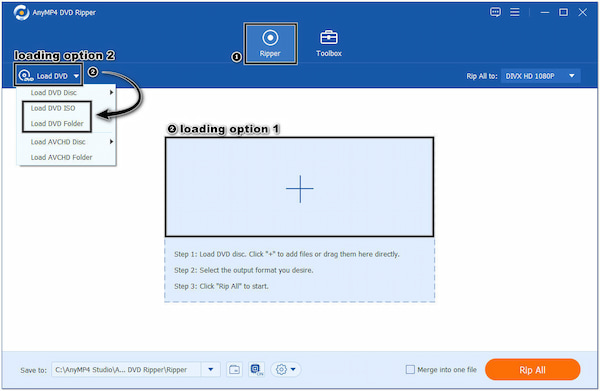
2.Click the Plus button under the program's Ripper tab to import the DVD content. Otherwise, click the Load DVD dropdown button to Load DVD Folder or Load DVD ISO. AnyMP4 DVD Ripper will load the DVD content automatically after analyzing it.
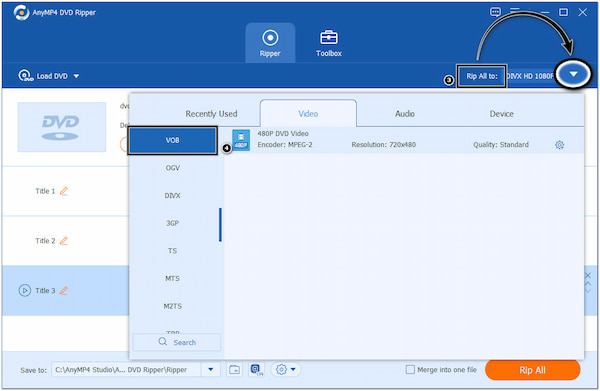
3.In the Rip All to field, click the dropdown menu and select VOB as your output format. You can choose the VOB format from the Video tab or use the Search Field to locate it quickly.
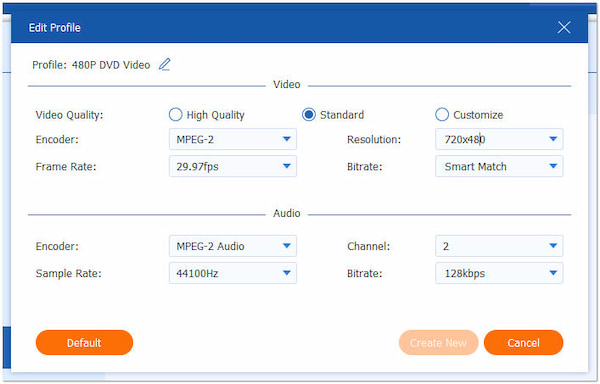
4.Optionally, click the Settings button to customize the output settings, such as Video/Audio Encoder, Resolution, Bitrate, Frame Rate, etc.
5.Click the Save to field to select a destination folder where you prefer to save the converted VOB files.
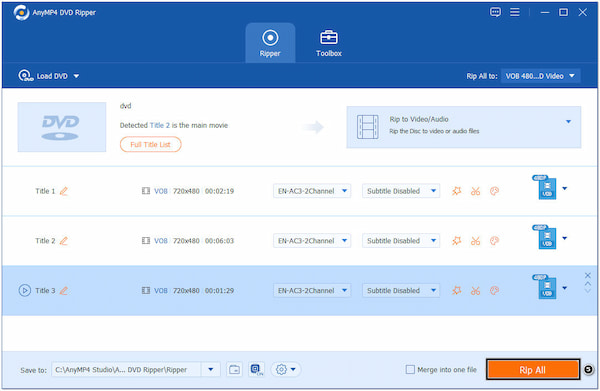
6.Once the file destination is set, click the Rip All button to convert DVD to VOB.
AnyMP4 DVD Ripper is a great choice when searching for a DVD-to-VOB converter. Aside from the features mentioned earlier, it is infused with basic and advanced video editing tools, allowing you to upscale video resolution, remove unwanted background noises from videos, reduce video shakes, and more.
DVD Shrink is a program enabling users to create backup copies of DVDs by compressing the video files and removing unnecessary content. It was primarily designed to help users save space on their hard drives by reducing the size of the DVD files.
1.Download DVD Shrink from a trusted source and install it on your computer. Position the DVD into the computer's drive and run the program afterward.
2.Click the Open Disc button in the program's toolbar to load the DVD.
3.Select the main movie or DVD content you want to convert to VOB by checking the corresponding box.
4.Click the Backup button in the toolbar to open the backup options. Choose ISO Image File as the target output format in the Select backup target section.
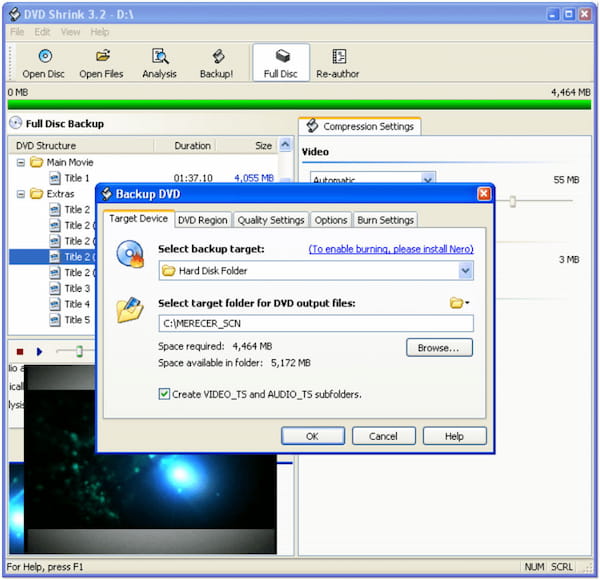
5.Select the output folder where you prefer to save the VOB files by clicking the Browse button. Click the OK button to start the DVD to VOB conversion process. It will create an ISO image file containing the selected DVD content.
6.Once the ISO image file is created, use ISO mounting tools to mount the ISO file as a virtual DVD drive. Then, save the VOB files from the mounted ISO to your desired location.
Following these steps, you can back up ISO to VOB using DVD Shrink. However, DVD Shrink is an older software that may be incompatible with newer copy protection methods. Additionally, it hasn't been actively updated for a long time. Consider using more modern and up-to-date DVD-ripping software for better compatibility and functionality, and you have to seek for some Shrink alternatives to convert DVD to VOB.
DVDFab allows you to rip DVDs to VOB files and other file formats. It lets users extract video, audio, and subtitle tracks from DVDs and convert them into various formats, such as VOB, MP4, AVI, etc.
1.Download and install DVDFab on your computer. Once installed, put the DVD into the DVD drive and open the software after.
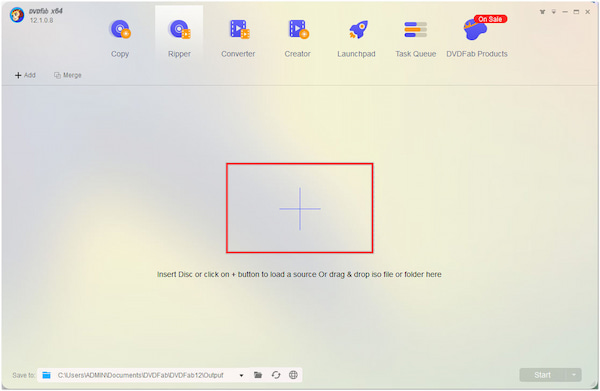
2.Click the Plus button to import the DVD content. The program will analyze and load the DVD immediately.
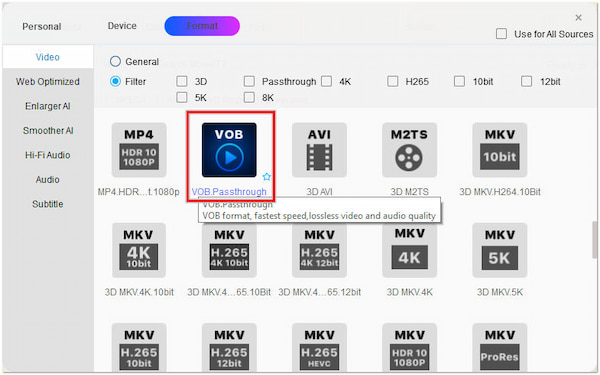
3.In the Profile section, click the dropdown menu and select VOB as the output format.
4.Click the Save to button to select a folder where you prefer to save the converted VOB files.
5.Click the Start button to initiate the DVD to VOB conversion process.
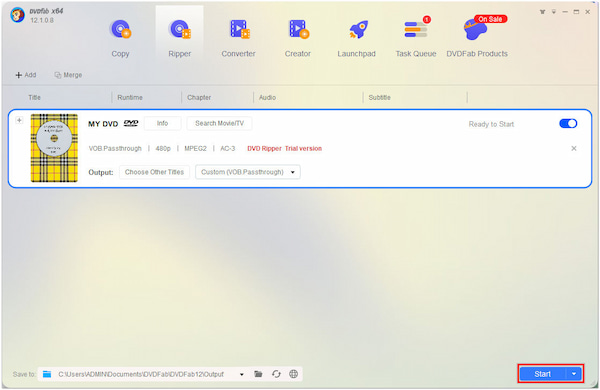
Converting a DVD to VOB with DVDFab is simple and easy. However, the free trial version has limitations and does not offer all the features in the premium version.
DVD Decrypter is a program used for ripping and decrypting DVDs. It supports various disc formats and can extract video, audio, and subtle streams into separate files. DVD Decrypter lets users select specific DVD content to rip, preserving the original DVD structure.
1.Download DVD Decrypter and install it on your computer. Place the DVD into the computer's drive and launch the program afterward.
2.Click the Mode menu and select IFO mode. Then, click the File menu and choose Select IFO.
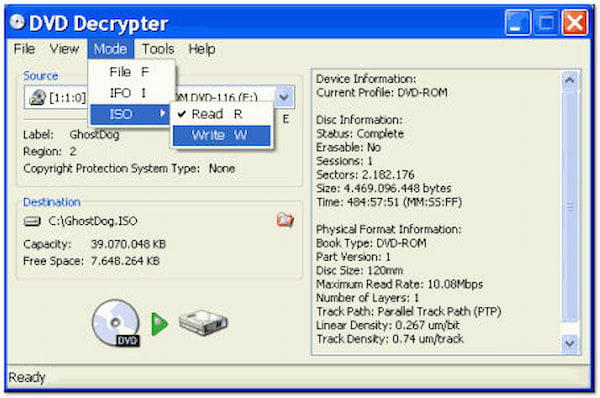
3.In the Select IFO window, browse and select the IFO file associated with the DVD you inserted. It will analyze the DVD and display the available files.
4.Click the Decrypt button to start the DVD to VOB conversion process. DVD Decrypter will extract the selected video files from the DVD and save them as VOB files in the specified output folder.
It's important to note that this DVD ISO to VOB decrypter is no longer actively updated or supported, and its functionality may be limited compared to more modern DVD ripping software. Consider using more up-to-date and feature-rich alternatives for converting DVDs to VOB.
Why is the VOB file not playing?
DVDs are often region-encoded, which means they can only be played on DVD players from a specific region. If you are trying to play a VOB file extracted from a region-coded DVD on a player from a different region, it may not work. Consider using a region-free DVD player or ripping the region-coded DVD, even you can download a VOB player.
Do VOB files contain audio?
YES! VOB files can contain audio tracks. The audio in a VOB file is usually stored in AC3 or DTS format, commonly used for DVDs.
What type of encoder does VOB use?
VOB files use MPEG-2 encoding for video compression. MPEG-2 is a widely used video compression standard specifically designed for DVD video. It provides efficient compression while maintaining good video quality.
Is VOB the only format for DVD videos?
NO! VOB is the primary format for DVD video, but DVDs can also contain other file formats such as IFO and BUP. These files work together to provide DVD navigation and structure.
Can I convert VOB files back to DVD format?
YES! It is possible to convert VOB files to DVD format using DVD authoring software. It allows you to create a new DVD with the VOB files and additional DVD features, such as menus and chapters.
Ripping DVD to VOB format provides the best solution to retain the original DVD structure and extract the video, audio, and subtitle content for various purposes. Whether you want to create backups or rip DVDs to VOB files, ripping DVDs to VOB can be accomplished using the above tools. By following the steps outlined in this write-up, you can successfully extract the contents of your DVDs into VOB files and enjoy them on various devices and media players.
Secure Download
Secure Download
 Updated by Ted Klarso to DVD
More readings
 2 Ways to Convert VOB to WMV with Pictures Online & Offline
How to export WMV from VOB file? Here you will get a 100% free VOB to WMV converter and a professional one to convert your VOB files to WMV fast and secure.
 [Solved] How to Compress VOB Files to Smaller Size with High Quality
If you are trying to find an easy way to compress VOB files on your Mac or Windows PC, then this post is the best solution to help you with that.
 4 Ways to Rip DVD to MKV With No Quality Loss
A specialized tool is needed when you rip a DVD to MKV. So, if you don’t know which tool to use for conversion, you better check them out here.
 2 Ways to Rip DVD to AVI [Full Guide]
Are you looking for the easiest way to convert DVD to AVI on your Windows? Then, the answers are all here! Come and find out how to attain this.
 Add your comments to join the discussion here

