
When you launch AnyMP4 iPhone Unlocker, you will click Start Removing to remove MDM for your iPhone. However, you see a notice that you are asked to unlock Activation Lock on your iPhone. You don't know the true meaning of Activation Lock. Don't worry. You can learn everything about Activation Lock you should know.
The Activation Lock is turned on automatically when Find My is enabled on your iPhone. It means that even if someone else stoles or possesses your iPhone, they cannot erase or reactivate it without the correct Apple ID and password.
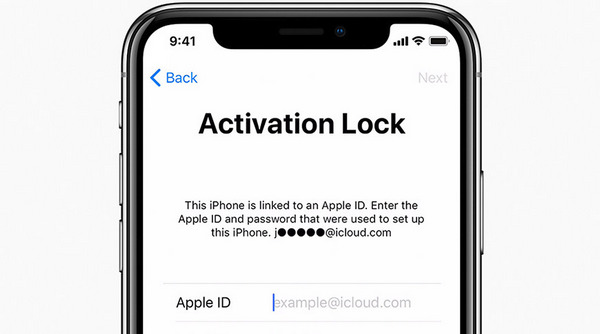
When Activation Lock is enabled on iPhone, you can enter the Apple ID and password to:
1. Turn off Find My on your iPhone.
2. Erase your iPhone.
3. Reactivate and use your iPhone.
The Activation Lock Account and Password refer to the Apple ID and password that are associated with an iPhone, iPad, or iPod touch. But many users don't know the difference between Apple ID and iCloud ID.
To help you understand them, here is a comparison.
| Definition | Usage | Account Creation | Sign-in |
|---|---|---|---|
| Apple ID is an account to access Apple services, including the App Store, FaceTime, iCloud, iMessage, Apple Music, and more. | It is used for downloading apps, making purchases, syncing data across devices, etc. | You create an Apple ID when you set up your device or register on the Apple website. | Sign in to your Apple account with the Apple ID and password. |
| iCloud ID is simply the Apple ID that you use to sign in to iCloud. | It is used for iCloud services, such as backing up your iPhone, syncing contacts, photos, and other data across your devices, using iCloud Drive for storage, etc. | When you create an Apple ID, you get an iCloud ID simultaneously. You can access iCloud services when you set up your device or later in the iCloud settings. |
Sign in to iCloud with the same Apple ID and password. |
Now, you learn what Activation Lock is on your iPhone. You can continue removing the MDM mode after entering your Apple ID account and password on the Activation Lock screen.
Related Articles
 5 Best Methods to Unlock iPhone/iPad/iPod Touch without Password
When you find the iPhone or iPad is disabled; you can learn more details about 5 best methods about how to unlock your iPhone or iPad without password.
 How to Bypass iCloud Activation Lock on iPhone iPad
Want to bypass iCloud activation lock on iPhone/iPad? This post provides free ways and ultimate solution to remove activation lock permanently.
 How to Change Apple ID on an iPhone or iPad for Different Scenarios
When you want to use another Apple ID, you can learn more about how to change the Apple ID on your iPad or iPhone.
 The Simplest Method on How to Remove iCloud Activation Lock
Do you know how to remove iCloud lock? You can follow this article to do iCloud Activation Lock removal to solve the problems.
 Add your comments to join the discussion here