
Summary:
MakeMKV extracts DVD, Blu-ray, and Ultra HD Blu-ray content into MKV files. All of these are done while preserving original streams. HandBrake, on the other hand, converts those files to MP4, MOV, and WebM using H.264, H.265/HEVC, or AV1 encoding.
My first 4K rip failed at 47%; that is how I learned that MakeMKV and HandBrake aren't interchangeable. I wanted to save a Blu-ray movie on my computer without sacrificing its original quality. However, I also needed a smaller file that would not consume too much storage.
MakeMKV and HandBrake are both free software, but they handle video content differently. MakeMKV is used to rip disc streams, while HandBrake is used to compress and convert videos that already exist. This HandBrake vs MakeMKV comparison explores their ripping capabilities, video quality, file sizes, speed, pricing, and limitations. It also explains when to use both programs and when an alternative makes more sense.

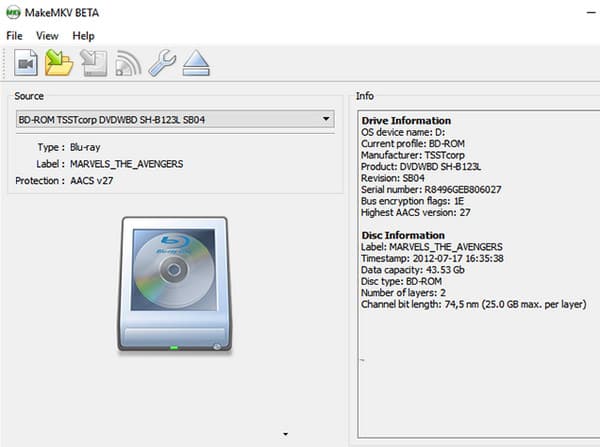
MakeMKV extracts DVD, Blu-ray, and supported UHD Blu-ray discs to MKV without re-encoding. This process, called remux, copies the original media streams into an MKV container to preserve the quality. In the MakeMKV vs HandBrake comparison, MakeMKV stands out for 1:1 copy, chapter and track selection, and drive-bound ripping speeds.
Typically, a Blu-ray may occupy 30 GB, while a UHD disc can reach 50 GB. Its UHD support requires a compatible LibreDrive-enabled drive.
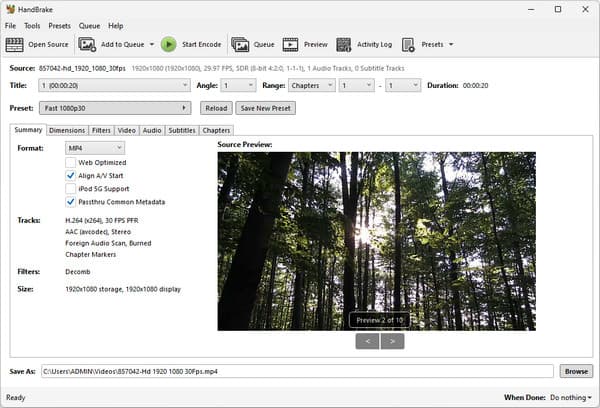
HandBrake is a video encoder that allows encoding videos into MP4, MOV, MKV, or WebM containers using H.264, H.265/HEVC, or AV1 video codecs. It supports presets, video cropping and scaling, subtitles and audio manipulation, and a job list for batch conversion. It also supports GPU encoders such as NVIDIA NVENC, Intel Quick Sync (QSV), and AMD VCE/AMF help accelerate conversion. However, HandBrake cannot handle copy protection or DRM, so it cannot rip protected DVDs or Blu-rays.
MakeMKV or HandBrake? Which tool to use? There’s nothing to be confused about because MakeMKV and HandBrake handle video content differently.
MakeMKV extracts DVDs, Blu-rays, and supported UHD Blu-ray discs, including many commercially protected titles. HandBrake can process unprotected disc sources but cannot independently decrypt commercial DVDs or Blu-rays.
Since MakeMKV utilizes remuxing, the original streams are preserved, so there is no quality degradation due to generation losses. With HandBrake, you will have to re-encode the video, which will degrade quality depending on the settings you use and the encoder.
MakeMKV preserves the original streams; thus, the exported files will be larger. If you rip Blu-ray to MKV, the file size may amount to about 30 GB for a Blu-ray disc and 50 GB or more for UHD discs. HandBrake can reduce these sizes through H.264, H.265, or AV1 compression.
Both programs are available for use at no cost, but their licensing models vary. HandBrake is fully free and open-source software that does not have any subscription or expiration date. MakeMKV is free software for ripping during a 60-day beta period; further use requires a paid registration.
MakeMKV is faster as it just copies already existing streams and doesn't re-encode them. The speed depends on the optical drive and the quality of the disc being ripped. HandBrake will need extra time to re-encode the video files.
The HandBrake vs MakeMKV workflow is simple. Use MakeMKV to extract the movie as an MKV file. Next, feed this file into HandBrake to compress it as MP4 or MKV. This allows you to create a more storage-friendly version for Plex and Jellyfin.
HandBrake cannot bypass protected discs alone. You can use HandBrake’s libdvdcss to remove the CSS encryption used by DVDs. Blu-rays, on the other hand, are encrypted with AACS and BD+. MakeMKV can handle disc decryption and extracts the original streams into an MKV file. In other words, the MakeMKV-to-HandBrake workflow therefore separates disc extraction from video compression.
| MakeMKV | HandBrake | AnyMP4 Blu-ray Ripper | |
|---|---|---|---|
| Primary job | Decrypt and remux disc streams | Transcode and compress decrypted disc streams | Rip protected discs to device-ready video |
| DVD / Blu-ray / UHD input | Decrypted DVD and Blu-ray only | Blu-ray, BDMV folder, ISO, and 4K UHD | |
| Copy protection | AACS, BD+, CSS, and region handling | libdvdcss only | Handles all protected commercial discs |
| UHD 4K support | |||
| Output formats | MKV | MP4, MKV, MOV, and WebM | MP4, MKV, MOV, and 500+ other formats |
| Compression/file size | None | Strong | Adjustable |
| Quality | Bit-for-bit original streams | Re-encoded | Re-encoded; 1:1 for supported 4K copy mode |
| Speed | Drive-bound | Encode-bound | GPU-accelerated, up to 50× |
| Hardware requirement | Blu-ray drive; UHD needs LibreDrive | Any modern CPU/GPU | Blu-ray drive for disc input |
| Batch/queue | |||
| Learning curve | Simple | Moderate | Simple |
| Price | Starts at $35 | Free | Starts at $30.00 |
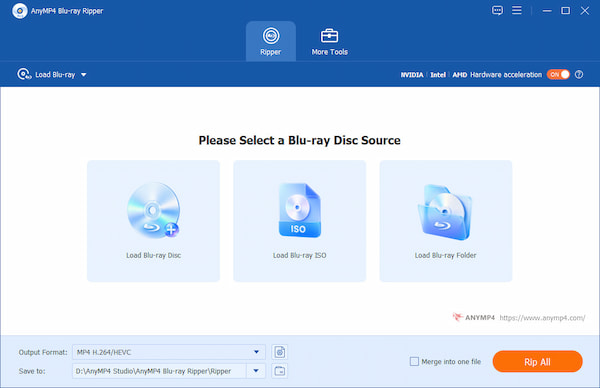
Instead of using MakeMKV or HandBrake separately, use AnyMP4 Blu-ray Ripper for an all-in-one Blu-ray ripping solution. The software can rip Blu-rays, BDMV folders, ISO files, and 4K UHD to more than 500+ standard media formats.
Secure Download
Secure Download
It can handle Blu-rays regardless of their region and copy protection. It uses advanced acceleration technology to achieve up to 50× ripping speed while maintaining 1:1 quality. Beyond Blu-ray ripping, it is also packed with additional tools for editing metadata, compressing video, creating GIFs and 3D content, and enhancing video with AI.
Do I need both MakeMKV and HandBrake?
Yes. MakeMKV will do the actual disc extraction and bypass commercial copy protection on Blu-rays and 4K UHD discs. Then, use HandBrake to transcode an existing video file and recompress it using modern codecs.
Can HandBrake rip copy-protected DVDs or Blu-rays?
No, HandBrake cannot rip copy-protected DVDs or Blu-rays on its own. You must install libdvdcss to rip copy-protected or region-locked DVDs or Blu-rays. Alternatively, use AnyMP4 Blu-ray Ripper to rip Blu-ray discs without installing an external library.
Does MakeMKV compress video?
No, MakeMKV does not compress video. It extracts raw streams from DVDs, Blu-rays, or UHD Blu-rays and places them into an MKV container without re-encoding.
Which is faster, MakeMKV or HandBrake?
MakeMKV is faster than HandBrake because it simply copies and repackages the original video and audio data into an MKV container without re-encoding. HandBrake takes much longer because it decodes and re-encodes the video to reduce file size and change the codecs.
That's the main difference in this HandBrake vs MakeMKV comparison: MakeMKV is for extracting disc content, while HandBrake is for compressing and converting those extracted files. You can also use both together to create high-quality rips and compressed versions for Plex or Jellyfin. However, if switching between applications feels inconvenient, AnyMP4 Blu-ray Ripper offers a more unified alternative. It combines Blu-ray extraction, lossless output options, and conversion to 500+ formats with GPU acceleration.
 Posted by Alice Thorne to Converter
Related Articles
 In-depth HandBrake Review: Features, Pros, and Cons
You must know the well-known converting tool HandBrake. Is it worth a try? This complete HandBrake review can give you an answer.
 How to Use HandBrake to Merge/Join Multiple Videos
Are you wondering if HandBrake merge videos? Learn the answer here and explore alternatives to join clips. Also, discover how to compress videos with HandBrake.
 Get MakeMKV Read/SCIS/Rip Errors? 2026 Solutions Here
Learn to solve MakeMKV errors like read/SCIS/rip errors by reading this article to know what these errors appear, and how to fix them quickly.
 5 Best MakeMKV Alternatives: Windows, Mac, and Online
You may have used MakeMKV and are troubled by its single output format. We will show you 5 MakeMKV alternatives to rip DVDs and Blu-rays to multiple formats.