
Free Download100% Clear & Secure
Free Download100% Clear & Secure
Are closed captions and subtitles interchangeable terms? Many people think so, but the difference is critical for video accessibility, SEO, and global reach. For content creators aiming to expand viewership and deliver inclusive video experiences, understanding the difference between CC and subtitles is more than just a technical detail. It’s actually a strategic advantage. In this post, we’ll break down closed captions vs subtitles. We will clearly define how each works, compare their use cases, and explain why choosing the right option matters. By the end, you’ll also gain actionable tips on how to correctly implement captions and subtitles. This way, you can maximize reach and ensure your video content meets modern accessibility standards.

In this section, we will explain the difference between closed captions and subtitles. Though both serve the purpose of displaying text on screen, they are designed for different audiences and have distinct functions. Below, we will help you understand when and why each is used.
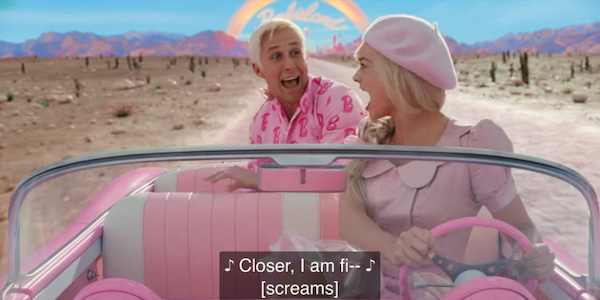
Closed Captions are primarily for viewers who are deaf or hard of hearing. They display the spoken dialogue and include non-speech elements. Some of which are sound effects, speaker identification, and other important auditory information. Closed captions are closed because they can be turned on or off by the viewer. Their primary focus is accessibility, ensuring that everyone, regardless of hearing ability, can follow the content accurately.
Adding subtitles makes your videos more accessible, but to keep viewers engaged, you must also improve the video quality in Premiere.
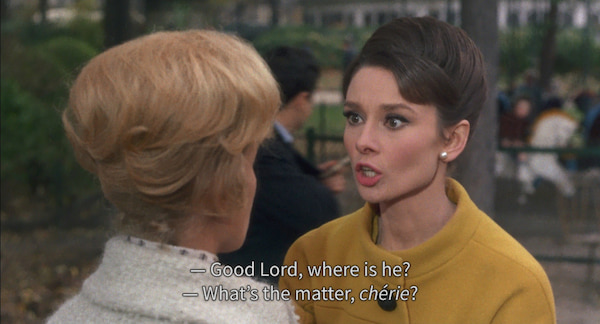
Is closed captions the same as subtitles? No
Subtitles are intended for those who can hear but don’t understand the language spoken in the video. They provide a textual translation of the spoken dialogue without including additional sound cues or speaker identification. Subtitles focus on language comprehension rather than accessibility for the hearing-impaired. They are generally static in terms of content, displaying only dialogue and occasionally providing limited contextual clues.

Subtitles for the Deaf and Hard-of-Hearing (SDH) is a hybrid format that combines text and audio. It combines the functions of traditional subtitles and closed captions. Like subtitles, SDH provides a textual representation of dialogue, often in the same language as the audio. Also, it includes important non-verbal audio information similar to closed captions. SDH is commonly used to make content accessible to those who are deaf or hard of hearing.
After understanding the definitions and purposes, it’s time to examine how they differ in practice. This section provides a side-by-side comparison of subtitles vs closed captions. This comparison will help you understand which format to use in different situations.
| Closed Captions | Feature | Subtitles |
| Accessibility for deaf and hard of hearing | Purpose | Comprehension for hearing viewers |
| Dialogue, speaker IDs, sound effects, music cues, etc. | Content | Dialogue only (spoken words) |
| Same language as the audio | Language | Can be same or different language (translation) |
| Toggle on/off | Viewer Control | Sometimes fixed, sometimes toggled |
| STL, SCC, TTML/DFXP, SRT, and VTT file | Format Used | SBV, SMI, EBU-STL, ASS/SSA, VTT, and SRT file |
| Flexible | Placement | Centered at the bottom |
| Deaf or hard-of-hearing viewers | Target Audience | Viewers who do not understand the audio language |
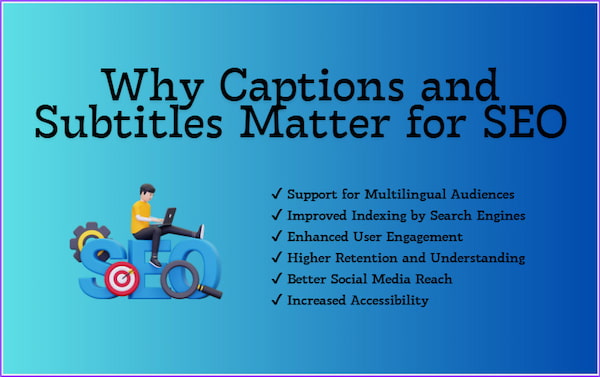
Closed captions (CC) and subtitles do more than just improve accessibility. They can boost your website’s search engine optimization (SEO). Search engines can crawl and index the words spoken in your videos. This makes it easier for your content to appear in relevant search results. This increases the discoverability of your videos and can drive organic traffic to your site.
Furthermore, they enhance user engagement, as viewers are more likely to watch videos longer when they can follow along with the text. Higher engagement metrics signal to search engines that the content is valuable, which can positively impact rankings. Incorporating captions and subtitles is a strategic way to improve accessibility and search visibility for your content.
Reasons Why Captions and Subtitles Matter for SEO:
After understanding the difference between CC and subtitles and why they matter for SEO, you’re probably wondering which tool to use. To make the process simple, efficient, and professional, AnyMP4 Video Converter Ultimate is what you need. It is a multifunctional media software bundle that outperforms the competition by mastering media conversion and beyond. It operates as a caption and subtitle editor, accepting SRT, SSA, ASS, and other common subtitle formats. For better engagement, you can customize font style, size, color, outline, position, opacity/visibility, and delay. It can also handle multiple subtitle tracks for different languages. Plus, its Converter ensures your final video is in the exact format needed for specific platforms.
1. To start with, acquire the free download of AnyMP4 Video Converter Ultimate. Install the caption and subtitle editor and wait for the installation process to finish. Once the setup is completed, launch the software to access the main dashboard.
Secure Download
Secure Download
2. Upon opening, you’ll be directed to the Converter tab by default. Click + Add Files to import the video you want to insert captions or subtitles. Please note that this software supports over 500 media formats, including MP4, MOV, MKV, AVI, WMV, and more.
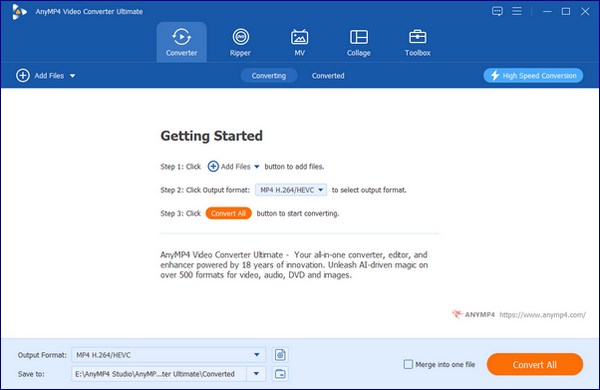
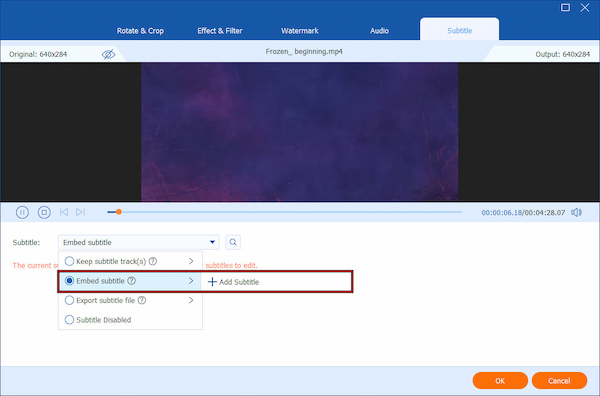
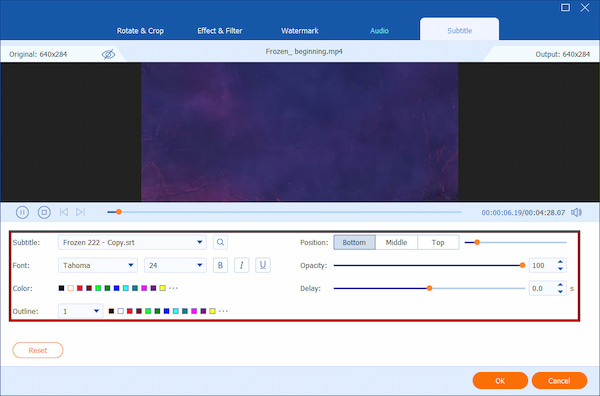
3. Click the Edit (Magic Wand) button next to your video thumbnail to open the editing window. Navigate to the Subtitle tab. From the Subtitle selector, select Embed Subtitle, then click + Add Subtitle to import your subtitle file.
Once imported, customize your subtitles to ensure maximum readability. You can freely adjust font style, size, and color. If needed, modify outline, position, and opacity/visibility. You can also modify the Subtitle delay to synchronise audio with video. Click OK to apply your changes.
4. Use the preview function to check that subtitle timing, style, and positioning are accurate. If satisfied, move to the Output Format selector and specify your output format and quality. Finally, click Convert All to embed the subtitles permanently and export your final video.
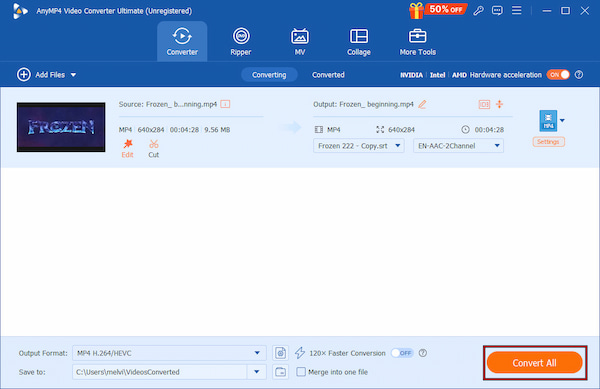
AnyMP4 Video Converter Ultimate is a highly flexible software that enables you to easily add subtitles to a video. Beyond subtitles, it is also a full-featured video editor. It is equipped with over 20 additional tools, including Video Enhancer, Video Compressor, MV Maker, and more.
Q: What does CC stand for?
A: CC stands for Closed Captions. It is an on-screen text that represents spoken dialogue and non-speech audio elements. They make video content accessible to viewers who are deaf or have hearing loss.
Q: Are subtitles good for SEO?
A: Yes, subtitles are very good for SEO. Subtitles provide searchable text that search engines can crawl and index. It helps video content appear in relevant search results. They also improve viewer engagement and watch time.
Q: Is a transcript the same as a closed caption file?
A: No, a transcript is not the same as a closed caption file. A transcript is a plain text document that contains the spoken dialogue, but is not time-synced to the video. Meanwhile, a closed caption file is time-coded and synchronized with the video playback.
Q: Do I need closed captions or subtitles for YouTube?
A: It depends on your audience and goals. Closed captions are recommended to improve accessibility and comply with inclusive content standards. Meanwhile, subtitles are useful for reaching international or multilingual audiences.
Q: Is it a legal requirement to use CC?
A: In some cases, yes. Closed captions are legally required for certain types of content, such as broadcast television and government communications. Using closed captions helps ensure compliance with accessibility standards and avoids potential legal or usability issues.
In summary, the primary difference between closed captions vs subtitles lies in their purpose and intended audience. Closed captions provide the full audio context to make videos accessible to deaf or hard-of-hearing individuals. Subtitles, on the other hand, focus mainly on spoken dialogue. They are used for language translation and expanding global viewership. Both are essential in improving accessibility, engagement, and SEO when used correctly. To ensure your videos are inclusive, professional, and optimized, choose the right tool. AnyMP4 Video Converter Ultimate makes it easy to add, customize, and embed closed captions or subtitles in any language. It can export videos in the exact format you need.
Secure Download
Secure Download
 Updated by Mark Cristobal to Edit Video
More readings
 Best Way to Add Subtitles to MP4 Video Fastly
Have you ever be upset that there are no subtitles on your MP4 video? This passage will give you a detailed guide about how to add subtitles to MP4.
 Learn how to delay subtitles in VLC Media Player and different ways to adjust them, including extracting subtitles, syncing subtitles, and delaying subtitles.
 How to Add/Remove/Extract HandBrake Subtitle
Check our post and explore various ways to use HandBrake Subtitle for managing your video’s subtitle. Discover the easy-going solutions with our complete guide.
 3 Best Ways to Rip DVD with Subtitles (Forced and Soft)
Do you want to know how to rip a DVD with subtitles? The three best ways to do it will be introduced in this article! Read on for more information about it.
 Add your comments to join the discussion here