
Many people no longer use DVDs as their physical media because they prefer digitized formats. However, you might still need to rip one at some point, mainly if you have a large collection of them. Whether you want to rip files from an older DVD for backup or just want to digitize your DVD collections, this post has covered you! This post will walk you through a guide on how to rip a DVD using specialized programs. So without any further discussion, let's begin.

What exactly is the definition of a DVD rip?
DVD ripping refers to extracting a DVD's contents and converting it into a digital media file that can be kept and played on a computer or other media devices. It involves copying the audio, video, and other data from the DVD and converting it into a digital format, such as MP4, AVI, MKV, or other popular formats.
If you do not want to rip DVDs, then you need to open the DVD movies with a DVD player.
DVD ripping is usually done using specialized programs, which allow users to make backup copies of their DVDs or convert the content for playback on different devices, such as smartphones, tablets, media players, or computers.
| Platform | Price | Supported output format | Best for | Usability | Overall ratings |
|---|---|---|---|---|---|
| Windows 11/10/8.1/8/7, macOS 10.12 or later (including macOS Sonoma). | Starts at $49.95, with a free trial | MP4, MKV, AVI, MOV, WAV, and 500+ more. | Ripping and converting DVDs into various formats and devices, editing ripped DVDs, copying DVDs in 1:1 ratio, and more. | Excellent | 9/10 |
| Windows using the MinGW-w64 toolchain, Mac, and Linux. | FREE | MP4, AVI, MKV, etc. | Conversion, video editing, transcoding, etc. | Good | 8.5/10 |
| Windows 10, 11 (64-bit). | Starts at $34.99 | MP4, FLV, WebM, etc. | Editing ripped DVDs. | Poor | 7/10 |
| Windows 10 and later, macOS 10.13 and later, and Linux Flatpak. | FREE | MP4, MKV, MOV, etc. | DVD conversion, video compression, and optimization. | Average | 8/10 |
| Windows, Linux, macOS X, Unix, iOS, Android. | FREE | MP4, AVI, MKV, etc. | Media conversion and multimedia playback. | Average | 8/10 |
| macOS X 10.6 and above. | Starts at $29.95 | MP4, MOV, M4V, etc. | DVD ripping and conversion. | Good | 8.5/10 |
AnyMP4 DVD Ripper is a powerful program designed for ripping and converting DVDs for Windows 11/10/8/7 and macOS. It allows users to extract video and audio from DVDs, folders, and ISO image files and convert them into digital formats. AnyMP4 DVD Ripper is a convenient solution for users who want to digitize their DVD collections or convert DVD content for playback on various devices and media players. It provides a beginner-friendly interface and a scope of features to make the DVD ripping and conversion process easier and more flexible.
Recommendation
Here's how to rip a DVD to a computer using AnyMP4 DVD Ripper.
1.Beforehand, download AnyMP4 DVD Ripper by hitting the Free Download button below and following the installation instructions. Insert the DVD into your computer's drive and launch the program afterward.
Secure Download
Secure Download
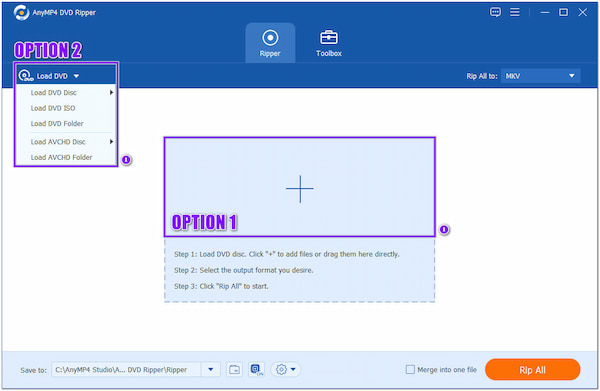
2.Click the Plus icon to add the DVD you wish to rip. Alternatively, you can upload a DVD folder or DVD ISO file by clicking the Load DVD dropdown button on the top-left corner of the main interface. In this guide, we use a DVD ISO file as an example.
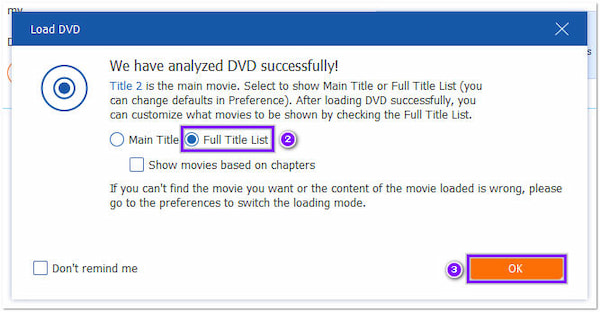
3.After the program analyzes the DVD, choose Full Title List, then click the OK button to proceed. You will find the titles displayed on the main interface afterward.
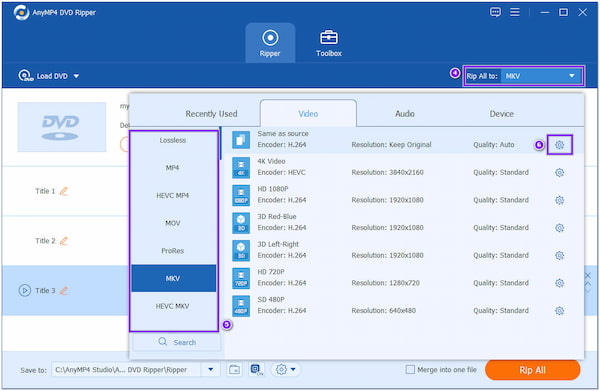
4.Navigate your cursor over the Rip All to option from the top-right corner and choose your desired format. Clicking the Gear icon next to each format will enable you to modify your file's video and audio settings.
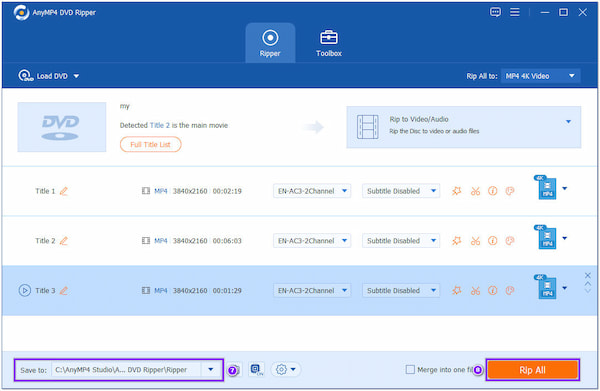
5.Once done, choose your file destination at the Save to option. Then, click the Rip All button on the bottom-right corner to initiate the ripping of your DVD.
AnyMP4 DVD Ripper allows you to edit your DVD contents before ripping it. It is infused with basic video editing features, allowing you to trim, crop, merge, add watermarks, adjust video effects, and apply filters to ripped videos.
FFmpeg is an open-source program that provides a collection of libraries and programs for handling multimedia data. It is a powerful command-line tool capable of performing various operations on audio and video files, such as converting formats, resizing, cropping, merging, splitting, applying filters, and more.
Refer to the steps below to rip a DVD to MP4 on Windows 11/10/8/7 using FFmpeg.

1.Download the program from its official website, then follow the installation process for your computer.
2.Insert the DVD into your computer's DVD drive and identify the path to the DVD content.
3.Open a command prompt or terminal and use the following FFmpeg command to convert the DVD content to a video file:
ffmpeg -i "path/to/dvd" -c:v copy -c:a copy output.mp4
Replace "path/to/dvd" with the actual path to the DVD content, and specify the desired output file name. For example, "output.mp4". This command will copy the video and audio streams from the DVD without re-encoding, ensuring a lossless rip.
4.The program will start the conversion process, and you'll see the progress in the command prompt or terminal.
After the conversion, you can find the converted file in the command and play it with a media player to verify that the DVD has been successfully ripped.
Can I use CyberLink PowerDirector to rip DVDs?
Unfortunately, CyberLink PowerDirector does not include built-in features for ripping DVDs. It primarily functions as a video editing software. However, you can use third-party tools to rip DVDs and import the ripped video files into PowerDirector for editing.
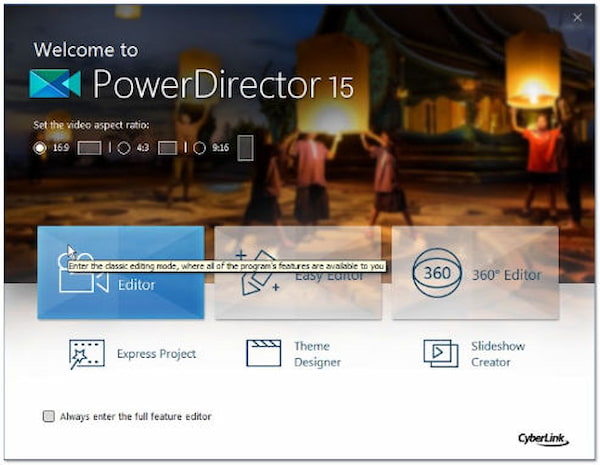
1.Place the DVD into the computer's optical drive. Next, launch CyberLink PowerDirector and go through Preview Movie for a quick DVD preview to ensure all the content looks good.
2.Select the titles of your DVD in the contents box. Make sure all the DVD title boxes are checked.
3.Choose the file's location in the Destination box to the right of the Video Preview.
4.Click the Copy button, which represents a golden DVD with a flame. Eject the DVD and preview the copied file.
Copying DVD content with CyberLink is quite simple and easy. However, you cannot perform it if you are a free-user. You have to pay $39.99 to use the program with no limit.
HandBrake is another open-source program that allows you to rip and convert video files from one format to another. HandBrake supports various video formats as input, including MP4, MKV, AVI, and more. It lets you convert videos to various output formats, including MP4 and MKV, with control over video and audio codecs, bitrate, resolution, and other settings.
Want to learn how to rip a DVD with HandBrake? Follow these steps.
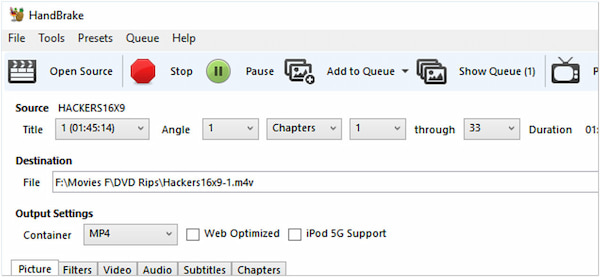
1.Download and install HandBrake from its official website. Ensure to download the appropriate version for your Mac and install it afterward.
2.Insert the DVD into your computer drive. Next, launch HandBrake. The program will detect the DVD inserted in your drive and display it in the Source Selection window. Then, select the DVD as the source.
3.In the Destination section of the program, select where you want to save the ripped video file. Next, hit the Start button to initiate the ripping process.
4.Once the ripping process is complete, the program will save the ripped video file to your specified destination folder. You can now access the ripped video file and use it as desired.
Check the detailed guide here to rip DVDs in HandBrake.
Ripping DVDs with HandBrake is now attainable with the following steps above. Besides ripping DVDs, HandBrake allows you to modify the output settings, like the output format, codec, quality, and other desired parameters, before starting the ripping process.
VLC Media Player is known for its ability to play numerous multimedia formats, including video and audio files. VLC media player is primarily a multimedia player rather than a dedicated DVD ripping tool. But here, it can also help you convert DVDs to digital formats in VLC.
If you want to rip a DVD with VLC, refer to the steps below.
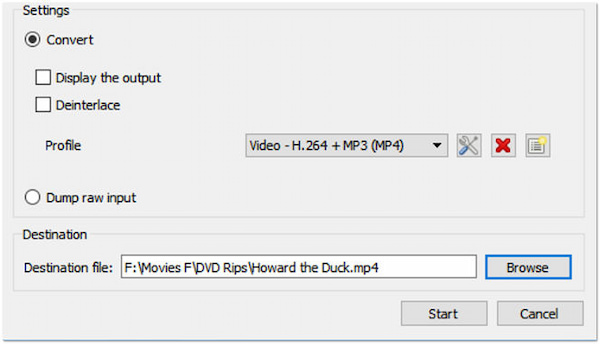
1.Insert the DVD into your computer's DVD drive. Then, launch the VLC on your computer.
2.Click on the Media tab and select Convert/Save. In the Open Media dialog box, go to the Disc tab. Make sure the Disc Selection area displays the correct DVD drive letter. Check the No Disc menus option to skip any DVD menu screens.
3.Click the Convert/Save button. In the Convert dialog box, choose the ripped video's destination file path and desired output format. You can select a video codec, container format, bitrate, and other settings.
4.Hit the Start button to begin ripping the DVD. The program will play the DVD and convert it to the specified video format. You can monitor the progress in the VLC media player interface.
While VLC can play DVDs and even provide some basic DVD playback functionality, it does not have built-in features for ripping the contents of a DVD. So the above steps of ripping DVDs in VLC are a little complicated.
MacX DVD Ripper is a program for ripping and converting DVDs on macOS. It is the best program to rip TV shows from DVDs, movies, and other videos. It provides a user-friendly interface and various features for ripping video and audio from DVDs and converting them into digital formats.
Below are the steps to rip a DVD using MacX DVD Ripper.
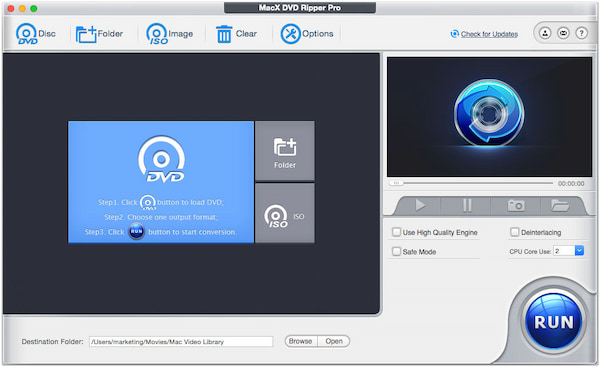
1.Download and install MacX DVD Ripper on your Mac. Next, insert the DVD you want to rip into your Mac's DVD drive. Afterward, open MacX DVD Ripper.
2.Click the DVD Disc button on the top left corner. The program will then analyze and load the DVD contents.
3.Select the desired output format for the ripped video from the dropdown menu at the bottom of the main interface. You can customize video and audio settings like resolution, bitrate, codec, etc.
4.Hit the Browse button and choose a destination for your ripped video. Afterward, click the RUN button to start the procedure.
Aside from the ripping and converting task offered by MacX DVD Ripper, it also provides various customization during the ripping and conversion process. You can adjust parameters like video and audio codecs, bitrates, resolutions, frame rates, and more to tailor the output to their specific preferences or requirements.
Is ripping a DVD illegal?
It may be legal to rip DVDs for personal use, such as making backup copies of DVDs that you own, but distributing or sharing ripped content may be prohibited.
Can I rip a DVD on Windows 10 with Windows Media Player?
Unfortunately NO! Windows Media Player does not have built-in features to rip DVDs. It is primarily designed for playing media files and does not include DVD ripping functionality. Nonetheless, you can utilize a third-party app to rip DVDs on Windows, like AnyMP4 DVD Ripper. (Check how to play DVDs in Windows Media Player.)
What is the best quality DVD rip format?
The best quality DVD rip format depends on your needs. However, the MKV file format is widely accepted for DVD ripping. It is a versatile container format that can store multiple audio, video, and subtitle streams in a single file while maintaining high quality.
How to rip a DVD on Windows 11/10/8/7 or macOS? With the help of the programs and instructional guide earlier, ripping DVDs on your computer is now quite easy. All the programs presented above are designed for ripping DVDs. However, if you're looking for the best tool you can rely on for your ripping needs, we highly recommend AnyMP4 DVD Ripper for its fast conversion speed and high-quality outputs.
 Posted by Ted Klarso to DVD
More readings
 2 Ways to Rip DVD to AVI [Full Guide]
Are you looking for the easiest way to convert DVD to AVI on your Windows? Then, the answers are all here! Come and find out how to attain this.
 Full Guide to Rip Blu-ray for Playing on Apple TV
You can use multiple methods to play Blu-ray to Apple TV, but the best way is included in this post. Learn how to play the film as high as 4K resolution.
 DVD to WebM: How to rip DVD to WebM
This guide helps you rip DVD video to WebM format, which is one of the finest and most widely used online video format.
 What's the Best DVD Player for iPad/Android?
Is there a DVD Player for iPad or Android to play DVD disc directly? No, but you can watch DVD content on iPad or Android tablet with some workaround tools
 Add your comments to join the discussion here