
Since the equipment to play DVDs is not portable, using DVDs is no longer convenient for audiophiles or videophiles nowadays. Thus, people manage to find solutions to convert DVD to other formats compatible with popular media players, so as iPad users. So many iPad users would like to enjoy DVD video with their iPad. Designed to solve that problem, there are various kinds of rippers and converter aims to ripping DVD to iPad playable formats. The article will introduce professional and powerful ones to you, attached with detailed steps of how to rip DVDs to iPad.
What's iPad? iPad is a kind of tablet computer designed, developed and marketed by Apple Inc. Built as a platform for audio-visual media including books, periodicals, movies, music, games, and web content, iPad is now the most popular portable device that possesses excellent mobility as well as incredible video quality. However, DVDs are not compatible to play on the iPad, hence the necessity of ripping DVD to iPad.
AnyMP4 Video Converter Ultimate is also professional DVD Ripper, which can rip DVD video to iPad as well as other portable devices. AnyMP4 specializes in ripping DVD video to iPod, iPhone, iPhone XS/XS Max/XR/X/8/7/6, iPad, iPad Pro and other devices. You are free to customize your own video films with multiple functions of AnyMP4 DVD to iPad Ripper. After using this advanced software, you can enjoy DVD video with your iPad whenever and wherever you want to. The following part teaches you how to convert DVD to iPad playable format.
Secure Download
Secure Download
Step 1: Download and install DVD to iPad Converter
You can download the almighty AnyMP4 DVD to iPad Converter from our website and install it. After the installation, the software should be ready for you to operate.
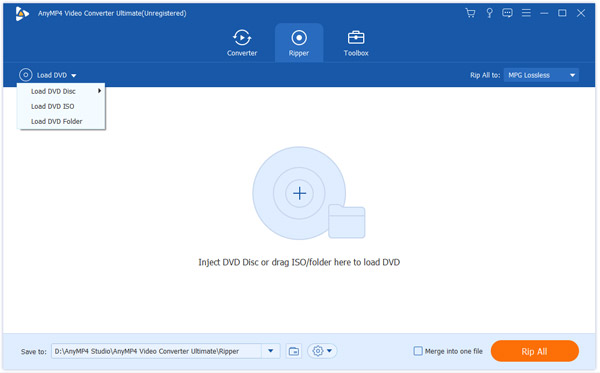
Step 2: Load source DVD
Before starting ripping DVD to iPad, you should first insert your DVD on the local drive. And launch the program to click the "Load DVD" button to add your source DVD video.
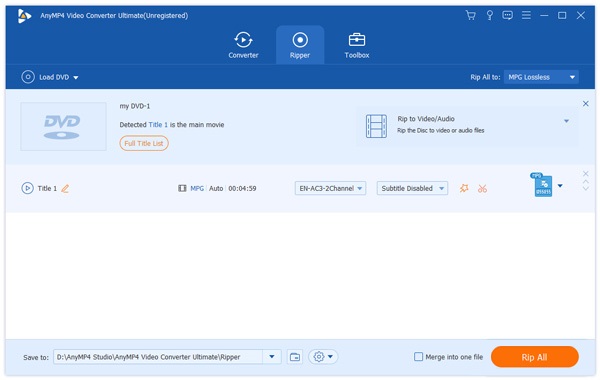
Step 3: Select iPad profile
The "Profile" drop-down list enables you to select your preferred output format for your portable device. AnyMP4 DVD Ripper can rip DVD video to iPad, iPad Air 2/1, iPad mini 4/3/2/1, etc. Here you can select "MP4", "M4V" or "MOV".
Moreover, this tool also supports rip DVD to iPod, iPhone, iPhone XS/XS Max/XR/X/8, Xbox, PS4, Wii, Android Phone and other portable devices.
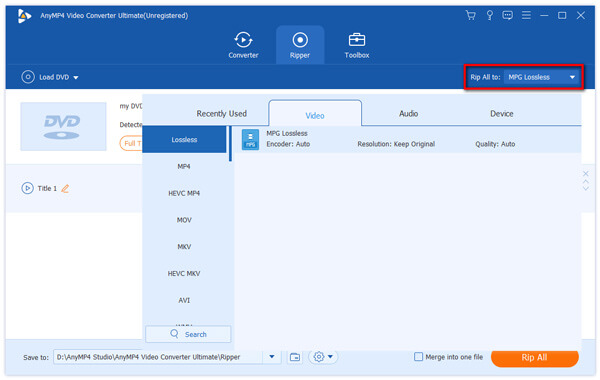
Step 4: Edit DVD video effect
This is the most important step to personalize your own video files. AnyMP4 DVD to iPad Ripper is equipped with multiple editing tools that help you do some further customization. In the right side of the interface, you can trim video length, crop video frame, merge several video clips into one and add text/image watermark to video according to your needs. AnyMP4 DVD Ripper also allows you to adjust Video Brightness, Saturation, Hue and Contrast. In the main interface, Original Preview and Output Preview are played apart to help you do better settings.
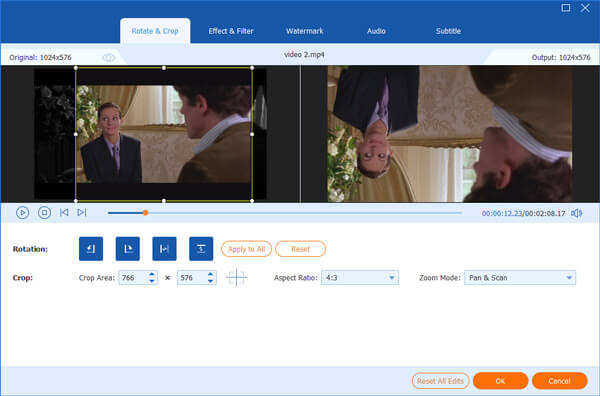
Not satisfied with the output effect of the video? AnyMP4 DVD to iPad Ripper also enables you to adjust output parameters such as Video Encoder, Resolution, Bitrate, Frame Rate, Aspect Ratio as well as Audio Encoder, Channels, Sample Rate and Audio Bitrate.
Step 5: Choose your preferred audio track and subtitle
Audio track and subtitle of your ripping can be customized as well. You can select your preferred audio track and subtitle before the ripping if they are available.
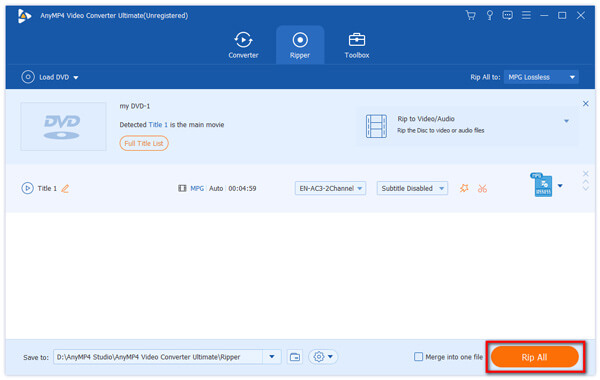
Step 6: Rip DVD to iPad format
The last step you need to do is click the "Rip All" button to rip DVD to iPad compatible format. The ripping operation will be completed soon.
When the progress bar reaches 100%, you are free to enjoy high-quality DVD to iPad video with your iPad.
Any Video Converter Ultimate can help you rip DVD to iPad with fast speed and high quality. As an all-rounded video converter, it not only convert DVD into MP4 and other video formats, but also edits the videos and more. Just check out the detailed process to convert DVD to iPad as follows.
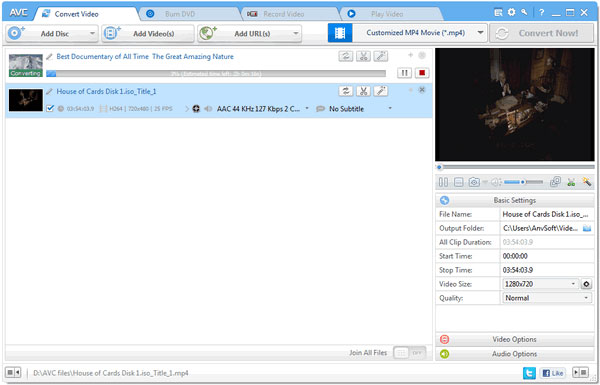
Step 1: Download and install Any Video Converter Ultimate on your computer or Mac. After that you can launch the program on your computer.
Step 2: First input your DVD to the local drive. And then click File> Add DVD to import DVD to the program.
Step 3: Select the output form supported by the iPad by clicking the "Profile" drop-down list.
Step 4: Check all the steps and click "Convert" button to start converting DVD into MP4 or other video formats.
WinX DVD to iPad Ripper is a professional DVD ripper allows its users to rip DVD to iPad with Retina Display, iPod and Apple TV. What is more, it is fully compatible with CSS, RCE, region codes, UOPs, APS and Sony ArccOS. It means you do not have any restriction to rip DVD files.
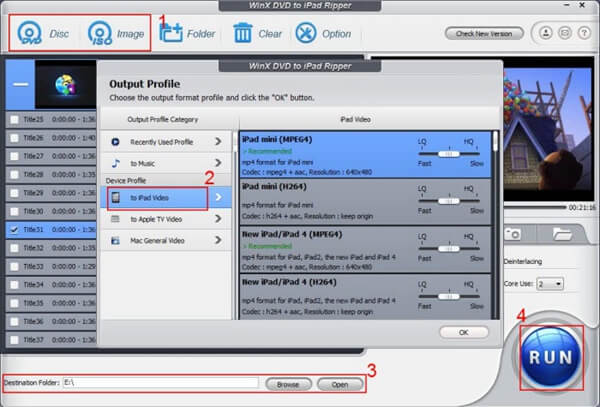
Step 1: Free download and install WinX DVD to iPad Ripper on your computer. Then launch the program on your computer. Click "DVD disc" to load the DVD into the program, you can load the latest version of DVDs into the program.
Step 2: Every video clip in your DVD will be listed in the main interface. And you are free to edit and adjust some parameters by clicking "Edit" button. And the view window on the right side can help you preview the effect you set.
Step 3: Choose the "to iPad" format as the output. In the meantime, find a destination for your customized video. There are other options that you can select "to Apple TV" and " to Music options". You can rip DVD to iPad and other iOS devices with ease.
Step 4: Start ripping by clicking the large "Run" button at the bottom. Before that, you have multiple parameter settings for the Use High Quality Engine, Deinterlace and Safe Mode and other parameters in order to get the best result for ripping DVD to iPad.
After ripping DVD to iPad compatible formats on your computer, how can you play DVD video on iPad? The answer is using iPhone Transfer Pro, which puts ripped DVD video on iPad easily.
Secure Download
Secure Download
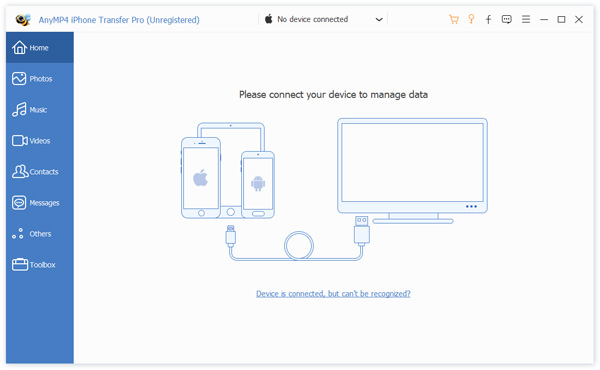
Step 1. Connect iPad to computer
Connect your iPad to computer with USB cable, mean while run iPhone Transfer Pro on your computer, and this software will detect your iPad automatically.
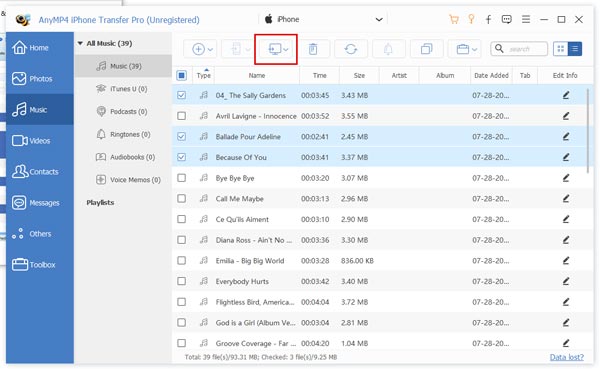
Step 2. Put ripped DVD video into iPad
Navigate "Media" in the left column, and you can see all the media files like music, TV Shows, ringtones, etc. on the right window. Click "Add" button and find the ripped videos to start to put the ripped DVD videos into your iPad.
Very easy, right?
Can you rip rented DVDs?
Yes, you can. You can rip a rented DVD with the DVD ripping software. However, it is not illegal to rip a copyrighted DVD, including the rented ones, in the US.
Is there a DVD player for the iPad?
No. To play DVD on iPad, you need a DVD play application or hardware, and a DVD optical drive. However, the iPad leaves no port to insert a DVD optical drive. As a result, there is no DVD player for the iPad.
Can you connect an external CD DVD drive to an iPad?
No. Apple has never designed a USB port for connecting an external CD or DVD drive for iPad iPhone and iPod users.
Actually, ways to convert DVD to iPad with the help of these rippers are generally the same. And you can rip DVD to other formats by following the same steps above as well.
 Updated by Ted Klarso to DVD
Related Articles
 How to Convert MP3 to MP4 Step by Step
Do you want to convert MP3 to MP4? You can follow the guides to change audio to video.
 How to Do Split Screen/Make a Video Collage on TikTok
Want to do a split screen for your videos on TikTok? This article will show you how to do it most easily. Plus, you can learn how to make more overwhelming split-screen videos here.
 Top 10 DVD to MP4 Converter Software
In this article, we will provide you with the best 10 DVD to MP4 Converter software.
 How to Hook up a DVD Player With Ease
Top ways to connect A DVD player to TV in details and you can follow the steps below.
 Add your comments to join the discussion here