Medal Recorder Review 2026: The Best Free Game Clipper - or Do You Need More?
Quick Answer:
Medal (the Medal.tv recorder by Netherlands-based Medal B.V.) is a top free game-clipping tool with features such as one-tap capture, multi-track audio, and instant sharing. While perfect for gamers, free-tier limits like 1080p caps and watermarks mean users needing full-screen recording or 4K capture should consider a more dedicated screen recorder like AnyMP4 Screen Recorder.
The clip just happened - did you save it? If you have ever lost an unbelievable clutch because your recorder was off or lagging, you know the frustration. In this Medal Recorder Review, we test whether Medal.tv is truly the ultimate free game-clipping tool for PC and mobile.
Medal offers effortless one-tap retro-clipping, multi-track audio, and instant social sharing. While its free tier is capped at 1080p and watermarked exports work well for quick highlights, users needing unlimited, watermark-free 4K recordings or full-screen desktop capture may need a dedicated alternative
Part 1. What Is Medal Recorder - and What It Isn't
A Clip-First Game Recorder for PC and Mobile, not a Full-Screen Recorder
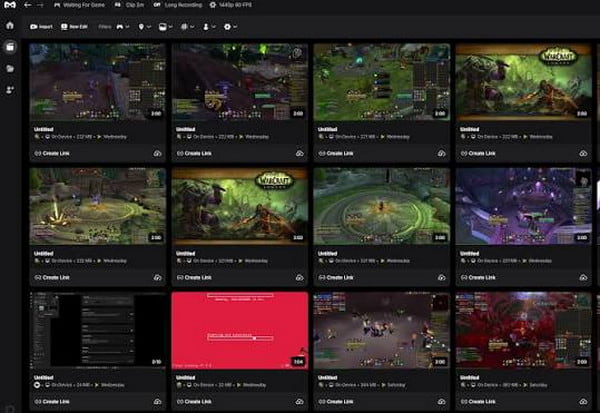
Medal (the Medal.tv recorder by Netherlands-based Medal B.V.) is a specialized, clip-first platform built specifically for gaming. With 12M+ users and over 3 billion clips uploaded, it excels at instant background capture, retroactive hotkey clipping, and direct community sharing. However, it is not a general-purpose full-screen recorder; it is optimized to integrate directly with game engines rather than capture desktop workflows, multi-window apps, or desktop tutorials.
Part 2. Is Medal Free? Free vs Premium Pricing and Limits
What the Free Plan Gives You (20-Minute Upload Cap, 1080p/60, Watermark, Ads)
Medal is completely free to download and use. On the free tier, you get access to core features like automatic game detection, one-tap clipping, and basic multi-track audio.
However, free accounts face hard limits: local recordings and cloud uploads are capped at 20 minutes per clip; output resolution is limited to 1080p at 60 FPS; exported videos include a Medal watermark and outro; shared web links expire after inactivity; and the app displays ads.
Medal Premium Price - $9.99/Month, or $7.99/Month Billed Annually
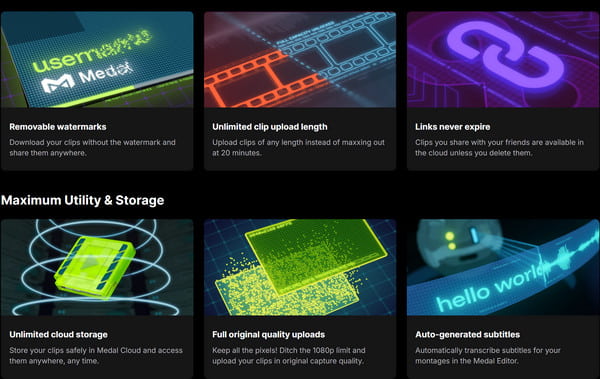
To unlock the app's full potential, Medal offers a Premium subscription priced at $9.99/month (or $7.99/month when billed annually). Premium removes all ads, eliminates the video watermark and outro, provides unlimited cloud storage, keeps share links active permanently, extends clip lengths up to 24 hours, unlocks up to 4K/144 FPS capture, and enables AI auto-subtitles.
| Medal Free |
VS |
Medal Premium ($9.99/mo or $7.99/mo) |
| Up to 20 Mins |
Max Duration of Upload Clip |
Up to 24 Hours |
| Up to 1080p/60 FPS |
Resolution & Frame Rate |
Up to 4K/144 FPS |
| Mandatory watermark |
Watermark |
Fully removed watermark |
| Limited |
Cloud Storage |
Unlimited |
| Contains ads; no AI subtitles |
Ad & AI Subtitles |
100% ad-free; auto AI subtitles |
Part 3. Medal's Signature Feature: One-Tap Clipping, Instant Sharing and Multi-Track Audio
Auto Game Detection and the F8 Clip Hotkey (Last 15s/30s/60s/Up to 20min)
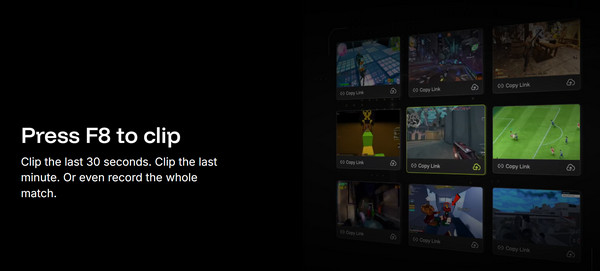
Medal's standout core capability is its low-friction background capture. It automatically detects thousands of PC games upon launch. When an epic moment occurs, pressing the default F8 hotkey retroactively saves the previous 15/30/60 seconds of gameplay, or up to 20 minutes, without requiring you to record beforehand. For marathon gaming, its "Long Recording" mode continuously logs full matches with hotkey bookmarking.
Separate Game, Desktop and Mic Audio Tracks - Plus the In-App Meme Editor
Medal seamlessly records your game audio, desktop VoIP (e.g., Discord), and microphone input onto isolated, separate audio tracks, allowing precise volume balancing during post-production. Once captured, clips open in an integrated video editor packed with meme overlays, slow-motion tools, sound effects, and text captions. From there, Medal generates instant, shareable URLs or directly uploads to TikTok, YouTube Shorts, and Discord, with support from its mobile companion app for on-the-go library access.
Part 4. Where Medal Stops: Watermark, Expiring Links and Platform Gaps
Free Watermark, 20-Minute Upload Cap and Expiring Share Links
Despite its high convenience, Medal presents clear obstacles for professional content creators on the free plan. Every video exported locally or published to external social platforms carries an unremovable top-corner Medal watermark and branded outro clip. Furthermore, the strict 20-minute upload ceiling prevents creators from sharing complete esports matches, while inactive free-share links will eventually expire and return 404 errors.
No Console Recording and No macOS; iOS Is Import-Only
Platform compatibility is another major limitation. Medal is fundamentally built for recording on Windows PCs and mobile environments (Android/iOS). There is no native macOS desktop client, and direct capture from consoles (PlayStation, Xbox, Nintendo Switch) is unsupported without external capture cards and complex setups. On iOS devices, the app functions primarily as a clip viewer, editor, and import tool rather than a native in-game background recorder due to Apple's system sandbox restrictions.
Part 5. Medal vs. Outplayed vs. Xbox Game Bar vs. AnyMP4 Screen Recorder
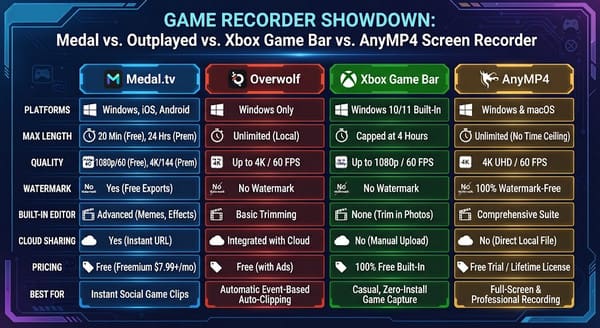
|
Platforms |
Max Recording Length |
Quality |
Watermark |
Built-in Editor |
Cloud Sharing |
Pricing |
Best For |
| Medal Recorder |
Windows 10+, iOS, Android (no console, no macOS) |
20 Min (Free)/24 Hours (Prem) |
1080p/60fps (Free)/4K/144FPS (Prem) |
Premium only |
(memes, SFX, captions) |
Instant URL, but links expire on free |
Free; Premium $9.99/mo or $7.99/mo annual |
Sharing gameplay clips fast |
| Outplayed (Overwolf) |
Windows only |
Unlimited (Local Storage) |
Up to 4K/60 FPS |
No watermark |
Basic trimming |
Local/Overwolf |
Free with in-app ads |
Hands-off auto-capture |
| Xbox Game Bar |
Windows 10/11 |
At most 4 hours |
Up to 1080p/60 FPS |
No watermark |
None |
Xbox network |
Free (Windows built-in) |
Zero-install quick captures |
| AnyMP4 Screen Recorder |
Windows 11/10/8/7 & macOS |
Unlimited |
4K UHD/60FPS |
100% watermark-free |
(trim, merge, annotate, multi-format convert) |
Local, privacy-focused export |
1-Month $12.45; Lifetime $49.96; 3-User $79.96 (with free trial) |
Tutorials, meetings, gameplay, full-screen recording + editing |
Which Should You Pick? (Decision Guide by Use Case)
- • You just want to clip and share gameplay with friends: Medal free is unbeatable - upgrade to Premium only if the watermark, 20-minute cap, or expiring links get in your way.
- • You want zero-click automatic capture backed by the Overwolf framework for specific competitive games: Outplayed.
- • You record once a month and do not want to install anything: Xbox Game Bar.
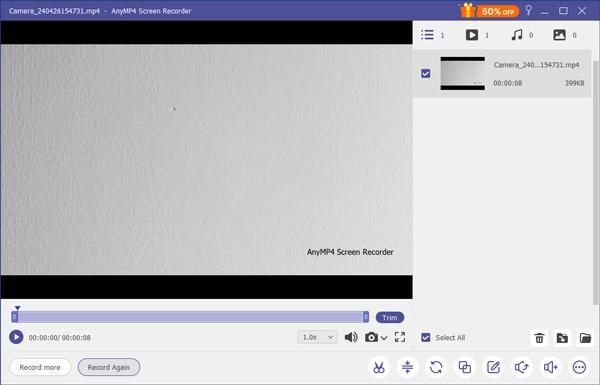
- • You need to record your whole screen - tutorials, meetings, demos, phone mirroring - in clean, watermark-free 4K with real-time annotation and webcam PiP: Medal is a clip tool, so pair it with AnyMP4 Screen Recorder (7-in-1 recorder + editor, 4K/60FPS, no watermark).
Pros and Cons (Watermark, 20-Min Cap, Expiring Links, PC-Centric, Clip-Only Scope)
Pros:
- Effortless one-tap clipping: Instant F8 retro-capture ensures you never miss a highlight.
- Multi-track audio isolation: Separates game audio, Discord calls, and mic input effortlessly.
- Lightweight footprint: Low impact on system RAM and CPU during intensive gaming sessions.
- Cloud-first architecture: Saves local disk space with instant URL generation and instant Discord sharing.
- Automated AI event detection: Automatically clips kills, wins, and clutch plays in top competitive games.
Cons:
- Watermarked free exports: Free tier embeds a persistent brand watermark and outro on exports.
- 20-minute free upload ceiling: Restricts long-form gameplay uploads without a Premium upgrade.
- Expiring free cloud links: Unvisited share links on free accounts eventually become inactive.
- PC-centric limitations: Lacks native macOS support and cannot directly record console hardware.
- Clip-only scope: Not designed for full-screen desktop workflows, software demos, or live annotations.
Audience Fit: Ranked Players Clipping Highlights vs. Teachers, Streamers and Testers Who Need Full-Screen Recording
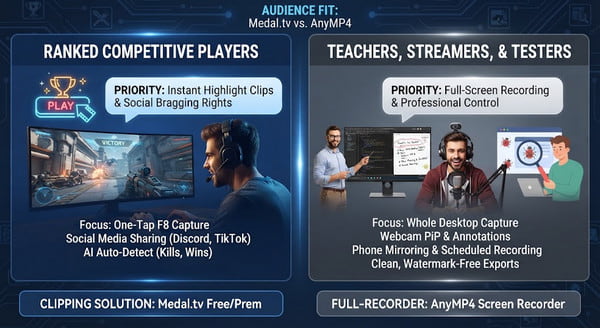
Medal is engineered precisely for ranked competitive players who prioritize speed, social bragging rights, and instant clip sharing.
Conversely, teachers, software testers, educators, and professional streamers require dedicated software like AnyMP4 Screen Recorder. AnyMP4 provides full desktop control, real-time drawing annotations, webcam picture-in-picture, mobile screen mirroring, and clean, watermark-free 4K video exports.
Part 6. FAQs
Is Medal free?
Yes, the recorder and basic clipping are free on PC and mobile. There is an optional Premium tier for extra powers; free clips carry a watermark and a 20-minute upload cap.
What is Medal's clip limit?
Free uploads are capped at 20 minutes and 1080p/60fps; Premium raises clips to 24 hours and uploads to 4K/144fps. Capture itself can go up to 4K/144fps on capable hardware.
How do I record/clip with Medal?
Install the desktop app, sign in, let it auto-detect your game, then press the default F8 hotkey to save the last 15s–20 min (or start a long recording).
Conclusion
Final verdict score: 8.4/10
Medal Recorder is the best free, lowest-friction way to capture and share gameplay clips in 2026 - auto-detection, one-tap clipping, separate audio tracks, and instant links are genuinely excellent, and 12M+ users prove it. But it is a clip platform, not a full-screen recorder, and the free tier's watermark, 20-minute cap, and expiring links are real limits.
If your focus is strictly on in-game highlights, grab Medal for free today. But if you need to record desktop tutorials, full-length 4K gameplay, webcams, or phone screens without watermarks, download AnyMP4 Screen Recorder to enjoy powerful 7-in-1 capture capability!