Adobe Audition vs Audacity Comparison: Which Should You Use?
Summary:
Audacity is recommended for people just starting to work with sound and for those who want something free. However, professionals will need to use Adobe Audition for spectral repair and integration with Premiere Pro. If large audio conversions are required, then AnyMP4 Video Converter Ultimate converts audio to more than 500 formats at 120× speed.
I have recorded a 40-minute podcast, but the audio has background noise, uneven sounds, and a few pauses to fix. Should I go with Adobe Audition, or stick with free tools like Audacity?
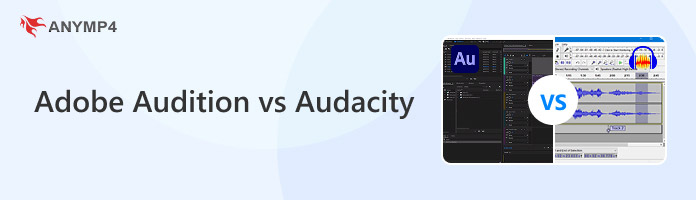
Adobe Audition is best for professional audio restoration and complex production. Audacity, on the other hand, is reasonably good for beginners and users with a tight budget. This Adobe Audition vs Audacity comparison will explore their editing features, noise reduction, multitrack mixing, pricing, and other aspects. This is to help you see where each program excels and where it falls short.
Part 1. The Full Comparison Table + Which Should You Pick?
|
Adobe Audition |
Audacity |
AnyMP4 Video Converter Ultimate |
| Price |
Starts at $22.99; no free trial |
Free |
Starts at $18.75 with a free trial |
| Platform |
Windows and Mac |
Windows, Mac, and Linux |
Windows and Mac |
| Waveform editing |
|
|
|
| Multitrack mixing |
|
|
|
| Spectral editing |
|
|
|
| Batch conversion |
via Batch Process |
via Macros feature |
|
| Noise reduction |
|
|
|
| Audio compression |
✅ |
✅ |
✅ |
| Sound booster |
✅ |
✅ |
✅ |
| Audio sync |
❌ |
✅ |
✅ |
| Trim/merge |
✅ |
✅ |
✅ |
| Configurable audio settings (bitrate/encoder/sample rate/channel) |
✅ |
✅ |
✅ |
The Verdict:
Choose Audition to remove background noise professionally, mix multitracks, and perform spectral restoration. If you need free podcast recording, basic editing, and simple waveform trimming, go with Audacity. But if your priority is an easy-to-use audio editing tool, quick audio extraction, and fast batch audio conversion, use AnyMP4 Video Converter Ultimate.
Check here how to remove background noise in Adobe Audition/Audacity.
Part 2. Editing Power, Deep Dive: Workflow & Track Control
Waveform vs. Multitrack
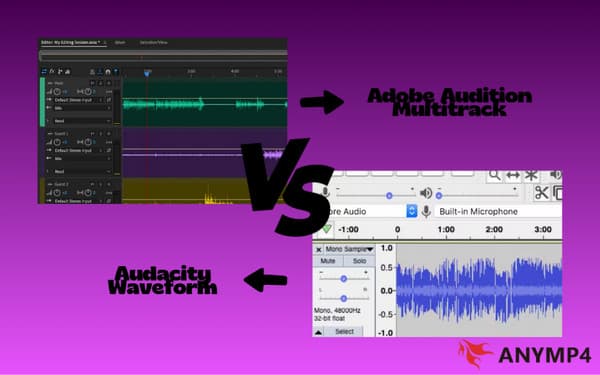
Adobe Audition’s Waveform Editor: edits are destructive, whereas in the Multitrack View they are 100% non-destructive. Audacity, on the other hand, is a destructive audio editor.
Unlimited Tracks (Both)
Both tools can create as many tracks as your computer can handle. However, Audition can handle high track counts and multi-layered audio projects more smoothly.
Spectral Editing
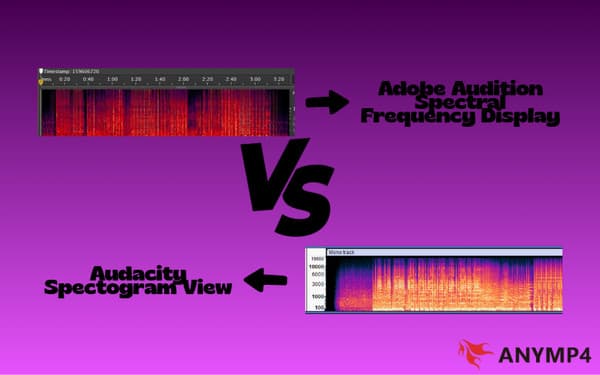
Adobe Audition is known for its Spectral Frequency Display, which turns audio into a visual map. Meanwhile, Audacity has a Spectrogram View, but it is more basic.
Effects & Plugin
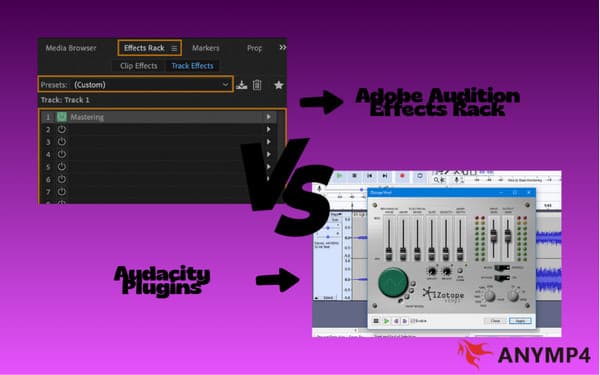
When comparing Audacity vs. Adobe Audition, Audition features an Effects Rack that lets you chain multiple VST or AU plugins on a single track. Audacity 3.7.8 now supports VST3, VST, and AU plugins.
Where Audacity 3.7.8 Smart Clip Closes the Gap
The introduction of Smart Clip in Audacity 3.7.8 was a leap forward. With it, you can now drag the edges of an audio clip to reveal hidden audio. You can also merge clips, drag them across tracks, and create loops non-destructively.
Part 3. Cleaning Up Your Audio: Noise Reduction & Restoration Showdown
Audition uses Adaptive Noise Reduction to eliminate background noise automatically. It also includes the Spectral Healing Brush, which lets you visually paint out transient distractions. When you compare Audacity noise reduction vs. Audition’s, Audacity counters with its classic Noise Reduction/Repair effects. It uses OpenVINO AI plugins for automated isolation.
Part 4. Price, Platform & License Reality Check
Adobe Audition is accessible via subscription services. Audition costs $22.99 per month for a monthly subscription, and $263.88 per year when paid annually. On the other hand, Audacity is completely free, costing precisely $0.
When Muse Group acquired Audacity in 2021 and proposed adding basic error reporting and telemetry, privacy concerns arose in the open-source community. Audacity is free and open source under the GNU General Public License (GPL). Following the community outcry, Muse Group revised its privacy policy. Telemetry is completely optional. If you do not want to share crash reports or app usage data, you can uncheck the box during installation.
Part 5. Learning Curve & Interface: From First Launch to First Clean Export
Audacity is a simple application with a single-window UI and a very quick export time of under 15 minutes. Though it looks outdated, it provides you with the necessary tools for editing, recording, and exporting right away. Adobe Audition will take 45 minutes to give its first export, which is quite clean. It is very intimidating for a newbie due to the workspace-based interface.
Part 6. How to Use AnyMP4 Video Converter Ultimate for Audio
AnyMP4 Video Converter Ultimate isn’t just a tool for converting video files. It can also convert almost any audio file you throw at it to more than 500+ formats. This software supports batch conversion of hundreds of audio files without lag or crashes. It uses the most advanced hardware-accelerated media processing to achieve a 120× conversion speed. Apart from audio-to-audio conversion, it can also extract audio from video, remove noise, compress large audio, boost sound, sync audio to video, and more.
Here’s how to use AnyMP4 Video Converter Ultimate:
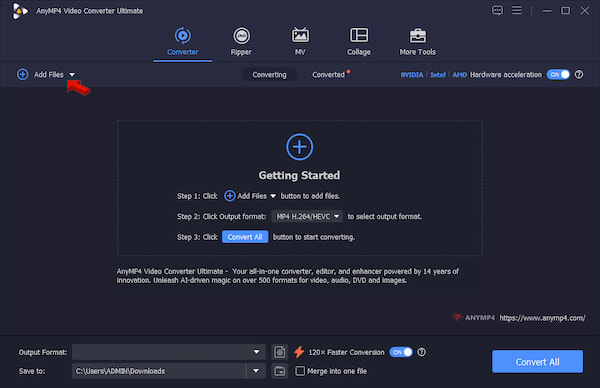
1. Download AnyMP4 Video Converter Ultimate and complete the installation.
After setup, it opens to the Converter tab. Click +Add Files to import the audio source.
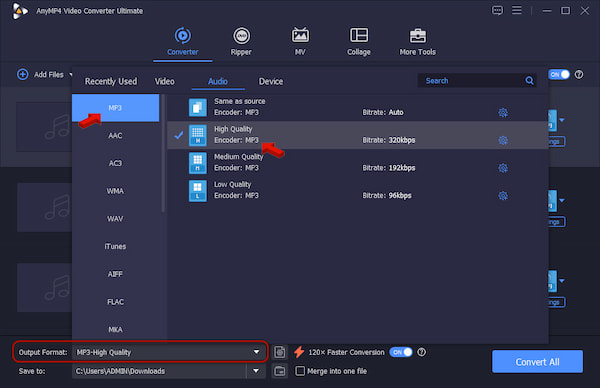
2. Go to Output Format and select MP3 under the Audio category. Select High as your quality preset to convert the audio source without losing quality.
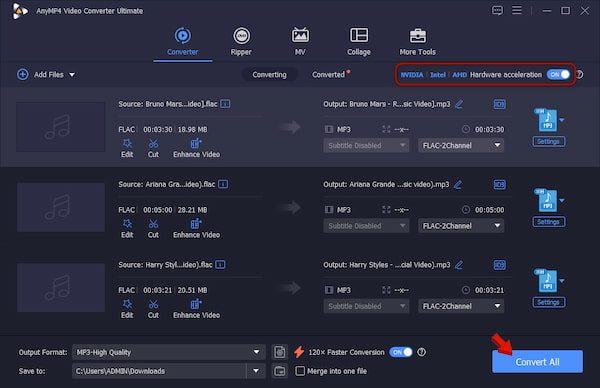
3. Back to the main interface and enable Hardware Acceleration to speed up the conversion. Set the output destination, then click Convert All.
As a multi-format conversion software, AnyMP4 Video Converter Ultimate can both re-encode and remux audio files to more than 500+ formats. If you need to compress audio, remove background noise, boost sound, or sync audio, go to More Tools to access the audio editing tools.
Part 7. FAQ about Adobe Audition vs Audacity
Which is better for podcasting?
When comparing Adobe Audition vs Audacity for podcasting, Adobe Audition is the better option for most podcast editors. But if you want a free audio editor for recording podcasts, Audacity is worth considering.
Can both handle multitrack recording?
Yes, both Adobe Audition and Audacity allow multitrack recording and editing. In this regard, Adobe Audition supports up to 32 simultaneous recording channels, whereas Audacity offers multitrack recording with easy mixing.
Which has better noise reduction, Audacity or Audition?
Adobe Audition offers more efficient noise reduction than Audacity. Even at higher reduction settings, the audio is not degraded and harsh artifacts are not created.
Conclusion
The Adobe Audition vs Audacity decision isn’t about which editor has more features. Rather, it is more about whether those features solve a real problem. For audio restoration, professional mixing, and integration, go with Audition. Choose Audacity if you want a free editing solution. When your main tasks are converting files and doing basic audio editing, AnyMP4 Video Converter Ultimate offers a more direct approach.




 Add your comments to join the discussion here