Audacity vs GarageBand: Which Wins on Mac & Everywhere Else?
Summary:
Audacity is used for editing and repairing audio on Windows, Linux, and Mac, including noise reduction, trimming, and spectral editing. If you’re an Apple user, you can use GarageBand, a built-in music creation app. Whichever you pick, keep AnyMP4 Video Converter Ultimate, a format converter tool, always ready.
Audio editing is an essential step to create clean audio podcasts, voiceovers, music, and recordings. However, choosing the right software to remove background noise, cut pauses, mix tracks, and apply effects can be challenging. Fortunately, there are free tools that offer useful features with zero subscription fee. Two popular options are Audacity and GarageBand. This Audacity vs. GarageBand review explores their audio-editing capabilities, features, strengths, and limitations. This way, we can help you choose the right tool for your audio projects.
Part 1. The Verdict First & Head-to-Head Comparison
Choosing between Audacity or GarageBand can be confusing because both can record, edit, and apply effects. However, the similarities end when you start working. Audacity is built for editing and repair, while GarageBand is built for creating music.
|
Audacity |
GarageBand |
AnyMP4 Video Converter Ultimate |
| Platform |
Windows, Mac, and Linux |
Windows and Mac |
Windows and Mac |
| Price |
100% Free |
Free for Apple users |
Starts at $18.75 with free trial |
| Music Creation |
|
|
|
| Noise Removal |
|
|
|
| Spectral Editing |
|
|
|
| Recording |
|
|
|
| Trim |
|
|
|
| Compress |
|
|
|
| Sound Booster |
|
|
|
| Virtual Instruments |
|
|
|
| Format Conversion |
Export to different formats only |
Export to different formats only |
True format conversion |
| Input and Output Support |
WAV, FLAC, MP3, and others |
Apple Loops, Apple Lossless, Multitrack MIDI, and others |
MP3, M4A, WAV, and 500+ others |
Part 2. GarageBand Deep Dive: The Mac Musician's Starter DAW
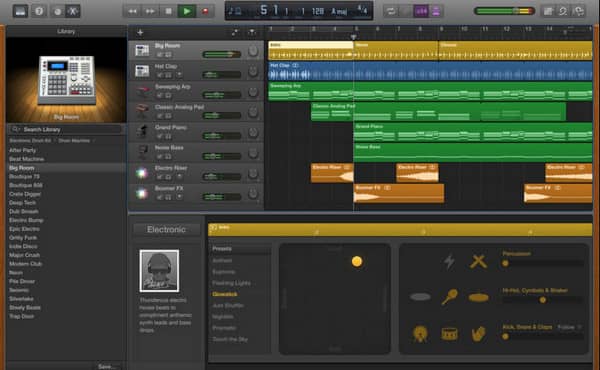
GarageBand is free on Mac and other Apple ecosystem devices. It provides a single-window workspace that features virtual instruments, Smart Controls, Drummer, MIDI editing, and amp simulations. The Share menu exports to AIFF, WAV, ALAC, compressed MP3, AAC, and M4A, but not FLAC. Also, band project support for Logic Pro migration for Mac and iPad.
Part 3. Audacity Deep Dive: The Cross-Platform Audio Surgeon
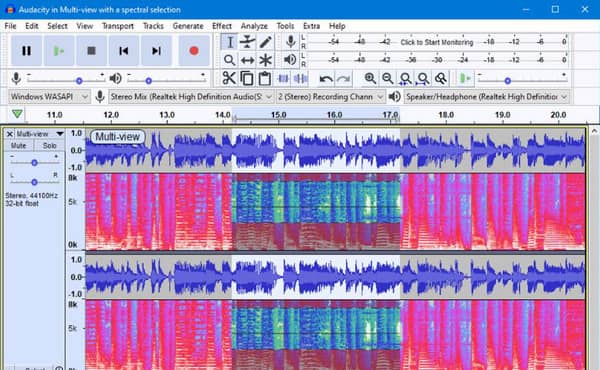
Audacity is a time-tested open-source audio editor that supports both destructive and non-destructive editing. It can remove background noise, mix multiple tracks, and features metered recording and the .aup3 project format. Also, it supports spectral views, effects chains, and VST3/LV2/AU plugins. It exports projects to WAV, AIFF, FLAC, MP3, Ogg Vorbis, and MP2.
Part 4. Audacity vs GarageBand: Which One You Should Choose
The difference between Audacity and GarageBand isn’t about which app has more features. Instead, you should focus on which app can make your particular audio job easier.
GarageBand is an exclusive digital audio workstation for Apple devices. It is bundled completely free with new Apple hardware and the App Store. It works as a full-featured music creation app packed with virtual instruments, software Drummer, loops, and MIDI sequencing.
Audacity is a long running audio editor licensed under the GNU General Public License (GPL). Unlike GarageBand, it isn’t limited to Mac; it can also run on Windows and Linux. It focuses on waveform editing, multi-track mixing, noise reduction, restoration, and plugin support.
Part 5. How to Use AnyMP4 Video Converter Ultimate: Convert Any Audio Format
When choosing GarageBand vs Audacity for saving audio, both can export to common formats. However, neither can do large-scale batch conversion. If you have already exported your audio projects and need to convert them for compatibility, use AnyMP4 Video Converter Ultimate.
Though the name suggests otherwise, it can also handle audio conversion and basic editing. This software can convert almost any audio file you throw at it to over 500 formats. It allows simultaneous conversion of hundreds of audio files without experiencing lag or crashes. It adopts the most advanced hardware-accelerated media processing to achieve a 120× conversion speed. AnyMP4 also comes with a toolkit packed with a noise remover, audio compressor, volume booster, and audio sync.
Here’s how to use AnyMP4 Video Converter Ultimate:
1. Download AnyMP4 Video Converter Ultimate and complete the installation.
After setup, it opens to the Converter tab by default. Click +Add Files to import the saved audio.
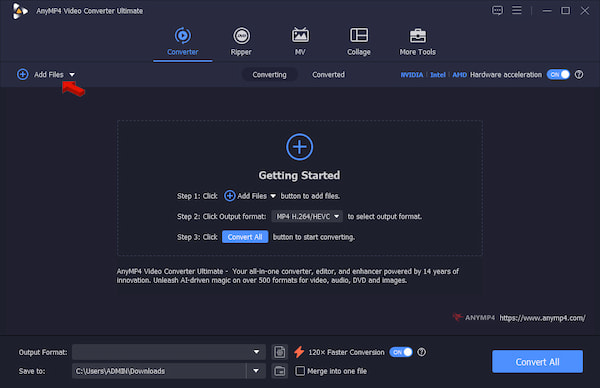
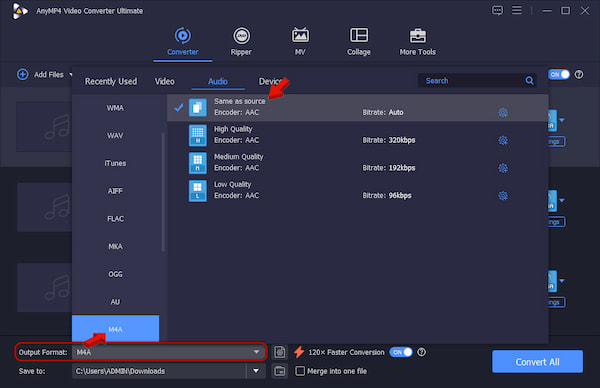
2. Go to Output Format and select M4A under the Audio category. Select Same as Source as your quality preset to match the audio settings of your source.
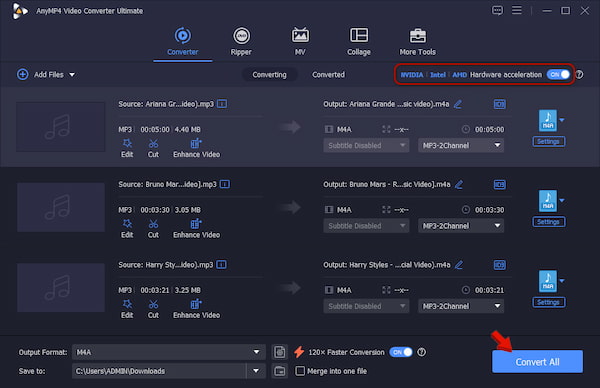
3. Back to the main interface and activate Hardware Acceleration to speed up the conversion. Set the output folder, then click Convert All to start the conversion.
Pro Tips
Use MP3 when file size and compatibility matter more than preserving the source’s quality. Also, please be informed that a 120× conversion speed must not be treated as a guaranteed audio conversion speed. The actual speed depends on the format, hardware, settings, and workload.
Part 6. The Honest Pros & Cons
Regardless of whether you choose Audacity or GarageBand, both apps are capable. Their strengths become more apparent when you consider what each one makes easy, and what it leaves out.
GarageBand
PROS
- Preinstalled on Apple devices with zero subscription fee.
- Music creation app with virtual instruments, drummer, and others.
- Can open exact project files in Logic Pro.
CONS
- No Windows and Linux version available.
- Limited export options and settings.
- Cannot load VST or AAX plugin files.
Audacity
PROS
- Available on Mac, Windows, and Linux OS.
- Works as a destructive/spectral audio editor.
- Supports VST3, Nyquist, LV2, and LADSPA plugins.
CONS
- Does not offer virtual instruments/sequencer.
- A bit complicated to use for beginners.
- Cannot export a session file to open directly inside DAWs.
Want a similar tool? Look for more Audacity alternatives here.
Part 7. FAQ about Audacity and GarageBand
Which is better for podcasting, Audacity vs GarageBand?
If you’re using Mac, iPhone, or iPad, GarageBand is best for recording audio and adding music intro or jingles. However, Audacity is a better fit if you need deep audio repair, cleanup, and a cross-platform tool.
How do I share my finished audio in any format?
To share your finished audio in any format, you must first export the project as a WAV or MP3 file. Then, use AnyMP4 Video Converter Ultimate to transcode them to your preferred formats.
Can GarageBand open Audacity projects?
No, GarageBand cannot open Audacity (.aup3) project files. Likewise, Audacity cannot open GarageBand (.band) project files.
Conclusion
Audacity vs GarageBand: which one should you use? Use Audacity to edit and repair audio. If your priority is producing songs, go with GarageBand. Choosing between them based on popularity or feature count misses the point. The best option depends on the work you need to complete. And if the audio is already finished but needs to be saved in another format, use AnyMP4 Video Converter Ultimate.


 Add your comments to join the discussion here