
Ripping a Blu-ray disc to MKV format is a practical solution for digitizing the Blu-ray collection. This way, you make it more accessible and compatible with various media players and devices. MKV is known for its versatility and ability to preserve high-quality video and audio. In this process, specific software tools come into play. They offer users the ability to extract and convert the contents of a Blu-ray disc into the MKV container. This guide will explore various methods on how to rip Blu-ray discs to MKV. We’ll provide step-by-step instructions and insights to help you transform your physical Blu-ray content into a digital format. Keep going to uncover more information!

| Windows and macOS | Windows, macOS, Linux | Windows, macOS, Linux |
| Free and Paid | Free and open-source | Free and Paid |
| Excellent | Good | Good |
| Blu-ray discs, folders, ISOs, 3D Blu-rays, DVDs | Blu-ray discs, DVDs | Blu-ray discs, DVDs |
| MKV, MP4, MOV, AVI, 3GP, and 500+ more | MKV, MP4, and WebM | MKV |
| 50× ultra-fast speed | Moderate | Moderate |
AnyMP4 Blu-ray Ripper stands out as one of the best Blu-ray to MKV converters. It offers an adaptable solution for users seeking high-quality conversions. This powerful software supports countless output formats, including MP4, MOV, AVI, and 500+ more. For good measure, it goes beyond simple format conversion. It allows you to retain all original subtitles, audio tracks, menus, and other parameters from the Blu-ray source.
Not limited to Blu-ray discs, it effortlessly handles Blu-ray folders, Blu-ray ISOs, and even 3D Blu-rays from any region. AnyMP4 Blu-ray Ripper ensures a rapid conversion process with its 50× ultra-fast speed, all while maintaining top-notch video quality. What’s more, it offers an Enhancer feature. It optimizes Blu-ray quality by reducing video shaking, eliminating background noise, adjusting brightness and contrast, and upscaling video resolution.
What to Expect With AnyMP4 Blu-ray Ripper:
Here’s how to convert Blu-ray to MKV without quality loss using AnyMP4 Blu-ray Ripper
1. Initially, get a free download of AnyMP4 Blu-ray Ripper. Install the Blu-ray ripping software on your computer and wait to finish the installation process.
Secure Download
Secure Download
2. Before launching, ensure to insert the Blu-ray disc into your computer’s Blu-ray drive. Navigate to the Ripper tab and click Load Blu-ray to add the Blu-ray content.
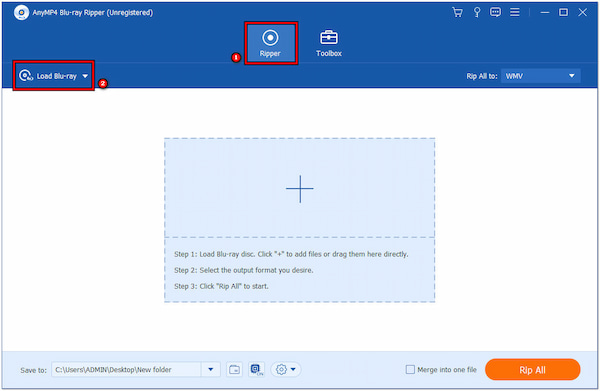
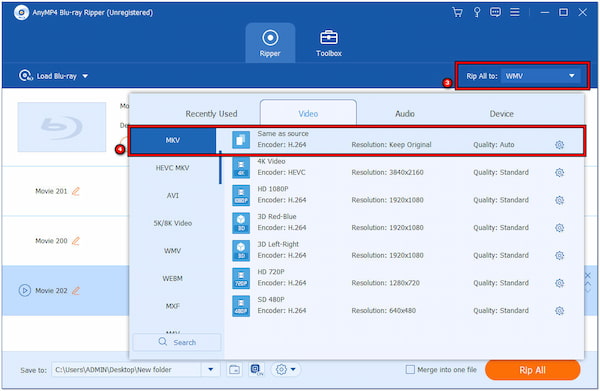
3. After loading the Blu-ray content, head to the Rip All To field. Choose MKV as your output format in the Video Category.
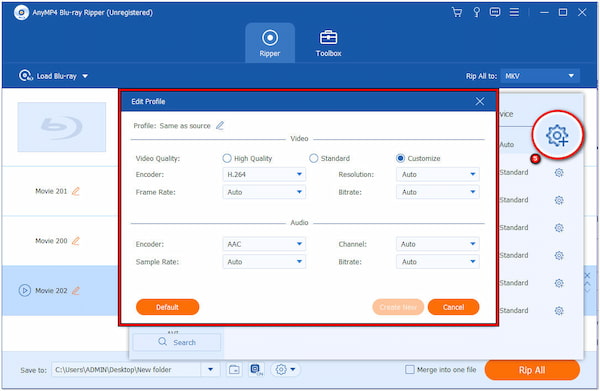
4. Click Custom Profile to configure the video and audio quality. You can customize parameters like Encoder, Frame Rate, Sample Rate, Bitrate, Resolution, and Channel.
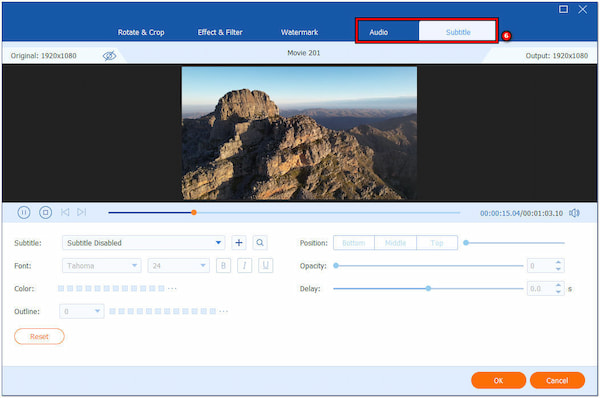
5. If your Blu-ray has multiple audio tracks or subtitles, you can select the ones you want to include in the MKV file. To do so, click Magic Wand and head to the Audio and Subtitle tab.
6. After configuring the settings, click the Save To field and select a path destination. Finally, click Convert All to initiate Blu-ray to MKV conversion.
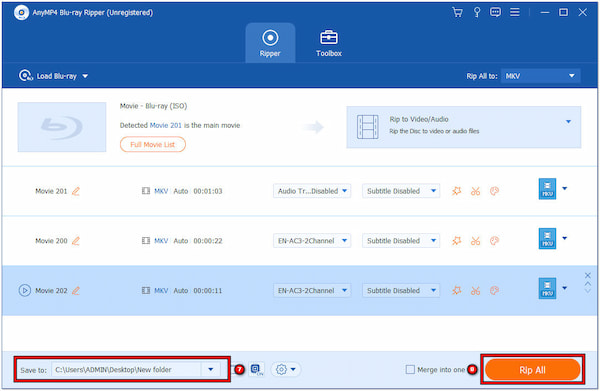
AnyMP4 Blu-ray Ripper proves to be a versatile and powerful solution for converting Blu-ray content. Besides the Enhancer feature, you can also use the video editing tools. It allows you to rotate, crop, add filters, adjust video effects, and even add audio tracks and subtitles.
HandBrake is a cross-platform and open-source video transcoder. It supports various input formats, including Blu-ray and DVDs. It serves as a versatile tool to rip Blu-ray to MKV, MP4, and WebM. It includes advanced features, such as batch processing, chapter markers, and adjusting video and audio settings.
Here’s how to rip Blu-ray to MKV in HandBrake:
1. Open HandBrake and click Open Source to import the Blu-ray content.
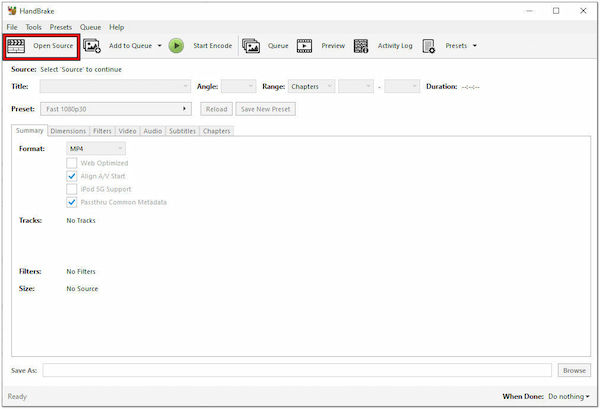
2. Click the Format dropdown menu and select MKV.
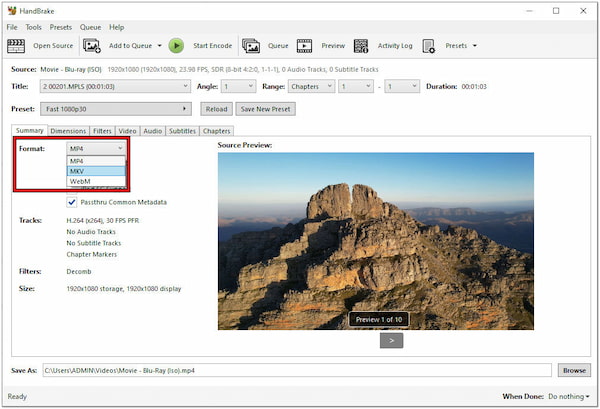
3. Click Start Encode to start converting Blu-ray to Matroska Video format.
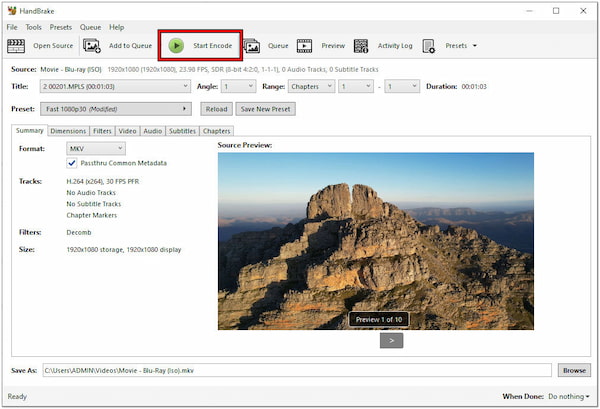
HandBrake stands as a reliable and versatile solution for ripping Blu-ray discs to the MKV format. However, there’s a tiny catch. HandBrake cannot convert copy-protected content directly. Also, the supported output format is limited to MKV, MP4, and WebM only.
MakeMKV is a user-friendly video conversion tool. Primarily, it is designed for transforming DVD and Blu-ray content into the MKV format. It excels in extracting and preserving the original video, audio tracks, and subtitles without unnecessary compression. The conversion process is relatively fast, allowing users to create MKV files efficiently.
Here’s how to convert Blu-ray ISO image to MKV with MakeMKV:
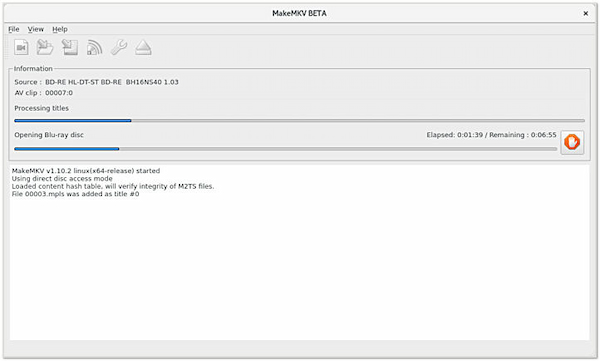
1. Run MakeMKV and click Source to load the Blu-ray content.
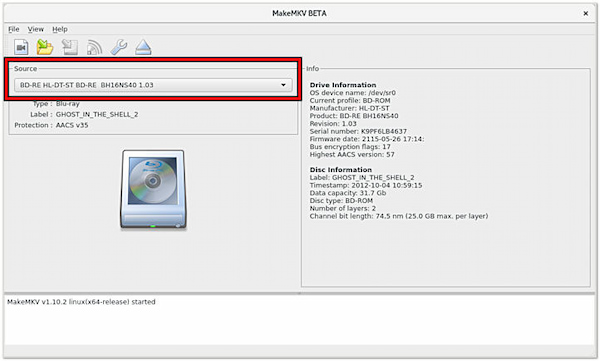
2. Click the Output Folder and choose where you want to save the ripped MKV file.
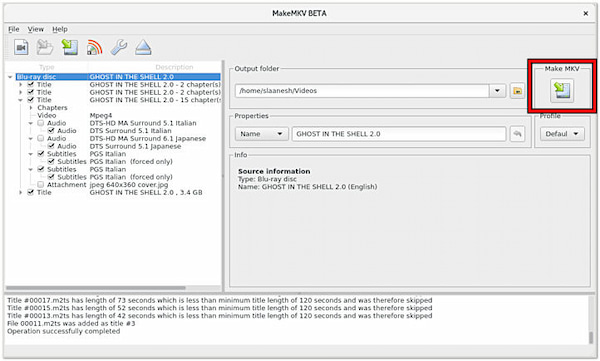
3. Click Make MKV to begin ripping Blu-ray to Matroska Video format.
MakeMKV proves to be an excellent Blu-ray-MKV converter. It is an ideal tool for those who prioritize maintaining the quality of their media collection. But here’s a small catch. As the name suggests, MakeMV only supports MKV as an output format.
Can you convert Blu-ray to MKV without quality loss?
YES! You can convert Blu-ray to MKV without quality loss. Using a reliable tool like AnyMP4 Blu-ray Ripper, you can preserve the original video, audio tracks, and subtitles while converting Blu-ray content to the MKV format. This tool is designed to maintain high-quality output. Also, it supports countless output formats besides MKV.
Is MakeMKV no longer free?
MakeMKV is still available for free during a 30-day trial period. It allows users to utilize shareware functionality. However, after the trial period expires, users who wish to continue using MakeMKV need to purchase a registration key. The registration key is valid for all MakeMKV versions on all platforms. It provides you with ongoing access to the software’s features and functionalities.
Is MKV better than Blu-ray?
MKV and Blu-ray serve different purposes. Blu-ray is a physical disc format that can offer uncompressed, high-definition video and audio. On the other hand, MKV is a digital container that supports several video and audio codecs. MKV files are used for digital distribution and storage. They may not match the quality of Blu-ray discs in terms of bitrate and quality. Simply put Blu-ray excels in physical media playback, while MKV is versatile for digital storage and distribution.
As a final thought, you are now equipped with the idea of how to rip Blu-ray discs to MKV. Ripping a Blu-ray disc to MKV format provides an efficient way to modernize your movie collection. By converting Blu-ray content, users gain flexibility in playback across various devices and media players. Among the various tools presented, AnyMP4 Blu-ray Ripper stands out as a robust solution. With its comprehensive features, it proves to be a reliable and feature-rich choice in Blu-ray to MKV conversion.
 Updated by Ted Klarso to Blu-ray
More readings
 3 Best Ways to Burn MKV to Blu-ray With Lossless Quality
Do you want to burn MKV to Blu-ray disc while maintaining its original quality? Find out here how to accomplish it with the help of user-friendly programs.
 4 Ways to Rip DVD to MKV With No Quality Loss
A specialized tool is needed when you rip a DVD to MKV. So, if you don’t know which tool to use for conversion, you better check them out here.
 How to Play MKV Files on Mac [3 Easy Ways]
Mac cannot open MKV videos directly. But you can get 3 best MKV players for Mac in this article. Learn the steps to watch your MKV movies and videos here.
 Beginner’s Guide to Rip Blu-ray to VOB [Easy Trick]
This post will outline the process of ripping Blu-ray to VOB format in an easy way. So, if you have Blu-rays and wish to digitize them, click this post.
 Add your comments to join the discussion here