
As we all know, AVCHD camcorders and some other cameras use MTS and M2TS as the video container formats for digital video camera recording and playback of high definition. Because of their high-resolution, MTS or M2TS files can be quite large. If you want to play an M2TS or MTS file on a portable media player or mobile device, you need to change it to a more flexible format, like MKV.
An easy way to do this is to use an M2TS/MTS to MKV converter to save up space for storage or being compatible with most devices. Below you’ll find a simple guide on how to convert M2TS/MTS to MKV with an efficient video converter. Read it and have a try.
The best way to convert an M2TS or MTS file to MKV or other formats is to use a professional video converter. AnyMP4 Video Converter Ultimate can easily handle this task since it supports all popular video and audio formats, including DVD, MTS, M2TS, MP4, MOV, FLV, AVI, MP3, and more. On top of that, you can use it to edit, compress, and enhance videos with this powerful MKV converter. Learn how to turn M2TS or MTS files to MKV video in just a few mouse clicks with this full-featured M2TS/MTS to MKV converter.
Secure Download
Secure Download
Step 1. Download AnyMP4 Video Converter Ultimate for Windows or Mac. Run the downloaded file and follow the instructions to install the software on your computer.
Step 2. Launch the program and click the Add Files button in the upper-left corner of the converter interface. Choose one or more files to convert from M2TS/MTS to MKV.
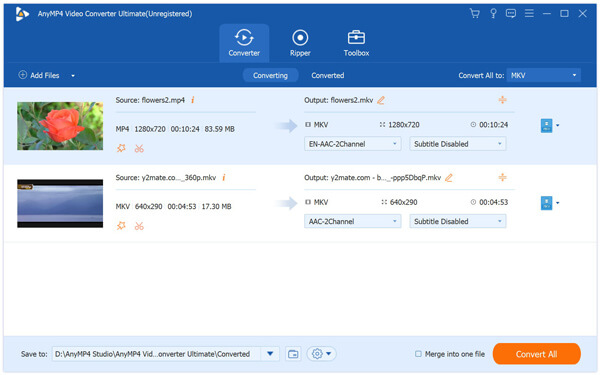
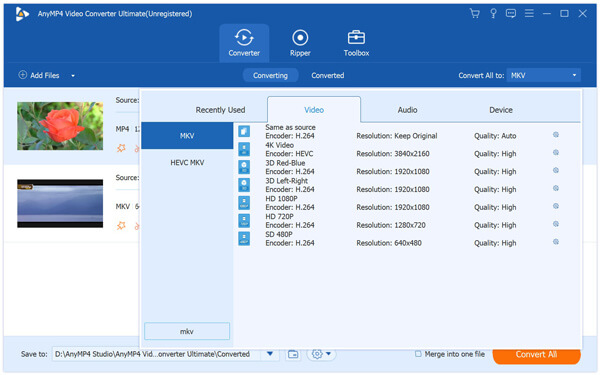
Step 3. To find the output video format you want, click the Convert All to option, hit on the Video tab, and then select MKV. If you want to be able to paly your converted video on a mobile phone, click the Device tab and choose your device model.
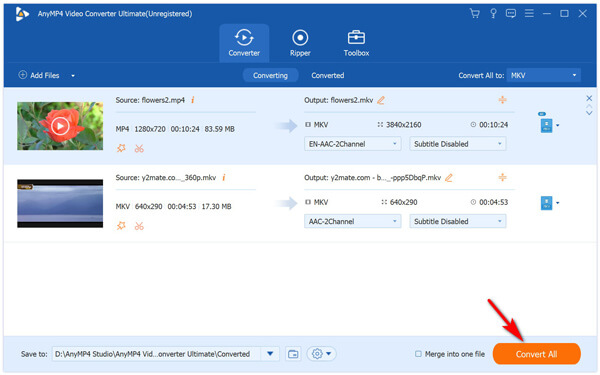
Step 4. By default, converted files are saved to the AnyMP4 Video Converter Ultimate folder. To change to a different output folder, find the Save to option and choose a new folder. In the end, click Convert All to start converting the M2TS or MTS files to the MKV format. Once the conversion is completed, the folder containing the converted files will open automatically.
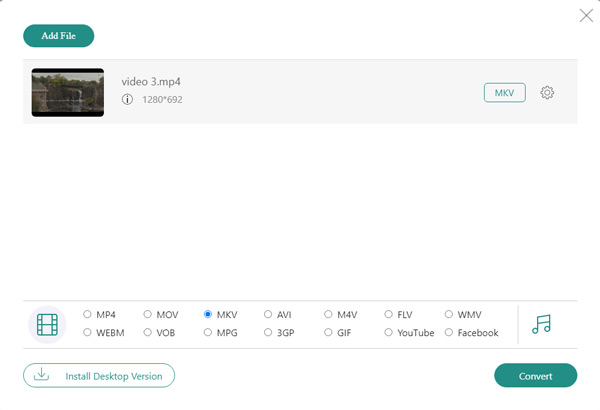
Another option for changing M2TS or MTS files to MKV is to use an online free M2TS/MTS to MKV converter, like Free Online Video Converter. This is a free video conversion tool that can change M2TS or MTS video files to MKV video format or other output formats including MP4, MOV, AVI, MP3 and more.
Here’s how to make the conversion from M2TS/MTS to MKV:
Step 1. Go to https://www.anymp4.com/free-online-video-converter/ and click the Add Files to Convert button and then activate the launcher.

Step 2. Then, choose the M2TS or MTS files that you want to convert. From the Video tab, select the MKV format as your output format. In the end, hit on the Convert button and wait for the conversion to end. The converted video file will be saved to your hard drive automatically. When you got your desired video format, you can enjoy it on your media player or mobile phone.
How do I convert M2TS files to AVI?
To make the conversion from M2TS to AVI, you can use the above mentioned two tools, Video Converter Ultimate and Free Online Video Converter. Or you can check out this article to have a check: 2 Quick Ways to Convert MTS to AVI Files on Windows/Mac/Online.
What is the best MKV converter?
Here is the list of the top MKV converters:
Can QuickTime play M2TS files?
No, QuickTime is not able to open MTS files. But don’t worry, you have other options to open your M2TS files on your Mac. AnyMP3 Blu-ray Player is a comprehensive media player that can easily play M2TS, MTS, MP4, MOV, AVI, or other popular video or audio formats. More importantly, it also supports the playback of Blu-ray and DVD discs.
Can iPhone play MTS files?
The MTS format can’t play on an iPhone or other iOS devices. As we know, iPhone can open MP4 and MOV video files. If you want to play MTS files on your iPhone, you should convert them to iPhone compatible formats, like MP4 and MOV.
How to open an M2TS file?
M2TS files can be opened with Windows Media Player, VLC, Splayed, 5KPlayer, Splash, and other popular media player applications.
Now you have learned an efficient way to add MKV to iTunes. Have you tried it yet? What do you think about it? You can let us know by leaving a comment below. You are also welcomed to post your good ideas below. We just want to help all our readers to find the best solution to convert MKV movies to iTunes.
 Posted by Riley Mitchell to Convert Video
Related Articles
 7 Best MKV to MP3 Converters to Extract MP3 from MKV Videos Simply
Some of the best video converters are able to extract MP3 from high quality videos. Here we list top 7 MKV to MP3 Converters for Windows PCs and Mac computers.
 How to Effectively Convert AVI to MKV on Windows and Mac OS X/11/12
Are you looking for the most reliable AVI to MKV converter? This article will show you four methods that can help you to convert AVI video files to MKV format without quality loss.
 How to Convert MP3, AC3, WAV to AVI on Windows and Mac
Want to convert audio file formats like MP3, AC3, WAV to AVI, a video format? This post shows you free and online ways to change MP3/AC3/WAV to AVI on Windows and Mac.
 How to Convert AVI to iMovie Easily
How do I convert AVI files to iMovie? In this post, you will find the best and easiest way to convert your AVI files to iMovie with high quality for further editing.
 Add your comments to join the discussion here