International:


We are dedicated to the work on Blu-ray Software Player, Blu-ray Copy, Blu-ray Ripper, Video Converter, MTS Converter for Mac and MXF Converter,etc.

May 5,2012 16:31 / Posted by Ross Gelle to iPhone Converter
Follow @Ross Gellerfull
Aiming to bring iPhone fans the best visual experience, AnyMP4 iPhone Converter possesses the function to convert all kinds of video formats to any iPhone compatible video and audio format. The most amazing part of this software is that it also helps convert Blu-ray and DVD to iPhone.
M4V is a file container format used by Apple's iTunes application. It is a video format developed by Apple and is very similar to MP4 format. Apple uses M4V files to encode TV episodes, movies, and music videos in the iTunes Store. M4V can also be used as an online video format.
You can install AnyMP4 iPhone Converter to your PC. Choose a preferred path to install the software, or use the default installing path. If you can open the software and check out its interface, it means that the software is successfully installed.
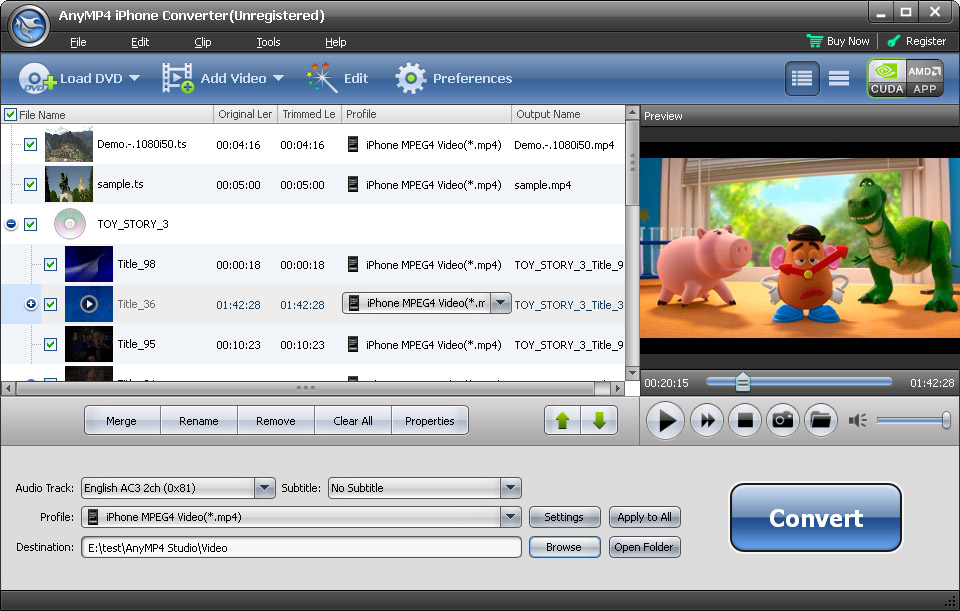
Open the Blu-ray drive tray on your PC and put your original Blu-ray disc into it, then click the "Load Blu-ray" button on the toolbar. The software will start reading the disc and will show the files within the disc in the "File Name" list.
Click the "Profile" drop-down list to select your needed M4V video format, or input it in the text area, then the software will find it for you. This list contains all the supported output video and audio formats.

Specializing in video effect customization, AnyMP4 iPhone Converter provides you with a collection of versatile editing tools. These efficient tools help you to trim video for your preferred length, crop video frame to remove unwanted black edges, join multiple video clips into one, add text/image watermark to personalize the video, and adjust Video Contrast, Saturation, Brightness, Hue and Volume to improve video quality.

Even output parameters can be easily customized. AnyMP4 iPhone Converter allows you to adjust Video Encoder, Frame Rate, Bitrate, Resolution, Aspect Ratio, and Audio Channels, Encoder, Bitrate and Sample Rate to bring the video quality one step closer to perfection.

Many video file contain more than one audio track. AnyMP4 iPhone Converter helps you to choose your preferred audio track for the video, and add downloaded subtitle to the video.

When you've done customizing the video, click the "Convert" button to start the conversion task. Designed for fast speed, high video quality and universal application, AnyMP4 iPhone Converter can achieve any conversion task within a very short time.

Enjoy Blu-ray video with your iPhone when the progress bar reaches 100%!
AnyMP4 Social Network